
GPU-Z 2.70: a single-file health check for a graphics card, for second-hand buys and overclocking alike
Summary
GPU-Z reads a card's real identity in one screen: GPU model and code name, process, shader and raster counts, memory type, capacity, bus width and the vendor of the memory chips, plus driver and BIOS. The sensor page then keeps temperature, fan speed, power and clocks live, and the BIOS can be backed up before anything is flashed.
Recommend- Name
- GPU-Z
- Version
- 2.70
- Open source
- Proprietary
- Operating system
- Windows
- Updated
- 2026-10-06 16:03
An identity card for a graphics card, on one screen
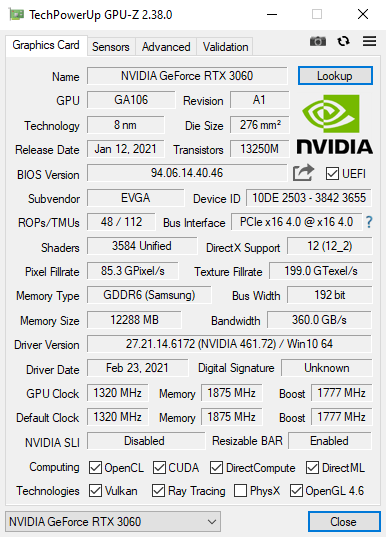
Buying a graphics card is mostly a matter of not being lied to, and GPU-Z is the tool the hardware community reaches for to check. Start it and it lists the GPU model and code name, the manufacturing process, the number of shaders and raster units, the memory type, capacity, bus width and effective clock, and it can even name the company that made the memory chips. Driver version and BIOS information sit on the same panel, so holding the official specification next to what the machine reports makes the provenance of a card obvious at a glance. The program is maintained by TechPowerUp, ships as a single file, and runs the moment it is opened.
Live sensors, for overclocking and for diagnosing
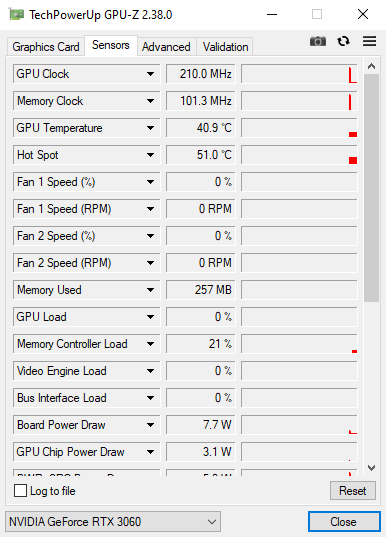
Switch to the sensor page and core temperature, hot-spot temperature, fan speed, board power, voltage, and core and memory clocks all refresh in real time, with GPU load, memory usage and video engine usage recorded separately. Someone overclocking uses it to check whether a frequency really holds; someone playing a game uses it to decide whether a frame drop is the card hitting a thermal wall; an ordinary user can use it to confirm the cooling is doing its job. The readings can be exported as a log file, so after a stress run the curve can be reviewed and the exact stretch where something went wrong is easy to find.
What it is actually worth when buying
For an ordinary buyer the value is in comparing against the official specification and noticing the difference: a card whose memory capacity, bus width or core specification does not match the vendor's own numbers is a card to be suspicious of. In a second-hand sale, the first thing to do after powering on is read the memory chip vendor and the BIOS date it reports, because a refurbished card seldom hides both. For someone building a machine, a bus test confirms the card sits in the slot it should and is getting the full bandwidth, which stops an expensive PCIe part from being quietly slowed down by a secondary slot on the board. None of this needs specialist knowledge; reading the panel is enough to judge.
Detail on the information panel
The main panel goes down to the driver and firmware layer: supported versions of the graphics interfaces are stated outright, and the counts of raster and texture units let someone check whether a specification has been quietly reduced. On a multi-card system a drop-down switches between the cards, so a two-card machine is covered too. A result can be exported with a validation code, and pasting that into a forum request or a sale listing lets the other side check the numbers are genuine, which is a large part of why it appears in so many hardware troubleshooting threads.
Backing up the BIOS, and checking the bus
Before flashing a BIOS, the existing firmware can be backed up in full, and if the flash goes wrong the card can still be brought back, which is one of the reasons experienced users keep recommending it. A built-in bus test verifies that the PCIe lanes are running at the generation and width they claim, so a quick check after assembly catches the invisible problems: a card in the wrong slot, or a riser cable that is not what it was sold as. A render load test will also push the card to full load on demand, which is how the real behaviour of the cooling and the power delivery gets confirmed.
Nothing to install, and new cards recognised quickly
The whole program is a dozen megabytes, small enough to carry on a USB stick and open on whatever machine needs testing. Releases come often, so a card on a new architecture is identified correctly soon after it appears, and version 2.70 also hardened security around the kernel driver. One thing to expect: the first run prompts about loading a driver, which is normal. Checking a purchase, overclocking, diagnosing a fault, backing up a BIOS, the whole life of a card falls inside its scope.