
Glary Utilities review: more than twenty tools behind one maintenance button
Summary
A suite that answers the vague feeling of a machine getting slower with a single panel, then keeps the individual tools available underneath. The free edition does cleaning, repair and trace erasing; the paid step adds upkeep that happens without being remembered.
Recommend- Name
- Glary Utilities
- Version
- 6.47.0.51
- Open source
- Proprietary
- Operating system
- Windows
- Updated
- 2026-10-06 13:33
Every must-install list carries a category of software whose purpose is hard to state and yet which comes to mind each time a machine slows down. Glary Utilities belongs there. Its site calls it the number one free all-in-one utility, describes the job as cleaning and maintaining a computer, stresses more than 20 built-in tools for maximum performance, and under the slogan asks you to clean, optimise and protect. The idea is not to perfect one operation but to gather the small chores of upkeep into one interface, so less time goes on switching windows and hunting for the right program.
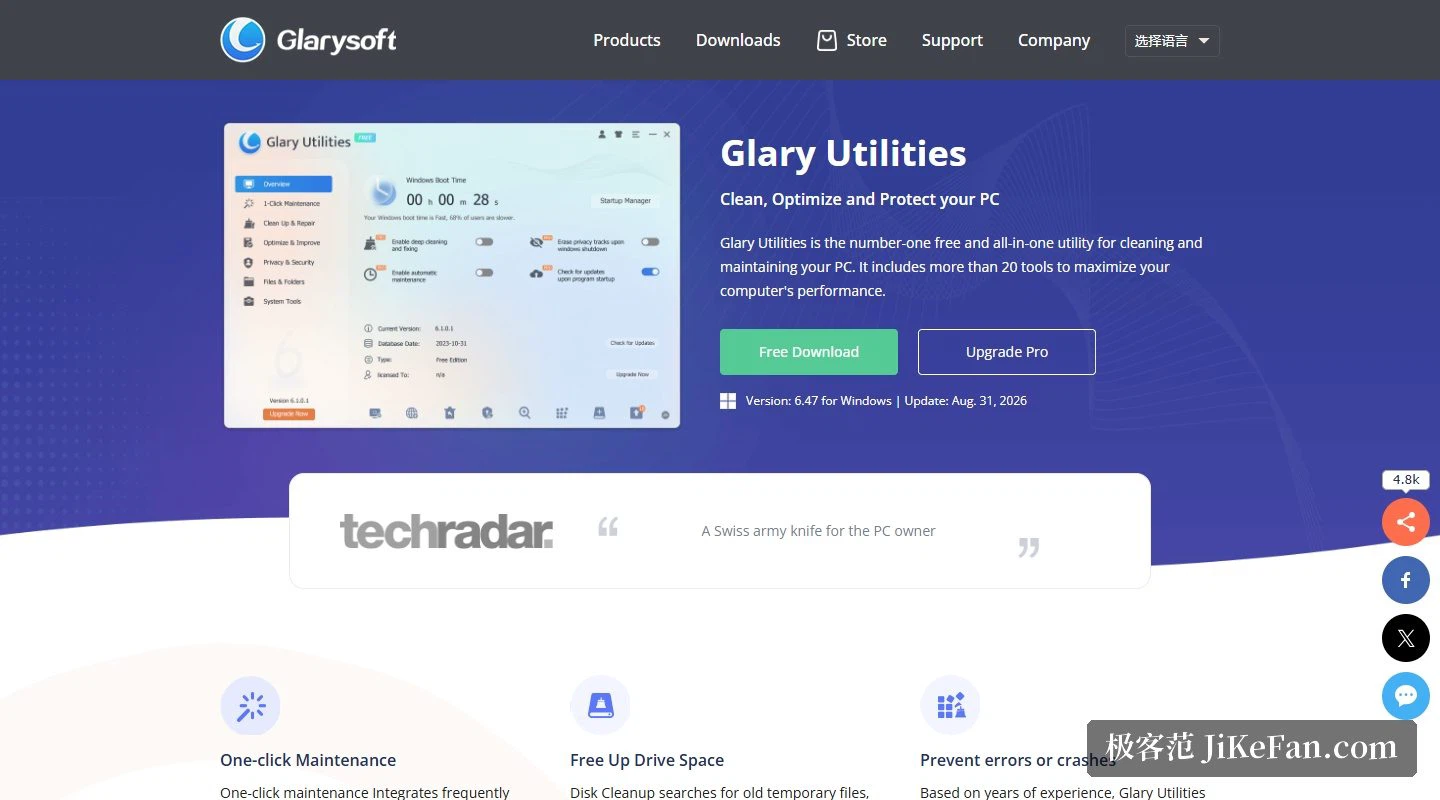
Maintenance in one press: four actions at once
Maintenance in one press is the entry most people mention. The site describes it as gathering the frequently used functions so a single press cleans junk files, repairs system errors, clears privacy records and tunes performance. For anyone who would rather not study the details, that panel is the whole product: scan, tick a few boxes, press. A user comment quoted on the page makes the same point, that many tools are free and there is a single maintenance button, so there is no need to install a separate program for each function.
Cleaning and repair: from temporary files to the registry
The detail is there for anyone who wants it. Beyond the aggregated panel, the listed abilities include disk cleaning, registry error repair, start-up management, software removal, software updates, trace erasing, recovery of deleted files, disk space analysis and duplicate file search, grouped into cleaning and repair, optimisation and boosting, privacy and security, files and folders. So it serves two kinds of user at once, the one who wants a single press and the one who wants to confirm each item.
For the disk cleaner the site says it searches old temporary files, obsolete installers, log files, browsing history and caches, error reports, offline content and error logs, all classed as safe to remove. That qualifier matters: it suggests the tool grades risk while filtering rather than counting everything it finds as junk. On the registry the claim is that years of experience let it clean errors more safely, preventing odd program faults and system crashes, and that it also detects and repairs disk damage. Both address the hardest thing to diagnose, a machine that misbehaves for no obvious reason. It is worth saying plainly that registry work remains the highest-risk class in tools like this, and the phrase more safely is an admission that the boundary is known.
Speed, space and the version sheet
Under speed the site gives two routes: identify and disable start-up programs that eat resources without being needed, and remove software you rarely use to free disk space. The first answers a slow boot, the second a tight drive, and neither needs expertise. The release notes for the current version mention an optimised start-up manager algorithm for greater stability, so this part is still being worked on.
The version facts are stated plainly: current release 6.47.0.51, dated 2026-08-31, installer 27.15 MB, support running from 11, 10, 8 and 7 down to Vista, both 32-bit and 64-bit, and an interface in 44 languages. That list says something about the audience: this is a tool that still fits old machines and old systems, which matters to anyone not ready to move on.
Privacy: erasing traces and destroying files
The privacy section starts from real situations: the browser records the addresses you visited, some applications keep the name of the last file you opened, and the tool finds and deletes those records. It can also destroy files outright so they cannot be recovered. The first handles traces of what you did, the second handles the file itself, and the two address entirely different risks.
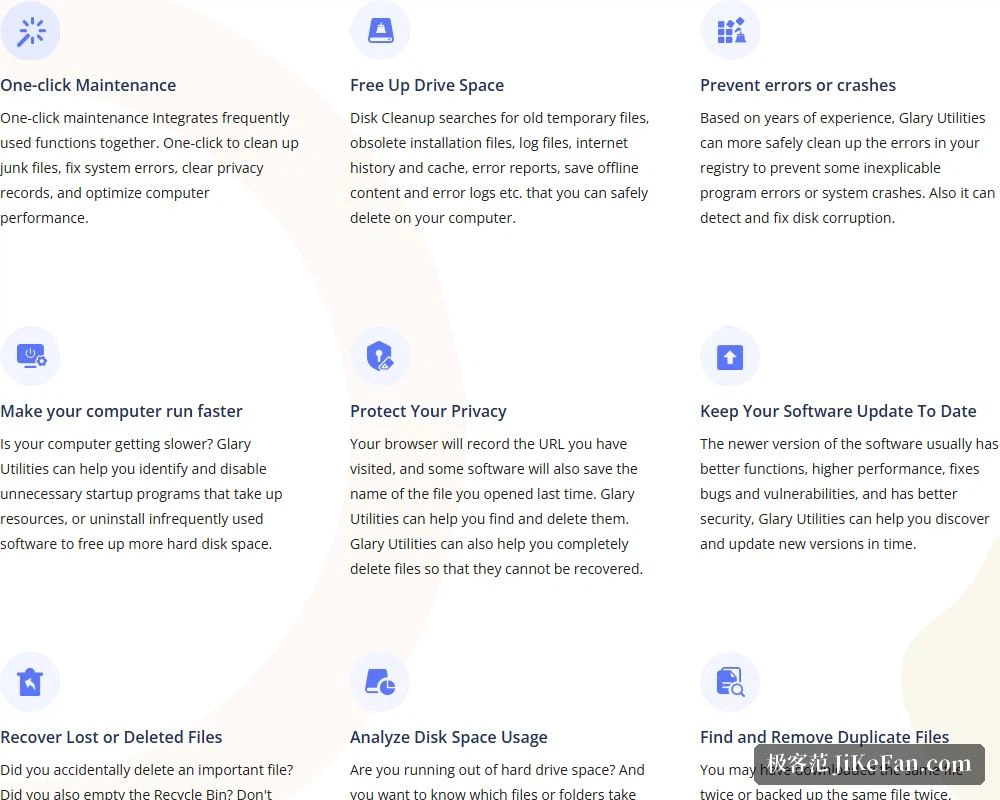
The two space tools deserve their own mention. The disk space analyser scans the drive quickly and ranks the largest files and folders by size, giving the question of where the space went a direct answer. The duplicate file search targets the same file downloaded or backed up twice, the kind that takes up real room and is hard to spot. The site's own line is that duplicates are the big eater of disk space, which is fair enough.
Where the free edition ends and Pro begins
The download page sets the two editions against each other in a table: a faster computer, problem repair, privacy protection, automatic updates, complete cleaning, automatic maintenance and unlimited support. Automatic updates are marked as manual in the free edition, so free users press the button themselves, and automatic maintenance plus unlimited support sit with Pro as well. Pro is priced at 19.97 dollars a year against a crossed-out 39.95.
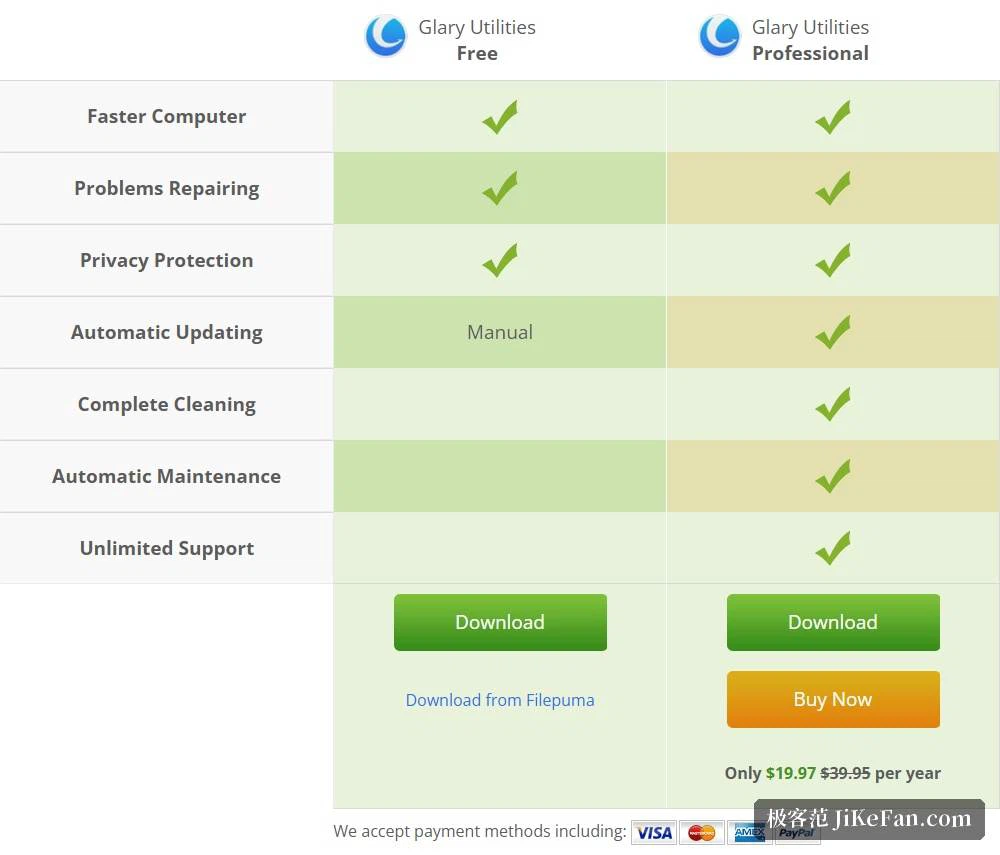
In practice the free edition covers the active work, cleaning, repair and trace erasing, while Pro adds the part that does not depend on remembering, namely scheduled maintenance, automatic updates and a fuller cleaning set. Anyone who tidies a few times a year is served by the free edition; only the wish for upkeep to happen on its own calls for paying.
Two things easily missed
The first is recovery of deleted files: the site gives the situation its own section, an important file deleted by accident, the recycle bin already emptied, and the tool can find and restore it quickly. Recovery inside a cleaning utility sounds contradictory, but the two complement each other, since cleaning frees space and recovery repairs a mistake made while doing it. The second is software updates, argued sensibly: new versions tend to work better, run faster, fix defects and holes and are safer, and the tool spots and applies them in time.
The page also claims the trust of 200 million users with a rolling counter reading 200,000,000, and shows comments from long-standing users, one of whom says it has been in use for decades and calls it the most reliable and complete set of maintenance tools. Numbers and testimonials are only reference, but set beside the fact that the project has been updated from the era of old systems to this one, they say at least that it has lived long enough.
Who it suits, and what to watch
Three groups. The first has an old machine at home and finds the system support reaching back far enough to install and use. The second does not want a shelf of single-purpose utilities and gets more than 20 tools in one interface with the learning cost paid once. The third regularly needs to recover space or find large files, and the analyser and duplicate search answer directly instead of sending them folder by folder.
Two cautions. Registry cleaning remains the riskier operation, the site itself says more safely, and a restore point before starting keeps a way back. And permanent deletion and disk cleaning cannot be undone, so confirm the selection first, especially with something like duplicate search that acts in batches: scan, look, then delete is far steadier than pressing once.
The value of a tool like this was never in any single function being the strongest, but in having the right one when you need it. More than 20 modules answer that question, cleaning, repair, speed, recovery and analysis each holding a corner, and the free edition covers the daily need, which for someone who does not want to tinker is efficiency in itself.