
Flix: Local File Transfers Without an Account, a Cloud or a Cable
Summary
Flix moves files between devices on the same network through a chat style window: drag, send, done. No account, no upload to a server, no re-encoding, and a preset destination folder so the receiving side does not have to confirm anything.
Recommend- Name
- Flix
- Version
- 1.6
- Pricing
- Free
- Open source
- Open source
- Website
- https://flix.center/
- Updated
- 2026-10-06 04:26
A transfer tool is judged by what it does not ask of you
Sending a file from one device to another has not been a bandwidth problem for a long time. On a home network there is more than enough capacity for anything a person is likely to move. The problem is that every route asks for something before it will carry the file. An email attachment has a size ceiling and leaves a copy in a mailbox. A chat application re-encodes photographs and video on the way through, which is invisible until somebody compares the two files. A portable disk has to be found, plugged in, written and unplugged. An online drive demands an account, a login and an upload that travels out of the building and back into it.
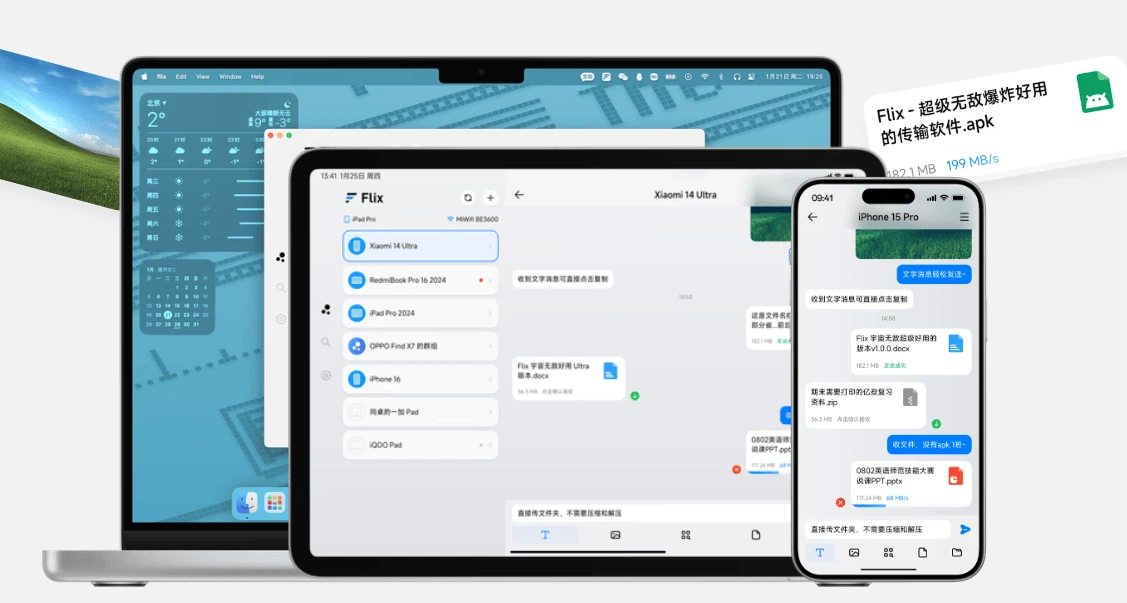
Flix takes all of that out of the path and leaves a window. The devices are on the same network, so the file goes from one to the other directly: no account, no server in the middle, no data allowance consumed and no waiting for an upload to finish before a download can start. The speed is whatever the local network can do, which on modern hardware means the transfer is usually finished before the person has looked away.
The chat window is not decoration
Presenting a file transfer as a conversation is a small design decision with a large effect. Every other method makes the user think in terms of sender and receiver: which device is the source, which is the destination, is the other side listening, has it accepted. A chat window removes that grammar. There is a box, things go into the box, and things appear on the other machine. The mental model of messaging is already installed in everybody, and borrowing it costs the user nothing to learn.
Text messages travel the same way, which sounds like a footnote and turns out to be useful: a link, an address, a password, a note about which of the five files is the right one, all sent in the same gesture as the files themselves. Clipboard synchronisation goes one step further and is, in daily use, probably the most frequently exercised feature of the whole program. Copying a paragraph on a computer and pasting it on a phone is a task that used to require a message to oneself and now requires nothing at all.
Automatic reception is the other half of the same idea, and it is a trade rather than a feature. If a destination folder has been chosen in advance, an incoming file lands there without anyone pressing accept. That removes a step from every transfer and, in exchange, removes a decision from the receiving side. It is the right trade between two devices that belong to the same person, and the wrong one on a network shared with strangers, which is worth knowing before switching it on.
No compression, and what the phrase is really about
Lossless transfer sounds like an achievement of the software and is actually a consequence of the route. Nothing in the path has an opinion about the file, so nothing rewrites it. That distinction matters most for exactly the two kinds of content people move around most: photographs, where a messaging service will quietly reduce the resolution and call it optimisation, and video, where re-encoding costs both quality and time. A file that arrives byte for byte identical is also a file whose checksum still matches, which is the difference between a copy and something that looks like a copy.
The details that decide whether it is used daily
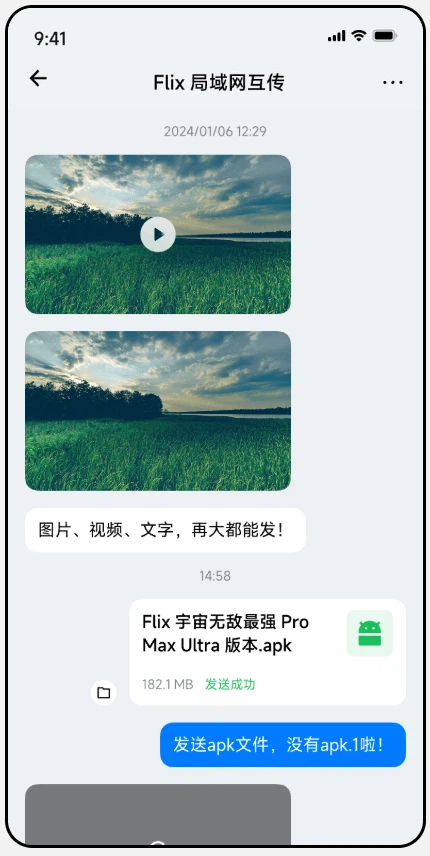
Several devices can receive at once, so a phone can push a set of photographs to two computers without repeating the operation for each. Whole folders can be sent rather than individual files, which is the difference between a tool that is convenient and a tool that is useless the moment somebody has a directory with three hundred images in it. The receiving directory can be chosen rather than assumed, because the sensible place for an incoming file depends entirely on what the file is.
Some of the recent work has gone into things nobody advertises: the permission handling that decides whether the program is allowed to write where it wants to on a locked down system, a refresh control for the device list when a machine has just joined the network, and duplicate detection so that sending the same folder twice does not silently double the storage it occupies. None of these are features a person would ask for. All of them are the reason a tool stops being interesting and starts being relied on.
Where a local transfer stops being the answer
The definition of the tool is also its limit: both devices have to be on the same network. That rules out sending something to a colleague in another city, and it also rules out a surprising number of home situations, because guest networks isolate their clients from each other by design and a router with two frequency bands can put two devices on different segments without telling anyone. When the devices cannot see each other, no amount of interface design helps, and the honest response is to use something that goes through a server instead.
What remains is a large share of real usage. A design file that needs to reach the laptop in the next room. A folder of conference material that four people in the same office need at once. Photographs from a phone that should appear on a television without a social platform deciding what resolution they deserve. Course material handed out to a classroom, where the network is local by definition and nobody wants to explain accounts to thirty people. In each case the file is large, the two ends are close together, and a cloud in the middle is pure overhead.
Who it suits
The program is free, carries no advertising and has no paid tier waiting behind the useful parts, which is worth stating plainly because it is unusual. It also has no account system, which means there is nothing to sign up for, nothing to remember and no profile sitting on a server somewhere describing who sends what to whom.
That combination makes it a good fit for households, small offices and classrooms, and a poor fit for anyone whose actual need is a synchronised folder that stays identical across devices over months. Flix moves a file from here to there; it does not keep two places in agreement. Knowing which of those two problems one has is the whole decision.