
FastCopy: moving thousands of small files without the progress bar stalling
Summary
A copying tool for Windows that reads and writes on separate threads and bypasses the system cache, which makes short work of folders containing thousands of small files. Free for personal use, in continuous development since 2004.
Recommend- Name
- FastCopy
- Version
- 5.12
- Pricing
- Free
- Open source
- Proprietary
- Operating system
- Windows
- Website
- https://fastcopy.jp
- Updated
- 2026-10-26 22:00
The progress bar stops at ninety-nine per cent and stays there
Anyone who has moved a folder of several thousand photographs, source trees or log fragments knows the experience. Windows copies them, the counter races up, then it reaches the end and stops. The remaining time estimate jumps around, the window stops responding, and what should have taken a minute takes ten. The problem is not the disk. It is that the copying code in the file manager handles large numbers of tiny files badly: reading and writing share one thread, everything is routed through the system cache, and the remaining-time calculation is redone for each file.
FastCopy was built to solve precisely that, developed independently by a Japanese author since 2004 and refined for more than twenty years. The stated approach is compact: read and write on multiple threads, use direct input and output to bypass the system cache, and overlap asynchronous operations to saturate the bandwidth the drive actually has.
The numbers are the kind that make people sceptical until they try it. Copying fifty gigabytes of mixed files between two NVMe drives typically takes sixty to seventy per cent of the time the built-in method needs. Between mechanical drives the gap widens, because the head seeks that hurt most are exactly what parallel access hides. On an all-flash array the tool has been measured near fifteen gigabytes per second.
Why it is so much quicker than the file manager
The built-in process is serial: read, write to cache, write to disk, repeat. This program separates reading and writing onto two independent threads, so both directions progress at the same time instead of taking turns.
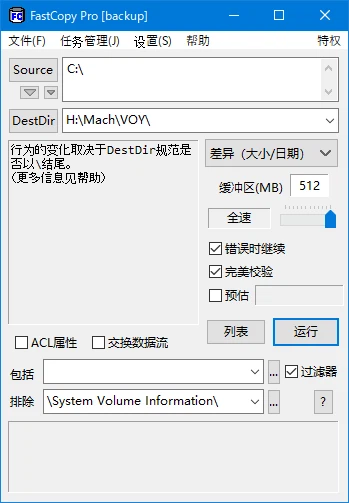
The second half of the trick is direct input and output. By bypassing the Windows file cache, data goes from the source drive to the destination drive without a detour through memory. Two consequences follow, and both matter more than raw speed. The copy does not consume the machine's available memory, so the system does not slow to a crawl halfway through; and the memory that would have been spent on caching stays available to whatever else is running.
Network storage is where the difference becomes dramatic. Against a NAS or a storage area network, the overlapping input and output optimisation reduces the loss that high-latency links normally impose. With a ten-gigabit link and twelve milliseconds of latency, measured throughput reaches two to three times what the file manager achieves on the same hardware – because the file manager waits for each round trip instead of keeping several in flight.
Not only copying: differences, synchronisation and verification
Several operation modes cover the jobs that copying alone does not. A difference mode copies only the files that actually differ, which is what an incremental backup needs. A synchronisation mode makes the destination match the source exactly, deleting anything extra there. A move mode cuts and then clears the source away. The paid edition adds a verification mode that compares the result byte by byte, which is the only honest answer to the question of whether a copy is really identical.
Filenames are handled properly, including Unicode and paths longer than two hundred and sixty characters, a limit the file manager still trips over. Include and exclude filters accept shell-style wildcards, so a job can be defined as everything except a working directory, or only files matching a pattern. The portable build is about four megabytes, runs from an unpacked folder without installation, writes nothing to the registry, and can be carried on a memory stick for exactly the situation where a large migration has to be done on someone else's machine.
Free at home, a licence in the office
The licence split is worth stating plainly, because it is easy to misread. Personal and household use is entirely free. Office and commercial use requires the paid edition. The paid edition also unlocks byte-level verification, silent corruption detection, processor affinity settings, and full support for the shell extension in the current Windows release.
This is not a decorative tool. The interface has barely changed in twenty years and the feature list has never strayed from the single job of copying. That narrowness is exactly why it ends up in the toolkit of system administrators and data centres. For anyone who moves large amounts of data regularly, half a minute of setup pays back minutes to hours on every subsequent transfer.