
Eraser: a right-click that really removes a file, even after the bin is emptied
Summary
Eraser overwrites the sectors behind a deleted file on Windows so routine recovery fails, and it also cleans the free space left over from earlier deletions.
Recommend- Name
- Eraser
- Version
- 6.2.0.2996
- Pricing
- Free
- Open source
- Open source
- Operating system
- Windows
- Website
- https://eraser.heidi.ie/
- Updated
- 2026-10-06 17:14
Deleted is not gone
Eraser is an open-source tool for secure deletion on Windows, released under the GPL. The problem it attacks is easy to state: deleting a file in the operating system only removes the entry from the directory, while the data itself stays on the disk sectors, where recovery software can pick it up without much effort. Eraser takes the other path — it overwrites those blocks repeatedly with a chosen scheme so that the original content cannot be rebuilt, and it deals with the directory entry that holds the file name as well.
The distinction is worth holding on to, because the interface lies a little: in both cases the file vanishes from the list, and only in the second does anything change for the person who later inspects the disk with the right tool.

One right-click, no detour through the program
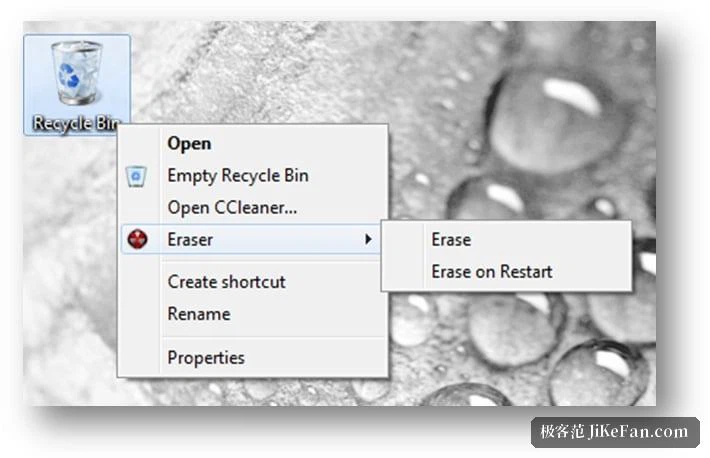
The most convenient part is the integration with the file manager: once installed, right-clicking any file or folder brings up an erase entry in the menu, so nothing has to be dragged into the main window first. Inside the main program the queue of erase tasks can be managed and the result log of each task read, which is the part that matters when a job runs for hours and you want to know whether it finished or merely stopped.
Beyond single files, Eraser can also erase the free space on a disk. This is aimed at the residue of ordinary deletions from earlier: the directory entries are gone, the bytes are not. How long it takes depends on how much free space there is, and on a large disk it can run for several hours, so it belongs on a night when the machine is not needed.
Methods, passes and a schedule
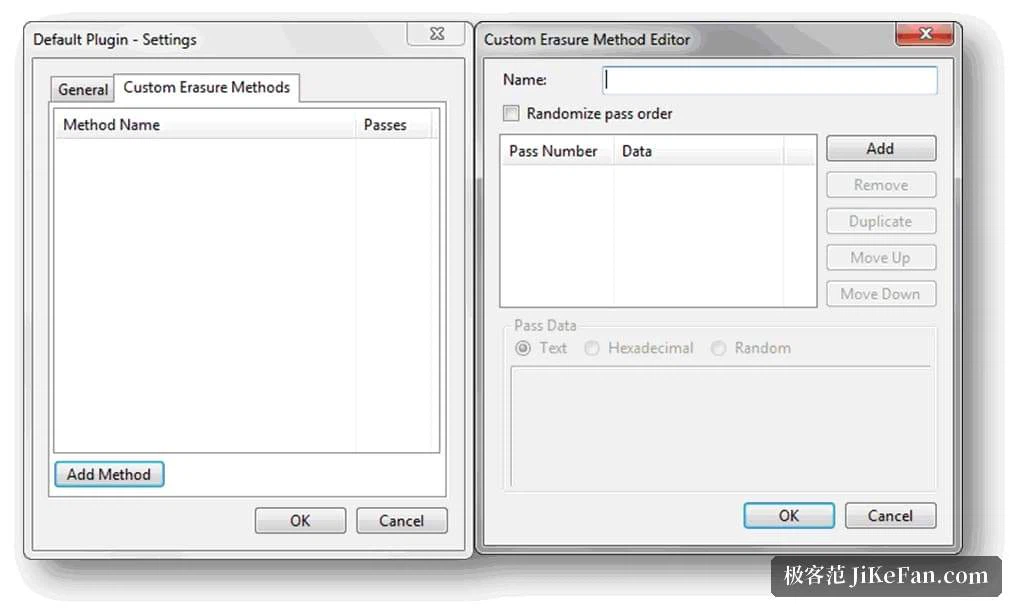
A dozen or so overwrite methods are built in, among them Gutmann, the DoD series and pseudorandom data, and the number of passes as well as their order can be set by hand. One honest remark belongs here: on a modern mechanical disk a single pass of pseudorandom data is already enough to stop routine recovery, and further passes mostly satisfy a compliance habit while multiplying the time. More passes are not more safety in any proportion a home user would notice.
Scheduled tasks let the work happen at a fixed time without anyone remembering it: cleaning free space on a regular basis, or running once at start-up. For a machine that is being handed on or recycled, this is the difference between intending to wipe it and actually doing so.
Where the tool stops
It works inside a running system and it erases at file level, so it cannot be used to wipe the whole disk the system lives on; that job belongs to bootable media, not to a program running from the disk it is supposed to clear. Solid-state drives add a second limit: wear levelling and reserved space make overwriting less certain than on a mechanical disk, because the controller may write somewhere other than the address it was given. Where an SSD is involved, the manufacturer's own secure erase is the better route. The mainline version stopped at 6.2.0.2996, and later releases are mostly changes at the build number level.
For an old machine, a disk changing hands, or simply a few files with sensitive content that should really disappear, Eraser is the free and sufficient choice on Windows: erase from the right-click menu, a method of your own choosing, and scheduled tasks for the rest. Two limits are worth remembering — it cannot clear the whole system disk, and on an SSD the manufacturer's secure erase deserves priority.