
EditPlus: a text editor that refuses to grow heavier
Summary
A long-running Windows editor that opens in a second and still does syntax highlighting, column selection, regular-expression replacement, multi-file search and direct editing of files on a remote server, without turning into a full development environment.
Recommend- Name
- EditPlus
- Version
- 6.1
- Pricing
- Paid
- Open source
- Proprietary
- Operating system
- Windows
- Website
- https://www.editplus.com/
- Updated
- 2026-10-20 22:00
Some tools improve by adding features. This one has improved mainly by staying the same size for twenty-five years, which for a text editor is a feature in itself.
The gap between a notepad and a development environment
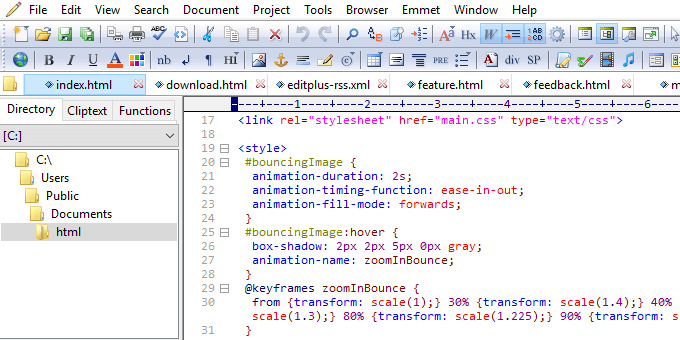
The plain text editor that ships with Windows becomes unpleasant the moment a file grows past a few megabytes, and the more capable open-source editors have accumulated enough panels and plugins that opening one feels like starting a small project. EditPlus occupies the space in between, and does so deliberately. It appears within a second, highlights syntax, folds code blocks, keeps several documents in tabs, selects text by column rather than by line, replaces with regular expressions, and searches across a folder full of files at once. None of that requires configuration before the first useful action.
It was written by a developer in South Korea, first released in 1998, and still receives maintenance. The interface has barely moved in all that time: native Windows controls, a menu bar, a toolbar, no attempt at a modern visual language. To anyone coming from a recently designed application it looks dated. To someone who has used it for a decade it looks like muscle memory, and muscle memory is worth more than a fresh coat of paint on a tool you open forty times a day.
What it does for code, and what it does not
It is not an integrated development environment and has no ambition to become one. There is no project model, no completion engine that understands types, no repository integration. The design principle is simpler than that: if a language can be highlighted, it can be edited here. Syntax definitions for the common compiled and scripting languages are included, and further schemes can be written by hand as templates. For a quick fix in a configuration file, a single script, or a fragment of markup, the absence of a project system is the point rather than a shortcoming.
The custom tools menu is what makes it more than a viewer. A compiler, a formatter, an external checker or any command-line utility can be attached to a keyboard shortcut, with the current file name passed as an argument. That turns the editor into a thin shell around whatever toolchain you already have, without importing that toolchain's opinions about how a project should be laid out.
Search and replace is where it earns its place
Most editors treat search as one feature among many. Here it is closer to the centre of the product. A query can run across an entire directory tree, match with regular expressions, and collect every hit into a single results window where each line is clickable. For anyone who spends an afternoon hunting a string through a pile of log files or configuration fragments, that window is worth more than every other feature combined. It is also noticeably faster than the equivalent search in heavier editors, which matters when the directory contains tens of thousands of small files.
Editing files that live on a server
Remote files can be opened directly over the file transfer protocols the program speaks, and saving uploads the change immediately. For the routine of adjusting a configuration value or a template on a live machine, this removes the entire retrieve, edit, re-upload loop and the class of mistake that comes with keeping two copies of the same file. The connection is configured once per server and then behaves like a local folder in the file browser.
Who it is still for
The tool is commercial, with a trial period after which a registration is required, and it runs only on Windows. That narrows the audience, but the audience it keeps is loyal for a reason. It suits people whose job involves opening a file, changing a few lines, searching for something, saving and closing, several dozen times a day. If opening an editor built on web technology means watching a splash screen for five seconds, the contrast is not subtle. Speed of that kind is not a benchmark result, it is a change in how willing you are to open the tool at all.
EditPlus has never tried to be the most capable editor available. It tries to be the one that is already open before you have finished deciding to use it, and after a quarter of a century that is still a defensible position.