
Dyad: describe the idea in plain language and get a website that runs, built on your own machine
Summary
An open desktop builder: describe the application you want, and it generates a conventional web project on your own disk, runs it on a local port and refreshes as you talk. Every round is versioned and can be rolled back, the code stays yours in a clean repository, and a hosted backend can be attached when the thing needs to store data.
Recommend- Name
- Dyad
- Version
- 1.16
- Open source
- Open source
- Operating system
- macOSWindowsLinux
- Website
- https://www.dyad.sh/
- Updated
- 2026-10-06 18:34
A prototype, a small internal tool, a demonstration site for a client: a lot of ideas die at the same step, which is that somebody has to write the code, or set up an environment for something that will be used by six people. Handing the requirement to a model and getting a website back became the popular answer to that, but most of those tools run in the cloud: a limit on messages, the code living on somebody else's server, and a detour if you want to take the real thing and change it.
Dyad takes a different position by moving the entire build onto your own computer. It is a native desktop application; there is no account to create and no card to enter. Once it is installed, one thing is needed — a key for a model service, and plenty of providers give a generous free allowance — and the idea can start turning into something that runs.
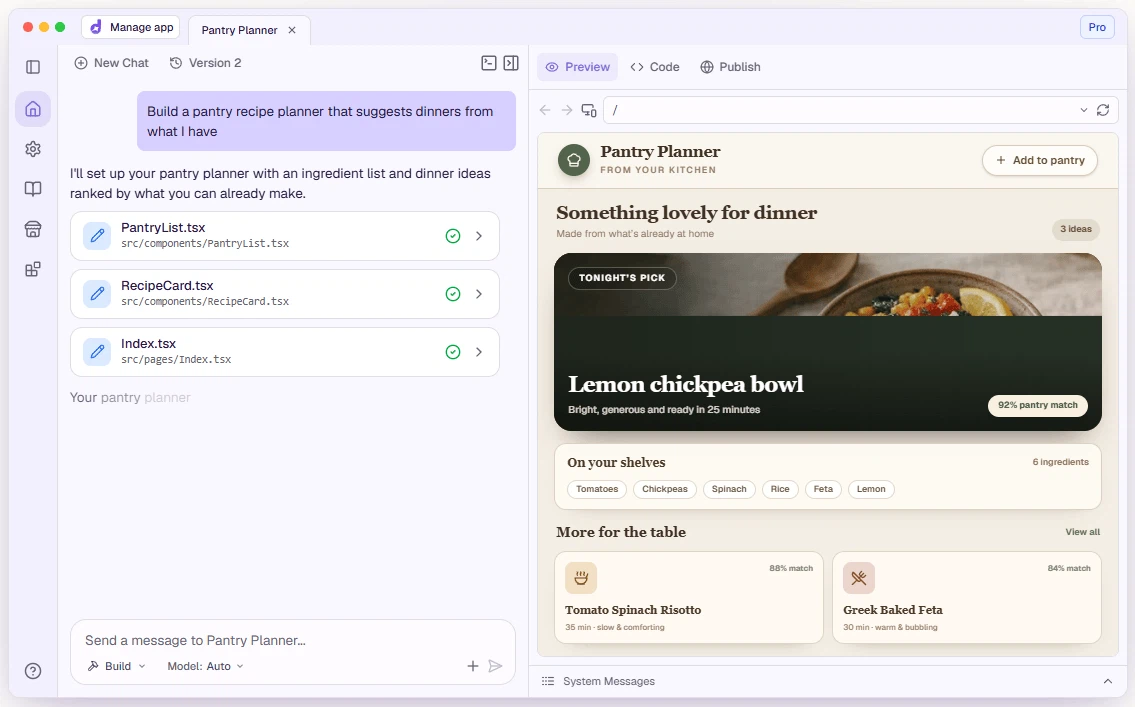
Describe the idea, and let the conversation do the rest
The core experience is development by conversation. Explain the application the way you would explain it to a person, and it produces a standard web project on your machine: file structure, dependencies and start scripts all following convention, indistinguishable from something written by hand. The application starts on a local port at the same time, so a follow-up sentence is followed by an immediate refresh. What you say is what you see.
The back and forth is not only about wording. A filter bar, a button that should move, a dark theme: all of it happens in the conversation, and each round is recorded as a version automatically. If the model breaks something or wanders off the point, one click returns to the previous state, with no digging through a pile of errors. Each change also produces a commit record, so the whole evolution reads like a real project rather than a folder of mystery files.
Ask for a to-do application with a filter bar, and the interface, the server side and the storage it needs all appear together, with a preview panel sitting right next to the chat so nothing has to be switched to.
Any model you like, and code that is always yours
Nothing here binds you to a single vendor. Commercial services attach through settings, and a model service running on your own machine can be used instead — which means the work continues without a network and the prompts never leave the computer. Switching mid-project is normal: a cheap small model for simple edits, a stronger flagship when the engineering gets serious, the cost in your hands.
The more unusual part is ownership. The generated project lands on your disk in an ordinary shape and is itself a clean repository; opening it in a familiar editor to keep refining is just opening a folder, and an existing project of your own can be brought in to continue from where it stands. If you lose interest, it exports and leaves with no format or platform holding it back.
From interface to database, one person can carry the whole stack
Many one-sentence site generators stop at a good-looking front end and falter the moment data has to be stored or a user has to log in. Dyad brings the back end in: a single authorisation connects a hosted back-end service, and tables, sign-up and login, row-level permissions and server-side functions can all be requested in plain language. A few rounds of conversation are enough to assemble something usable with a real back end behind it.
A built-in scan runs before anything goes live, checking the generated code for injection flaws and cross-site scripting, and looking at whether authentication is configured sensibly; where it finds a problem it proposes the fix. Capability extends through an open protocol, so browser debugging, web search and custom tools can be attached as extra hands. When the feature set is complete, a few clicks push the project to a public repository and deploy it, or connect it to a cloud environment you already use.
Who it suits
Non-programmers with an idea that has been postponed repeatedly, and engineers who want the scaffolding of a new project to exist before the interesting part begins. The client is free to use locally, with a paid subscription for the advanced features. By late 2026 the open repository had passed twenty thousand stars and a million downloads, and the community holds both complete beginners and professionals delivering client work. The founder's stated reason for building it as a free local tool was plain: someone who builds with a model should own the tool, not rent it from a platform.