
DriverMax shows what a driver did on other machines before you install it
Summary
A driver update and backup tool for Windows whose distinguishing feature is showing how each driver package turned out on other people's machines, so the decision rests on evidence, with unlimited scanning and backup even in the free edition.
Recommend- Name
- DriverMax
- Version
- 18.0.309
- Pricing
- Free
- Open source
- Proprietary
- Operating system
- Windows
- Website
- https://www.drivermax.com/
- Updated
- 2026-10-10 21:39
What makes people hesitate over a driver update is never whether to update, but whether they can get back afterwards. Lay the answer out in advance and the job becomes worth doing.
See the evidence before deciding
The old trouble with driver updates is uneven information. A tool announces that a newer version exists and stops there, saying nothing about what the machine will look like once it is on. A version number moving up a few notches may mean steadier behaviour, or a device that never wakes again. This tool fills the gap before the move: alongside its recommendation it lists how that driver package turned out when other people installed it, how many machines it went onto and how many it succeeded on, printed under the entry. One package can appear in three states, a concrete success rate when there are enough samples, a plain admission of thin data when there are too few, and no recommendation at all when it keeps going wrong. The logic is clear: the version number is only a candidate, the conclusion has to come from the record.
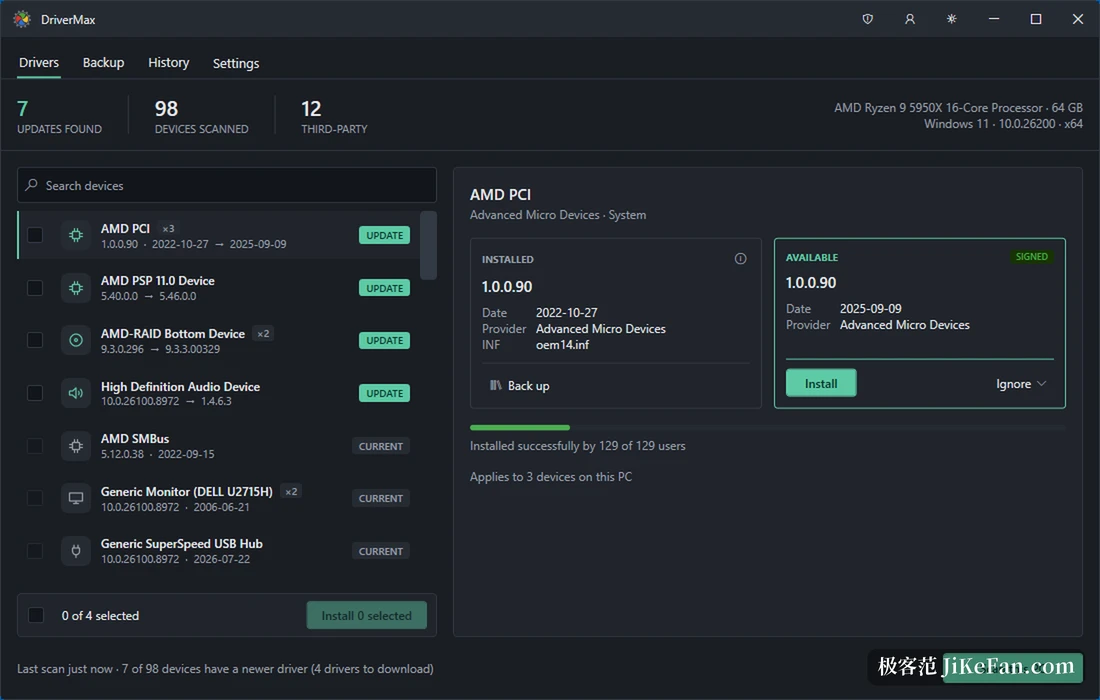
Leave a way back for every replacement
What people fear most about swapping a driver is that it cannot be undone. Before touching any driver the program copies the one currently in use out of the system driver store into its own archive, and creates a system restore point at the same time, two separate ways back of which either returns the machine to how it was. It is also honest about the outcome: if the system decides to keep the existing driver, it says so rather than dressing the result up as a success. The free edition is not crippled, since scanning, backing up and spotting missing drivers carry no limit; only the number of driver installations is capped, and a paid licence removes that single restriction with the rest of the program unchanged. Nothing needs an account, the installer carries no bundled extras, and with a network connection the scan can begin.
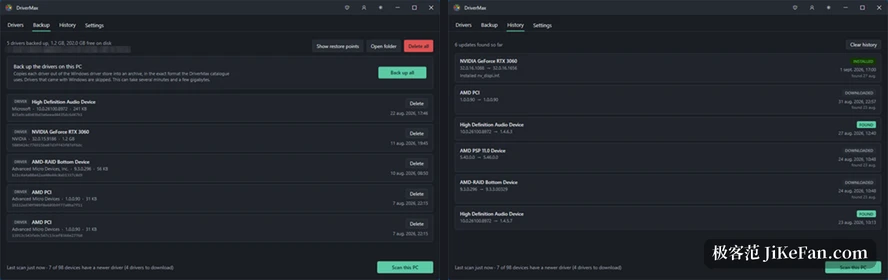
Hand the choice back to the user
Driver tools go wrong when they decide on the user's behalf, and this one stays restrained: candidate versions, installation samples and the way back are laid out together, and whether to replace is the user's call; if the system ends up keeping the existing driver, the program says so plainly. The driver catalogue covers more than 2.3 million devices, the interface is translated in full into fourteen languages, and it spans 64 bit and 32 bit systems from Windows 7 to Windows 11. For someone who wants control without querying hardware identifiers one line at a time in a console, that position lands neatly between manual digging and full automation.
In practice the devices worth handling first are graphics, network and chipset, the ones that affect stability; power management and fingerprint readers are tied closely to a machine model and are better left to the device maker's own release rhythm. Treat scanning and backing up as routine upkeep, and treat an actual replacement as something to decide only after seeing the samples.
The real threshold in driver updates is never whether it can be installed but whether a mistake can be undone. When every package carries someone else's result and every step keeps a route home, an update stops being a gamble and becomes a decision.
A practical note: confirm the archive and the restore point are in place before starting; for graphics, network and audio, look at the samples before deciding; on a laptop, follow the machine maker's rhythm for power and chipset drivers rather than chasing the newest version number.