
IExpress is the free packer already inside Windows and builds a self extracting EXE in eight switches
Summary
A built in Windows wizard that turns a pile of files into one self extracting EXE or a CAB without installing anything, with eight command line switches and automatic cleanup of the temporary files after it runs.
Recommend- Name
- IExpress
- Version
- 20261010
- Pricing
- Free
- Open source
- Proprietary
- Operating system
- Windows
- Updated
- 2026-10-10 20:33
IExpress is a packing tool Windows carries without ever advertising it. The main program iexpress.exe sits in the System32 folder, with nothing to download and nothing to register, and a few pages of a wizard gather scattered files into one self extracting EXE or straight into a clean CAB. Shipped with the system, it costs nothing extra, and twenty odd years on it is still the least painful route for handing out a whole batch of files.
Three programs do the work. iexpress.exe collects the settings and builds the package, makecab.exe presses the files into a CAB, and wextract.exe runs the finished package: it extracts on a double click, calls the setup command and tidies up behind itself. Once that division is clear the flow holds no mystery.
It does not appear in the Start menu and the vendor never promotes it; type iexpress into the Run box and it turns up. The documentation states that the wizard lives in WINDOWS\system32 on the system drive and has come along from Windows XP through Server 2003 and Vista to today. On this machine, Windows 10 22H2, iexpress.exe still answers, file version 11.00.19041.1.
The second page asks what the package is for. The vendor offers three routes: extract and then run a setup command, extract only, or produce a compressed file only. The first yields a full installer, the second a bare self extracting archive, the third nothing but a CAB. One point gets overlooked easily: every package IExpress builds goes through the CAB scheme, which compresses better than the familiar ZIP, so the result comes out smaller.
Every tick in the wizard becomes a switch on the command line. The documentation names eight in common use, and they all govern the moment of extraction.
Switch | What it does |
|---|---|
/Q | Silent mode, no prompt at all while extracting |
/Q:U | User silent mode, some dialogs still shown |
/Q:A | Admin silent mode, no dialog to the user at all |
/C: | Path and name of the .inf or .exe to run |
/R:N | Never restart the computer after setup |
/R:A | Always restart the computer after setup |
/R:S | Restart without asking the user |
/T: | Target folder for the extracted files |
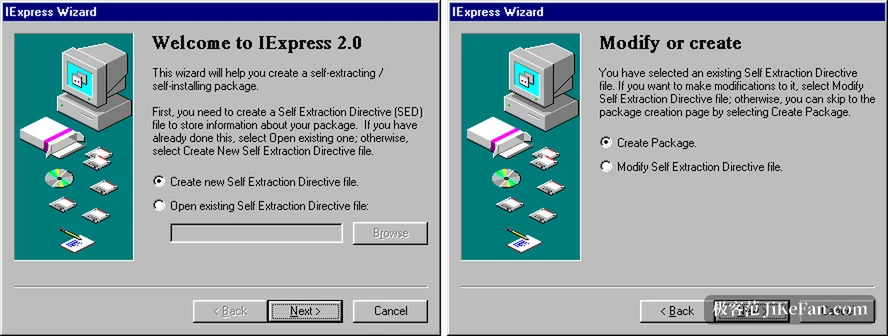
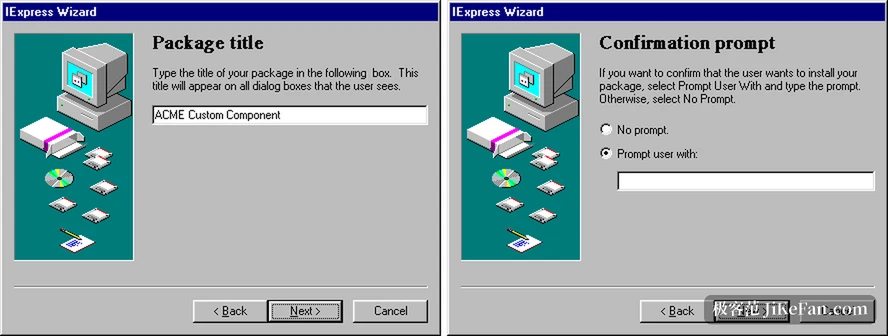
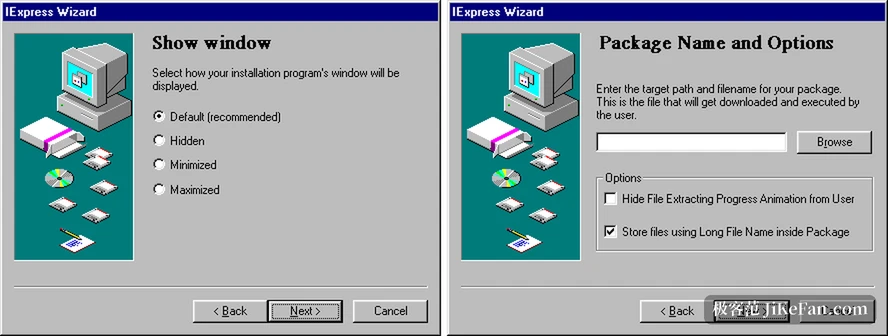
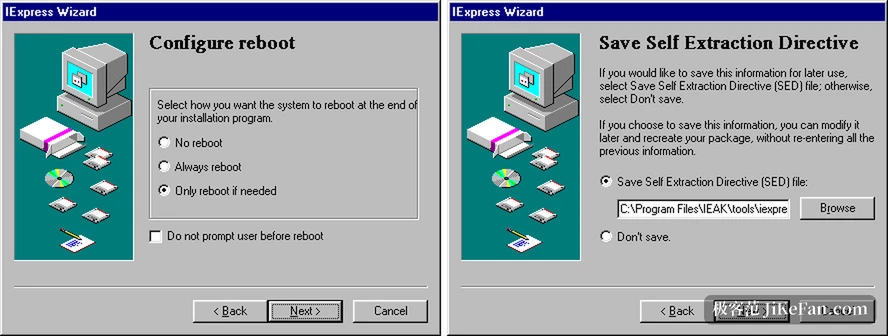
The wizard runs to about a dozen pages and the questions get more specific page by page. The package title becomes the line at the top of the setup window. The confirmation prompt decides whether the user is asked first, and what about. The licence page takes a plain text agreement that has to be accepted before going on. The page of files to carry adds them one by one to a list. Next come the program to launch and a command to run after setup. The window page offers four choices, default, hidden, minimised and maximised. The closing message page decides whether a word stays at the end. The final page carries the output name and two boxes, one hiding the progress animation, one keeping long names inside the package, and the second should stay ticked on a current system or long names get cut.
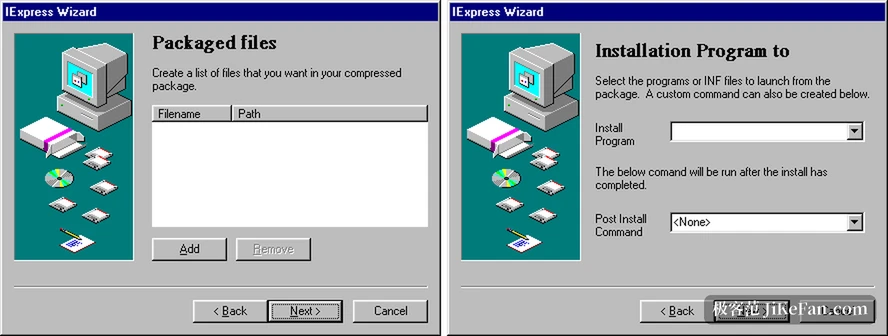
Choosing extraction and then setup, what gets called can be an .inf inside the package or an executable. The documentation says plainly that IExpress deletes the extracted setup files itself once the work ends. That drops a cleanup step from deployment scripts. In a company the usual shape is to write a sequence of steps into a batch file and start it after extraction.
On the last page the wizard asks whether to keep a SED file. It is plain text, openable and editable in Notepad, and it holds choices such as PackagePurpose and ShowInstallProgramWindow along with strings such as InstallPrompt and TargetName. Keeping it means the next similar package does not start again at page one. IExpress.exe takes arguments too: with /N and the path of a SED it works without showing an interface and hands the prompt back at the end, and /Q makes the whole run silent. The unattended form is START /W IEXPRESS /N /Q.
The limits sit in the manner of packing. IExpress treats every file as coming from a single folder, keeps no subfolders and cannot take an empty one; two files with the same name, even from different folders, make the build fail. To restore a tree inside the package the usual route is a batch file called from the command after setup, with copy commands putting each file back in place. The package itself offers neither password nor encryption, and that is the boundary of the CAB scheme rather than a forgotten setting.
By nature IExpress is a part of the system, delivered with Windows, with no version number of its own and no public code. It never set out to be a complete workshop for installers; it simply makes gathering a set of files into one thing that starts on a double click possible without installing anything else.
The good of IExpress is a threshold near zero: nothing to download, nothing to install, no choice of system version, one line on the command line brings it up, and eight switches cover silence, the setup command, the restart rule and the folder of extraction. For anyone who hands over scripts, settings or installers often, this quiet part in System32 sits in the hand better than one more tool.