
DoNotSpy11 gathers the scattered privacy switches of Windows into one list
Summary
A privacy tool for Windows 10 and 11 that collects settings scattered across the system into a single window: telemetry, advertising identifiers, app permissions, data collection in the browser and the office suite. Free, and it can make a restore point before anything changes.
Recommend- Name
- DoNotSpy11
- Version
- 1.2.33
- Pricing
- Free
- Open source
- Proprietary
- Operating system
- Windows
- Updated
- 2026-10-05 17:52
What it is
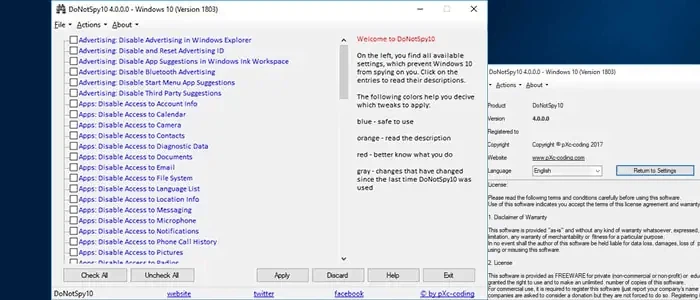
DoNotSpy11 hardens the privacy settings of Windows 10 and Windows 11, and it comes from the same hand as the earlier tool for the previous generation of the system. What it does is collect settings that normally sit in a dozen different places and put them in one plain window, so that telemetry, advertising identifiers and the various forms of data collection can be turned off without hunting through the system. As of September 2026 the program is still being maintained, and it handles recent releases of the eleventh version, including the update known as 24H2. That last detail matters more than it sounds: privacy utilities rot quickly, because every feature update to Windows can move a setting or rename it, and a tool that was accurate a year ago may quietly be switching the wrong things today.
Why anyone needs this
Windows ships with a large number of features filed under diagnostics and under the improvement of the experience. Between them they collect usage data, what gets typed, where the machine is, and what devices are attached. Many of the relevant switches are not easy to find in the interface that comes with the system, and some are not exposed there at all. DoNotSpy11 gathers them so that a person can decide, item by item, what may be shared and what should be blocked outright, and it does so at no cost for personal use. The value is not that the tool knows something secret; it is that the decisions are laid out together instead of being scattered across settings pages nobody opens twice.
What can be switched
Advertising and tracking come first: the advertisements inside the file manager, the advertising identifier that follows a machine between applications, and the app suggestions in the start menu can all be turned off. Application permissions are next, covering the camera, the microphone, location, the calendar and contacts, so that programs lose access they never needed. The browser and the office suite have their own entries: page prediction and search suggestions in the built in browser, and the related data collection in the office programs. And a fourth group covers the newer generation of features built on artificial intelligence, where the assistant and the snapshot feature can be disabled along with the rest.
Safety in the design
Every change is colour coded by risk: blue means safe, orange means read the explanation first, red means not recommended, and grey means the system has changed something since the tool was last used. That last colour is the honest one, because it admits that a utility of this kind is always chasing a moving target. Before making changes a system restore point can be created with one click, which brings the cost of a mistake down to a reboot. For anyone who wants to tighten privacy without reinstalling the system, this is one of the mainstream light options.
Where it fits
Whether the concern is telemetry, advertising pushed by the system, or applications reaching for permissions they have no business with, the switches are fine grained enough to say so precisely. The program is small and quick to understand, which is what makes it usable by people who are not administrators by trade. One warning is worth repeating: a few of the more advanced options do affect how the system works, so a restore point or a full backup before touching them is not ceremony. The vendor's site lists the categories in full and explains how to obtain the program.
The fair way to read a tool like this is as a checklist with a memory. It does not make Windows private on its own; it makes the decisions visible, and reversible enough that somebody can actually take them and see the result.