
BleachBit review: an open-source cleaner that shows the list before it deletes
Summary
A cleaner whose whole argument is that you should see the files before they go. Ticking items yourself, a preview list with paths and sizes, cookies you can exempt, and a current release that folds AI client caches into ordinary maintenance.
Recommend- Name
- BleachBit
- Version
- 6.0.4
- Pricing
- Free
- Open source
- Open source
- Operating system
- WindowsLinux
- Website
- https://www.bleachbit.org/
- Updated
- 2026-10-04 13:31
Every cleaning utility starts from the same awkward premise: the files it wants to touch are the ones you least want touched. Most of the category answers with a single button, leaving a number on screen and no way to know what went into it. BleachBit takes the other route, and its front page states the method plainly: you tick the items you want cleaned, and before anything is removed it shows you every file it intends to delete.
Preview first, delete second
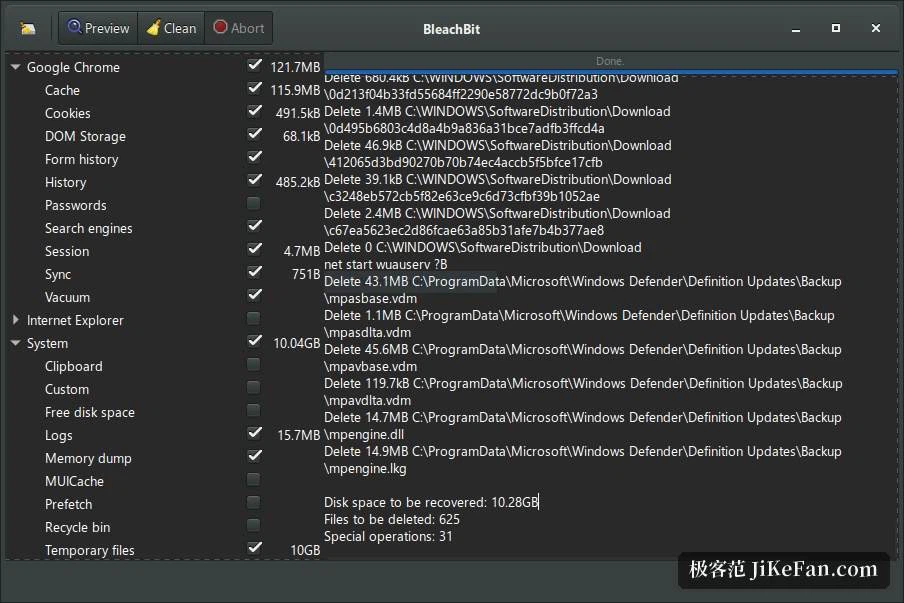
The feature page breaks the operation into four steps: read the description, tick the boxes, press preview, then press delete. The preview is not a formality. The interface lists the path and size of every file it is about to remove, and the footer totals the space and the file count, so entries can be unticked before committing. The official screenshot shows exactly that: categories left, preview right, the delete button after the preview rather than before it.
What that buys is an auditable cleanup. You know which files were touched, and if something breaks you can point at the entry that did it, instead of accepting a vague sentence about having freed 3.2GB. Coverage is the usual set, done properly: temporary files, browser caches, logs and application traces, and several gigabytes back is ordinary, not a boast. The privacy side erases browsing history, cookies, saved passwords and application traces, and items are grouped by application, with granularity running down to one program's cache rather than an all-or-nothing switch.
Cookies you are allowed to keep
The usual side effect of clearing cookies is being signed out of everything at once, then working back through mail, cloud storage and internal dashboards. The cookie manager handles that: when cleaning browsers built on the Chromium and Firefox engines, you choose which sites keep their cookies. The dialog supports searching by site and ticking the ones to preserve, with a live count along the bottom in the form of 10 kept out of 35. It first appeared in a 5.x point release and graduated with 6.0, so cleaning and staying signed in are no longer a choice between two.
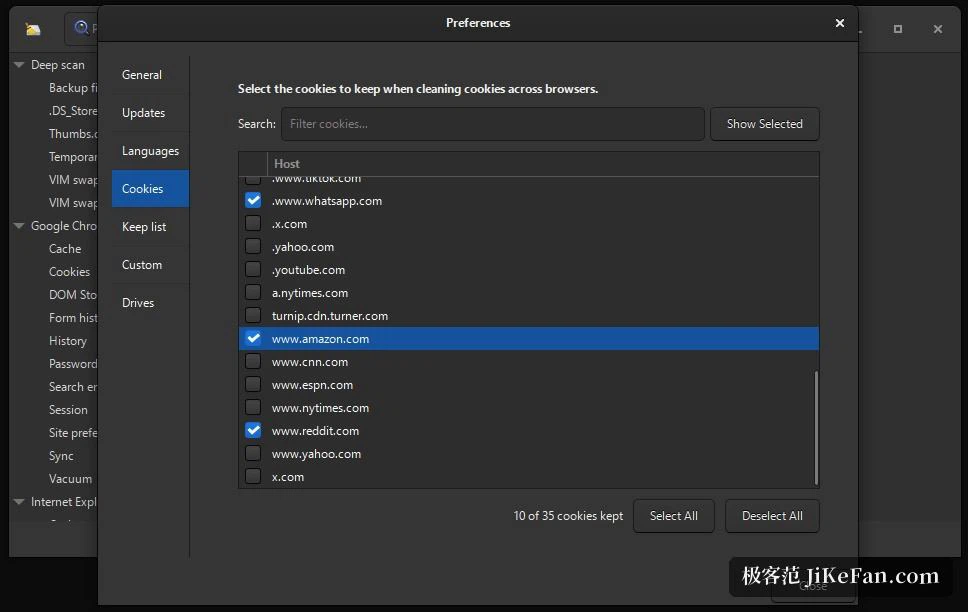
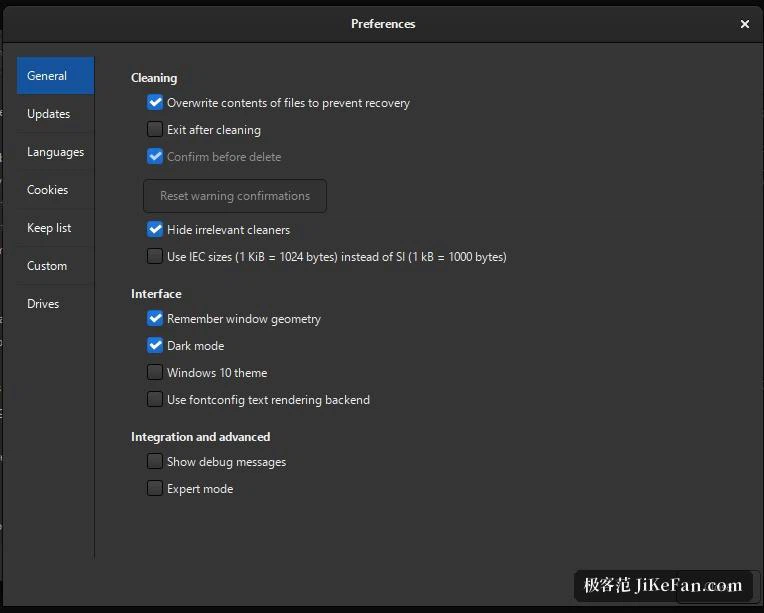
The preferences window splits into tabs for general settings, updates, languages, cookies, the keep list, custom rules and drives, so retention rules and hand-written entries each have a place. 61 translations are listed, and switching the interface language needs no extra pack. What to clean and what to keep stays a decision for the user.
6.0.4: the caches of AI tools and developer toolchains join the list
The current stable release is 6.0.4, released 2026-09-08, and the announcement frames it as maintenance: a large batch of security fixes, bug fixes, performance work and code cleanup, faster start-up and scanning, a smaller Windows installer and a smaller installed footprint. What drew attention is the new cleaners, covering an Android development environment and its build cache, two widely used command-line shells and the Python interactive shell, alongside improvements to an existing AI desktop client cleaner and to browser super-cookies.
Read back through the changelog and the pattern is a line filled in steadily. Earlier releases had added cleaners for several code editors and AI coding clients, the kind of tool that keeps session transcripts and model caches deep inside a user directory. That material is hard to find by hand and easy to delete wrongly, so a named cleaner pulls invisible storage into ordinary maintenance. It begins early macOS support with a new browser cleaner, keeps full command-line support, and calls the graphical side there early.
Command line, CleanerML and the community rule file
The site introduces its audiences separately, and the administrator entry is the interesting one: command-line and scripting support for cleaning whole batches of machines on a schedule. Advanced users get CleanerML, a rule language for custom cleaners against any application or file pattern. Windows users get one extra route: automatic import and update of the community rule file, which hands over thousands of additional cleaners and covers software the project has never touched. Anyone turning cleanup into a script, or folding an in-house application into scope, finds these doors worth the walk.
Secure deletion, and what it actually promises
An ordinary delete marks the index entry free and leaves the data in place. Secure deletion destroys files permanently so they cannot be recovered, with a fast mode for anyone who cares more about speed, plus an option to overwrite free disk space so traces of earlier deletions disappear too. The feature page adds a practical use: overwrite first, then compress a whole-machine image, and the image comes out noticeably smaller.
The strength claim is refreshingly narrow. Shredding performs a single secure overwrite, on the argument that multiple passes lack supporting evidence and are plainly slower, and an overwrite can be enabled before deleting a database file. Saying where the boundary sits beats shouting about military-grade standards.
Free, open source, no advertising
The terms read 100 percent free forever, under GPLv3, with no ads, no upselling and no bundled toolbars. Open source means no secrets: free to share, free to study, free to modify. Everything runs offline, with no account, no licence activation, no registration or telemetry, and translations and patches arrive through the community. For a tool meant to sit on a machine for years, no subscription means no date on which it stops working.
On platforms, the front page promises it runs where you do, covering Windows on modern and older releases alike and Linux across desktop, server and embedded use. The package list matches: Windows builds aimed at 10 and 11, Linux packages in deb and rpm form for the main distributions, plus source code, nightly builds and a text interface. The project has been maintained continuously since 2008, which the site puts at more than 18 years of active development, with millions of downloads a year, and it cites an established security specialist among its endorsements, plus a PC magazine's verdict of solid and no-nonsense.
Who it suits, and where to be careful
Three kinds of user. The first cares about privacy and wants browsing traces, cookies and application residue gone in one pass without handing the decision to a button labelled smart optimisation. The second is chronically short of disk space, and finds that confirming a preview list entry by entry beats an automatic sweep when the gigabytes are toolchain caches, browser storage and logs. The third is the operator or advanced user, for whom the command line, CleanerML and the community rule file make cleanup something that can be scripted, batched and extended to in-house software.
Two cautions. Never skip the preview: deletion is irreversible, so running blind throws away the one property that makes this tool worth choosing, on a first run, tick one category, read the list, then widen. And keep the secure deletion claim in proportion, since a single overwrite defeats ordinary recovery, while retiring a whole machine still calls for disk-level erasure or encryption.
The real dividing line in this category is not how much junk a cleaner can find. It is whether it is willing to show you the list before it acts. One project has spent eighteen years doing only that.