
Bitwarden: A Password Manager Whose Trust Is Checkable
Summary
Bitwarden keeps a password vault that is encrypted before it leaves the device, published under an open licence so the claim can be checked, and deployable on your own server when the location of the data matters more than convenience.
Recommend- Name
- Bitwarden
- Version
- 2026.9.1
- Pricing
- Free
- Open source
- Open source
- Website
- https://bitwarden.com/
- Updated
- 2026-10-06 21:03
The question is not whether you can remember, but who can decrypt
A password manager is usually sold as a memory aid, which undersells the problem it actually solves. Writing passwords down is not a failure of memory; it is a reasonable response to a world where every service demands a unique secret that no human can hold sixteen of. The interesting question is what happens to those secrets once they are collected in one place. A list in a notebook is only as safe as the drawer. A list in a spreadsheet synced to an account is only as safe as that account. A list in a service is only as safe as the operator's intentions and the operator's competence, neither of which a user can inspect.
Bitwarden is a password manager, free and open source, and its design is an answer to that last problem rather than to the first. Everything is encrypted on the device before it goes anywhere: the vault, the passwords, the payment details people store next to them, the secure notes. The master key that unlocks the vault exists on the user's machine and is derived from the master password, which is never transmitted. What sits on the server is ciphertext, and the server has no path to the plaintext because it never had the key. A breach of that server yields a pile of bytes that requires the user's own password to become anything.
Checkable, not merely claimed
The word open source is used loosely enough that it is worth being precise about what it buys here. Encryption that happens in a client is a claim, and claims about cryptography are worth exactly what the ability to check them is worth. Because the client code is published under an open licence, the claim that the key never leaves the device is a statement somebody outside the company can verify by reading the code, rather than a sentence in a marketing page. That does not prove the service is well run. It does move one important part of the argument from trust to inspection, and trust that can be inspected is a different category of thing.
The cryptographic choices behind that are conventional and, in this context, conventionality is the point: symmetric encryption of the vault with a strong standard cipher, salted hashing, and a deliberately slow key derivation function so that guessing the master password stays expensive. Nobody should be impressed by the names. What matters is that the construction is the ordinary one, because exotic cryptography in a consumer product is a warning sign rather than a feature.
Everywhere, which for a password manager means everywhere people log in
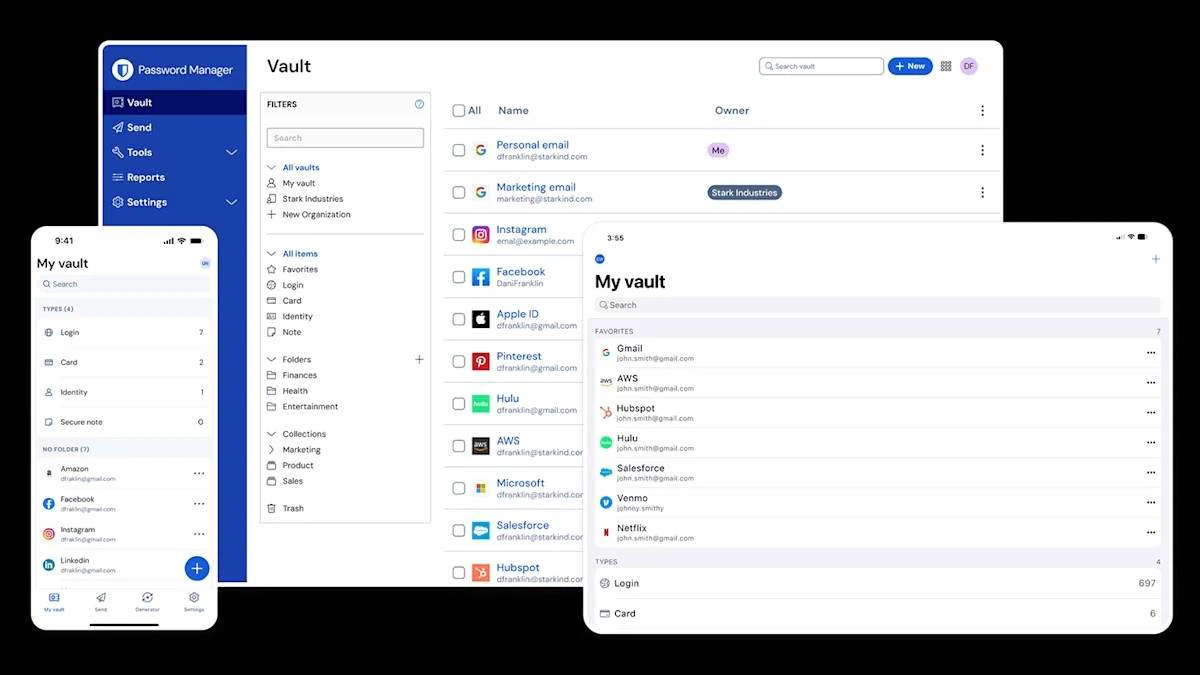
A vault that is only available on a desktop is a vault that gets bypassed on a phone. The product covers the three desktop systems, both mobile platforms, extensions for the common browsers, a command line client for people who script their work, and a web vault reachable from a borrowed machine. All of them read the same encrypted vault and synchronise changes between devices, so a password created on one appears on the others without anybody copying anything.
Filling is where the design shows in daily use. Matching a saved entry to a login form automatically, unlocking with a fingerprint or a face instead of typing the master password again, and keeping both behind a lock that closes when the device does: these are the details that decide whether a security tool is used or worked around. A password manager that adds ten seconds to every login gets disabled within a week, and its user goes back to reusing one memorable phrase everywhere.
What it does beyond storing strings
Three functions turn a vault into something more useful. A generator produces long random passwords, which addresses the actual root cause of most account compromise, namely reuse. Two-factor authentication support turns the vault into the holder of the second factor as well as the first, working with authenticator applications and with hardware keys for accounts that deserve one. And the organisation vaults let a team share credentials that genuinely are shared, with per-member permissions, instead of passing a password around in a chat message and hoping everybody forgets the right amount.
The sharing model is worth a sentence because it is where most password managers become awkward. A household or a small team has a few secrets that belong to the group - a shared utility account, a supplier portal, a certificate renewal - and a much larger number that belong to individuals. A tool that only understands the second case gets used for the first case anyway, badly. Separate collections with their own membership answer the question directly.
Where the data lives is a setting, not a doctrine
Two deployment routes exist. The official service is the ordinary one: encrypted vault, managed infrastructure, no server to maintain. The other route is to run the backend on hardware you control, which the project supports and which some organisations require for reasons that have nothing to do with paranoia - a compliance rule, a data residency obligation, or simply a preference for owning the machine that holds the key material. Container packaging makes that a realistic afternoon rather than a project.
The honest limits
The free tier carries the core without a device limit, which is unusual enough to state plainly, and the paid tiers add storage for attachments, emergency access for a trusted contact, single sign-on and policy controls for organisations. The split is reasonable, and the useful parts are not held hostage.
Three limits deserve saying out loud. The first is that a vault concentrates risk: one master password now guards everything, so it has to be strong and it has to be remembered, and losing it means losing the vault, since a system that could recover it for you would be a system that could recover it for somebody else. The second is that a browser extension runs inside pages it does not control, which is a permanent surface for trouble. The third is that any password manager is a single point of failure in a way that reusing one weak password is not: the failure is rarer, and it is total.
None of that argues against the category. It argues for choosing the implementation whose claims can be checked, keeping an exported backup of the vault somewhere offline, and treating the master password as the one secret that is worth committing to memory properly.