
Atlantis: a word processor under 3 MB that still exports ebooks
Version 5.0.5.2
Summary
An old word processor whose installer stays under 3 MB, with format conversion, encryption and backups, a portable build and writing aids inside, plus PDF and EPUB export. A 30 day full trial, and a free slim edition afterwards.
Recommend- Name
- Atlantis Word Processor
- Version
- 5.0.5.2
- Open source
- Proprietary
- Operating system
- Windows
- Updated
- 2026-10-05 23:38
An old word processor that fits in three megabytes
Atlantis Word Processor is one of the veterans, and its installer sits at about 3 MB while carrying the layout, conversion and document safety that daily writing needs. It comes from a team that has done little else for years, has been revised since the end of the last century, and as of September 2026 stands at maintenance release 5.0.5.2. Interface languages are well covered too: simplified Chinese, Japanese, Polish and Ukrainian packs have arrived over the last two years, so a Chinese speaking user can work with it without extra setup.
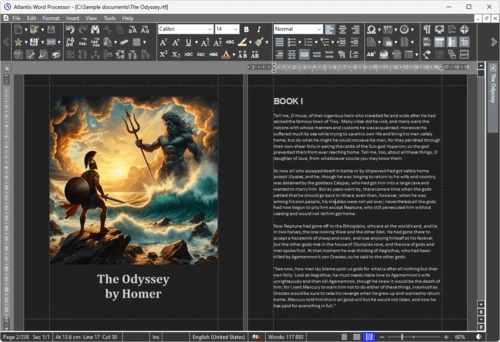
From format compatibility to ebook export
On formats, Atlantis reads and writes the usual set directly, plain text, RTF, DOC, DOCX and ODT among them, and can also save into its own encrypted document format. The fifth generation added a save as PDF command, which together with the ebook export that was already there means a finished manuscript can become either a formal document or a reader friendly book with one action. Batch conversion handles several files in a single pass, which is a great deal less tedious when old drafts are being tidied up.
Small tools written for people who write at length
Beyond the usual styles, templates, autocorrection and spell check, several features are aimed squarely at writers. An analyser counts the phrases that keep returning across the whole text, which keeps the vocabulary from going flat. A word frequency counter helps control the rhythm of prose, and earns its place especially in long form work. A clipping library holds frequently used paragraphs, source material and pictures, ready to drop into the text with one action. Typewriter sounds come in several sets, for anyone who misses the feel of paper and keys.
Safety, backups and a portable build
Documents can be encrypted with a password, so sensitive material does not have to be trusted to a plain file. Automatic backups leave a copy behind on every save, which means an accidental deletion or a bad edit can still be recovered. The whole program can be installed onto a USB stick as a portable build, so a change of computer needs no reconfiguration. Speech synthesis reads a document aloud, a change of senses for the proofreading session when the eyes are tired. Toolbars, icon sizes and shortcuts are all adjustable, and a guide on first launch helps tune the layout until it feels right.
Layout and file handling
The editor covers headers and footers, tables and mixed text and image layout, and the style and template system keeps a long document looking consistent from start to finish. Find and replace works in batches, and together with autocorrection and spell check it removes a large amount of repetitive work. On the file side, a document can be saved as a web page or packed into a ZIP and sent on, and converting several documents between formats completes in one operation, which means an archive of old drafts no longer needs other tools.
The details keep being polished
The release notes show the rhythm of the team. The fourth generation brought accessibility options such as typewriter sounds and a typing animation; the maintenance releases after it added a notification centre, a warning about missing fonts, sorting of table rows and a read only option for documents; the fifth introduced the new save as PDF command and began supporting the extended range of Unicode characters, so rare characters and unusual symbols no longer come out as blanks. Each maintenance release also carries real fixes, a new interface language or a preference for cursor position among them, and the official notes list every one.
Who it suits
Anyone who writes several thousand characters a day and cares about opening speed, a quiet writing environment and reliable backups rather than a large collaboration system and complicated macros will find the positioning right. Resource use is kept very low, so an old computer still opens and saves instantly; the interface can be trimmed to a single toolbar or spread out into a full editing environment, entirely by preference. Analyse the draft with the frequency tools while writing, export a book when it is done, and the whole path stays inside one small program.
Licensing and who it is for
There is a 30 day trial with every feature open. When it ends, the free Lite edition remains available, or a one time purchase unlocks the full set. Windows only, and it runs smoothly from very old machines up to Windows 11, with almost no demand on the hardware. For anyone who writes at length and does not want a bloated office suite slowing the machine down, this small word processor is worth a look and a trial.
Atlantis keeps a full writing path inside a program of about 3 MB: conversion between formats, encryption and backups, a portable build, aids aimed at long form work, and export to PDF and to electronic books. The trial is 30 days and the slim edition stays free, so the cost of finding out is an afternoon.