
Atlantis keeps word processing down to the writing itself
Version 5.0.5.1
Summary
A lightweight offline word processor built around the act of writing: overused word reports, a writing target, time and speed statistics, a collapsible outline and side by side views, with DOCX and RTF reading and writing, PDF and EPUB export, and a free edition for personal use.
Recommend- Name
- Atlantis Word Processor
- Version
- 5.0.5.1
- Open source
- Proprietary
- Operating system
- Windows
- Updated
- 2026-10-06 15:15
People who write do not need a whole office suite
Anyone who works with text all day has a very concrete list of demands: it has to open fast, the interface must not steal attention, formatting must not jump around, and what is finished has to be handed over cleanly. A heavyweight office suite stuffs tables, presentations and collaboration into one window, so the daily path always runs around obstacles; the plain text editor that comes with the system, on the other hand, has no paragraph styles, no spell check and no export. Atlantis Word Processor sits between the two: a standalone Windows word processor, running offline, with a small installer that fits on a USB stick and travels with you.
The centre of gravity is the writing process
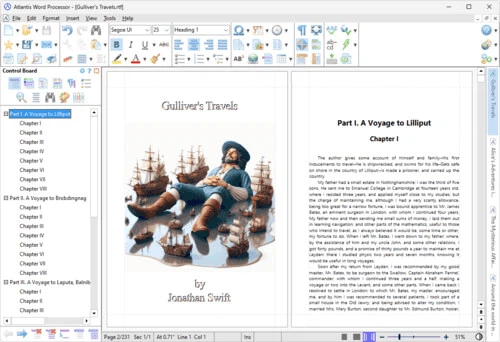
Atlantis carries a group of features written for authors. The overused words report counts the words that appear unusually often across the manuscript and nudges you to replace repetition and stock phrases. A writing target sets the goal for the current sitting, and together with statistics on writing time and typing speed it turns how much was written today into a visible number. When the middle of a section needs to be checked against what came before, the window can be split for comparison, the headings of a long document can be folded away to leave only the skeleton, or line numbers can be switched on to find a place quickly.
For layout there are drop capitals and floating pictures with text wrapping, and paragraph borders and shading are set directly. The Control Board is a dockable panel split into tabs: sections, lists, formatting marks, selection, and find and replace. Two of them can be open at once, so the structure of the chapters stays visible while the formatting is being changed. A full screen mode and a spotlight mode pull attention onto the small stretch of text around the cursor, and a draft view and a side by side view answer two different revising habits.
Format support and export
For reading and writing, Atlantis handles DOC from the older generations up to 2003, DOCX, RTF and plain text; WRI and ODT open for reading; and on the way out there is HTML plus EPUB, so with the ebook tool an ordinary document becomes an electronic book file. Encrypted documents are stored in the program's own format. The full edition adds saving as PDF, batch conversion and automatic backups, which lets a manuscript that changes constantly keep several earlier states.
Spell checking, the thesaurus and hyphenation are installed per language: the first time one is needed, a shortcut or the quick personalisation entry in the menu fetches the right one. Toolbars, the status bar, shortcuts, colour schemes and even interface sounds can all be changed, and the full edition ships with several colour sets and themes, a dark one among them.
What separates the free edition from the full one
Atlantis is sold in two lines. The Lite edition can be used free of charge for as long as you like, and covers reports, articles, letters and novels; it also works as a replacement for the system text editor, with an installer of about 2 MB and a very small memory footprint. As of September 2026 the download page lists the Lite installer at version 5.0.5.1, released on 1 June 2026.
The full edition fills in a set of capabilities on top: customisable toolbars and shortcuts, extra tabs in the Control Board, a second Control Board, saving as PDF, the ebook tool, batch conversion, the backup tool, full screen and spotlight modes, the draft and side by side views, and more text encoding options. It is priced at 35 US dollars, comes with a 30 day free trial, and registered users get technical support.
With the Lite edition installed, the more features entry in the help menu opens the full capabilities for free, so a few weeks of use can settle the question of whether to buy.
Where it does not fit
The positioning is clear, so there is no reason to demand everything from it. Nothing here was designed around several people editing together: handing a document to others, leaving comments and walking it through an approval chain all need a different tool. Complex scientific documents full of formulas and embedded objects are not its strength either; that kind of layout usually leans on a dedicated environment.
Its strength is being light and steady: it works offline, does not depend on a connection, and leaves control of the local document in your own hands; the size is small, so an older machine runs it smoothly. For anyone whose main or secondary work is putting words on a page, that trade is well aimed.
Atlantis Word Processor takes word processing back to writing: offline, light, quick to start, with overused word reports, a writing target and a folding outline serving the process, and DOCX, RTF, PDF and EPUB covering delivery. The Lite edition stays free, the full one costs 35 US dollars with a 30 day trial, so try before buying.