
Allavsoft review: paste a link, get a file, in a format you can use
Summary
The step most downloaders skip is the second one: after fetching the file you still need it in a format the phone, the television or the editor accepts. This one does both in a queue.
Recommend- Name
- Allavsoft
- Version
- 20260923
- Pricing
- Paid
- Open source
- Proprietary
- Operating system
- WindowsmacOS
- Website
- https://www.allavsoft.com/
- Updated
- 2026-10-08 16:47
The right way to keep a video
Finding a video you want to keep is easy; keeping it properly is where most people give up. The browser route produces a file with an unhelpful name in a format that may not play on the device you actually want to watch it on, and doing that seven times for a course playlist is enough to end the project. Allavsoft reduces it to two gestures: copy the address, paste it into the window, and the rest is a queue.
Support for sites is broad rather than narrowly curated, so the practical effect is that most links work without consulting a compatibility list first. Quality can be selected, playlists can be fetched as a whole rather than one item at a time, and a batch can be lined up and left running. The interface is in Chinese, which removes a barrier for a large group of users who otherwise work through a translated menu.
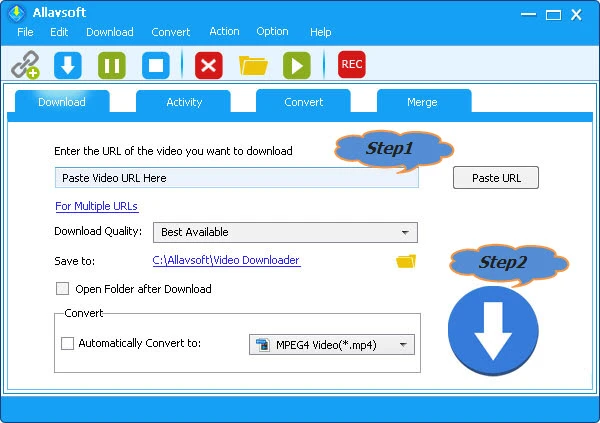
Conversion is the part that actually matters
Fetching a file is the easy half. The half that decides whether the result is useful is conversion, and here it is built in: the same job can output a format for a phone, a television, a tablet or an editing application, and audio can be extracted separately for listening. That matters because the file you downloaded is a distribution format chosen by the platform, not the format your devices want.
The details are the ones that separate a mature tool from a script. Clipboard monitoring means copying an address is enough to trigger a prompt, so the workflow becomes copy, confirm, done. A built-in player lets you check the result immediately rather than opening another application to discover a problem. Interrupted downloads resume instead of restarting, which is the difference between finishing a large playlist overnight and never finishing it at all.
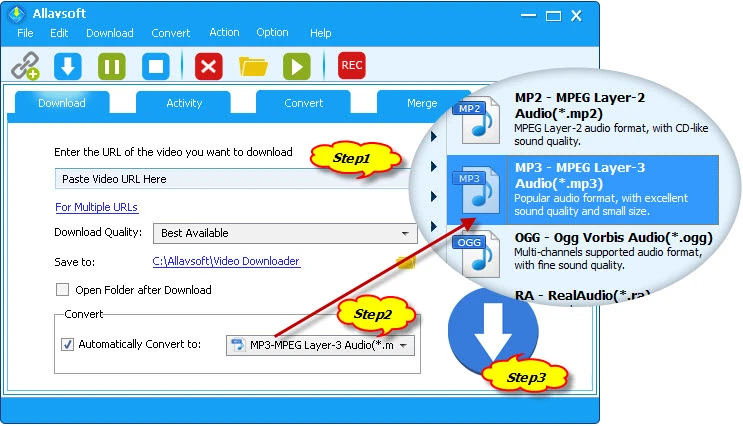
It is paid software with a trial, updated regularly, and the site support is maintained as platforms change how they serve media, which is the part that costs the developer real work and the part users never see. For someone who collects course material, keeps up with series offline, or needs footage in a specific format for editing, the value is in collapsing several scattered operations into one queue.
The boundary that matters
Downloading is not the same as owning. Content on a platform is licensed to you under terms that usually permit personal viewing and usually do not permit redistribution, re-uploading, public screening or commercial use. A tool makes the technical act possible and says nothing about the legal one, so the responsibility sits entirely with the person pressing the button.
The reasonable position is narrow and easy to state: keep what you have legitimate access to, for your own offline viewing, and do not redistribute it. Do not upload it again, do not put it in a monetised video, do not screen it in public. If a platform offers an official offline mode, that is generally the better first choice, because it keeps working when the unofficial route breaks.
The product logic is plain: it merges downloading and converting, two things that used to be separate, into one action. A good tool is defined by removing a turn from the workflow.
How to use it sensibly. Set the output format by purpose once, and reuse it: a compressed format for the phone, a higher-quality one for the editing archive. Run large playlists overnight and check the queue in the morning rather than watching it. Keep the original file when the material is going into a project, since converting twice loses quality. And when a site stops working, update the application before looking for another tool, because that is usually all that is required.
A final note on storage: downloaded media accumulates faster than anyone expects, and a folder that grows to hundreds of gigabytes is a sign to spend an hour organising rather than another evening downloading. Naming conventions applied at download time are far cheaper than sorting later.