
AdwCleaner 8.7: a free, install-free sweeper for the junk that antivirus leaves alone
Summary
A changed home page, a toolbar that appeared overnight and pop-ups that will not close usually come from unwanted programs rather than viruses, and ordinary antivirus tends to ignore them. AdwCleaner is the free single-purpose cleaner from Malwarebytes that quarantines them first and restores the browser settings they rewrote.
Recommend- Name
- AdwCleaner
- Version
- 8.7.1
- Open source
- Proprietary
- Operating system
- Windows
- Updated
- 2026-10-05 13:17
When the browser misbehaves, the cause is usually not a virus
A home page that has changed by itself, a toolbar row that appeared out of nowhere, pop-ups that will not stay closed: most of that is not malware in the classical sense. It belongs to the category usually called potentially unwanted programs, software that arrives bundled with something else, settles in behind an unclear consent screen and then behaves like advertising. Because it is not classed as a threat, ordinary antivirus products tend to leave it alone. AdwCleaner is the free, single-purpose cleaner from Malwarebytes that goes after exactly this layer: ad modules, junk that rode in on an installer, browser settings that were rewritten, questionable extensions and toolbars. It costs nothing for personal use, and there is nothing to install; the package unpacks into a folder and runs from there.
Narrow on purpose, and readable
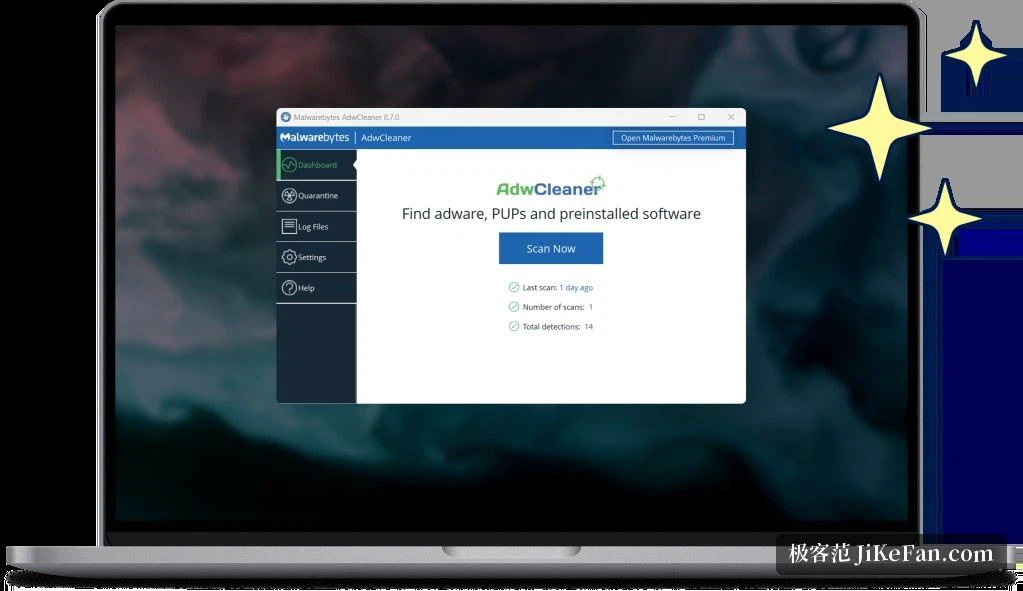
Unlike the all-in-one security suites, AdwCleaner does not try to be everything at once. Its detection leans on a definition set that is revised continuously and is deliberately stocked with the things a normal uninstall routine leaves behind. Every line of a scan result carries a type and a location, which is enough for an ordinary user to judge the risk from the category alone, while someone more technical can expand the path and check the entry in person. Before cleaning there is no need to fear collateral damage: anything judged suspicious goes into quarantine first, the system keeps running for a while, and only once nothing has broken does the quarantine get emptied by hand. That is a good deal safer than deleting on the spot.
Seconds to scan, one click to clean
The scan is quick even by the standards of the category: a typical system finishes well inside a minute. Results are grouped by service, folder, file, shortcut, scheduled task and registry entry, and every item can be ticked to keep it or cleared. The cleaning itself is brisk, and it puts the altered home page, search engine and browser settings back the way they were across the mainstream browsers. Mistakes stay recoverable, because findings sit in quarantine until they are confirmed and only then get removed for good, which means a confident click is never final.
Definitions that arrive over the network
Detection depends on a definition set updated over the network, so fresh samples of unwanted software and new patterns of abnormal behaviour are picked up quickly; that reach is one of the advantages of a vendor with a security business behind it. Scan logs are kept in full, so an IT person looking at somebody else's machine can export a report and file it away. The current version also recognises more of the software manufacturers preload on new machines, which means the small background helpers that ship with a fresh laptop can now be identified as readily as anything installed later.

Portable, and small enough to carry
The program itself stays under 10MB, small enough that a USB stick turns it into a rescue kit: when a friend's computer starts showing strange pages, the stick goes in and the work happens on the spot. The interface is translated into several languages including Chinese, and it runs from old systems through to the newest. Its position is clear. It does not pretend to be a full antivirus; it does one job, clearing unwanted programs, and does it cleanly. It earns its place when something has already gone wrong, as a first sweep on a freshly set up machine, and in a periodic check that costs a minute of the day.