
ZipGenius at almost thirty: the archive tool that never left the desk
Summary
ZipGenius arrived from Italy in 1997 and is still maintained: ZIP creation, extraction for more than twenty formats, password protection, splitting by size, repair of damaged archives and wizard-driven steps, all free in the standard edition, with the Suite adding an FTP client and scan-to-archive.
Recommend- Name
- ZipGenius
- Version
- 6.3.2.3116
- Pricing
- Free
- Open source
- Proprietary
- Operating system
- Windows
- Website
- https://zipgenius.it/
- Updated
- 2026-10-06 23:21
Almost thirty years on the same job
In 1997, when Windows 95 was still what an ordinary desktop looked like, ZipGenius appeared in Italy. Nearly three decades later most of the programs from that moment are gone, and this one still sits quietly on its official site. The standard edition is free with no countdown on features, and the Suite edition adds a set of extras, an FTP client and a scan-and-pack path among them, at the same price of nothing. Durability of that kind is a quality in itself, and it is the particular flavour of old software that simply refused to disappear.
The basics are solid, and two details go further
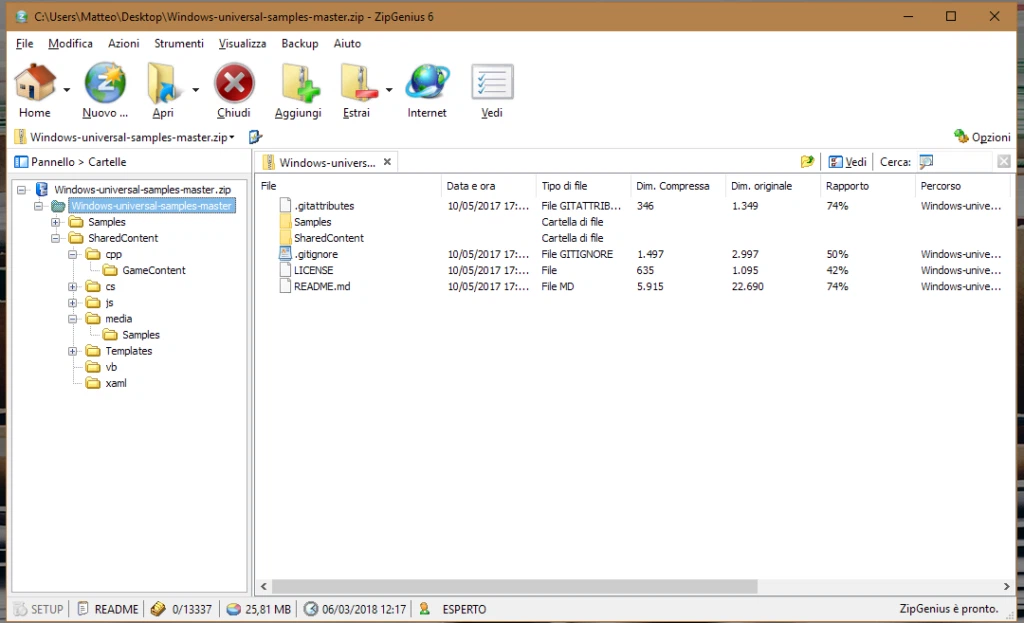
As an archiver its fundamentals are sound. It creates ZIP files, extracts more than twenty formats, applies password protection, splits an archive by size, and plugs into the right-click menu where people actually work. Two details go past what the category usually offers. The first is repair: when a download breaks halfway or a disc comes back scratched, a built-in recovery routine tries to pull the contents out of the damaged archive, which is rare among tools of this sort. The second is the wizard, a guided path for creating an archive, sending one by mail or publishing one to the web, step by step from beginning to end. That flow is unusually kind to people who are not comfortable with computers, and the build from that era even reads images straight from a scanner into a package, an integration idea that still looks complete today.
An honest word about maintenance mode
It is fair to say the program lives in maintenance mode. The current build, 6.3.2.3116, has not seen a large change in years, the interface still looks like the era it came from, and nobody should expect new formats or the most aggressive compression ratios. That sounds like a verdict, but it depends on the question. Packing and unpacking is a mature need. A tool that is stable, entirely free and extremely light on resources remains a calm choice for an old machine, a shared office desktop, or the computer you set up for a family member.
Who it still suits
Think about what such a machine is actually asked to do: open an attachment that arrived by mail, put a folder of photos into one package, protect a file with a password before handing it over. None of that needs a modern engine, and all of it gets easier when the program starts instantly, asks nothing, and never mentions an upgrade. Where a newer tool spends its energy on format support and speed, this one spends nothing at all and simply keeps working, which is sometimes the whole requirement.
What the guided flow changes for a beginner
Most archivers assume you already know what you want: a format, a compression level, a password policy, whether folder paths should survive. ZipGenius walks the same decisions as questions, one at a time, with a plain sentence attached to each choice and a back button that actually goes back. For an experienced user that is noise. For someone who opens the program twice a year to send a folder of holiday photos to a relative, it is the difference between finishing the job and giving up. The mail and publish paths follow the same logic: build the package first, then hand it to the next step.
An older idea survives in there as well. Scanning a stack of paper and packing the images straight into an archive was a small workflow the program handled in one place, at a time when doing it meant juggling three separate tools. Nobody would build it that way now. It is still a good reminder of how the program thinks: the archive is not the end of the work, it is the package that carries something somewhere.
ZipGenius is the old craftsman of the software world: not chasing novelty, only steadiness; not following fashion, just working the same small plot of packing and unpacking for almost thirty years. A classic is a classic because it is still there.