
BurnAware 19.4: twenty burning tasks, and BDXL 100GB in the free edition
Summary
BurnAware 19.4 shipped on 17 September 2026 and gathers twenty burning tasks behind twenty buttons. The free edition covers data, audio and video discs, ISO work and whole-disc backup for personal use. Premium adds transcoding and spanning, Professional adds recovery and multisession burners.
Recommend- Name
- BurnAware
- Version
- 19.4
- Open source
- Proprietary
- Operating system
- Windows
- Website
- https://www.burnaware.com/
- Updated
- 2026-10-19 22:27
A spindle of blank discs, a system image that has to boot, an audio CD for the car: all three ask the software for the same thing. Pick a task, drop the files in, write them, then confirm the disc reads back. BurnAware lays that routine out as twenty square buttons inside one window, so the choice comes before the project.
Twenty tasks, one window
BurnAware comes from BurnAware Technologies, and version 19.4 landed on 17 September 2026 with its changes concentrated in the burning engine and in file verification. Open the main window and twenty square buttons sit in rows: data disc, bootable disc, spanned disc, disc copy, audio CD, MP3 disc, video DVD, BDMV, ISO burning and ISO building, erase, disc information, verify, backup, data recovery. Press one and you are inside that flow already, without building a project first and then picking a type layer by layer.
The tool ships in three editions. The free one covers data, audio and video discs, ISO building and burning, and whole-disc backup, and its licence states personal use. Premium adds video DVD transcoding, spanned discs and disc-to-disc copying on top. Professional adds data recovery, audio track extraction, writing to several burners at once and a command line entry, and it permits use inside a commercial setting.
Media and capacity
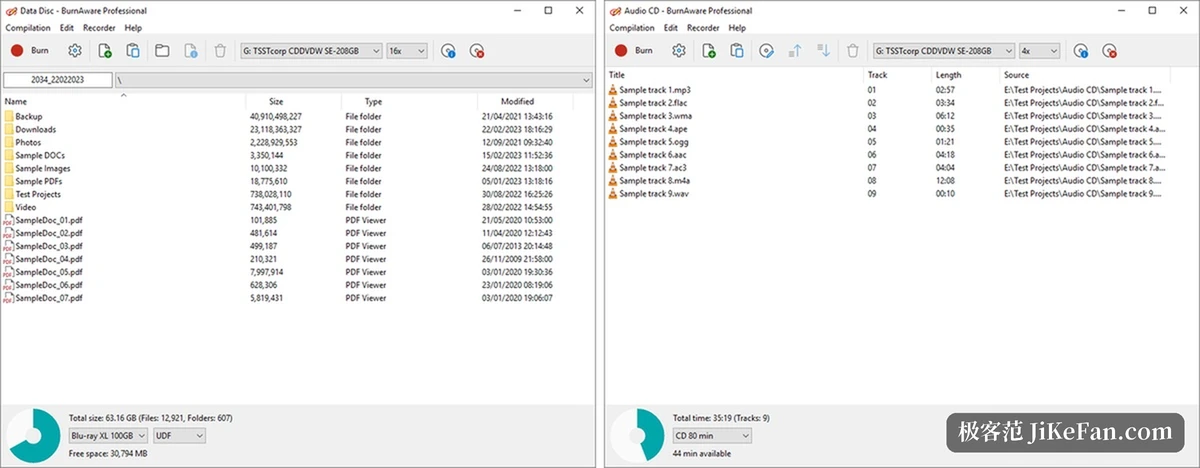
Support runs across CD, DVD and Blu-ray, plus dual layer media, M-Disc and BDXL. BDXL pushes a single Blu-ray disc to 100 GB; during burning you pick Blu-ray XL 100GB from the capacity drop-down and the file system switches to UDF to match. M-Disc and Archival Disc, both common in archiving work, appear in the same list, and these media trade an inorganic recording layer for a longer storage life.
Bootable discs and multisession are the two other options people reach for. The first writes boot information onto the disc for a system installer or a maintenance disc. The second lets you append to one disc across several sessions, each session taking only new space while everything written earlier stays readable.
Four things beyond burning
ISO works in both directions. An existing image goes straight onto a disc, files and folders get packed into an image, and an image can be unpacked back to the hard drive. Whole-disc copy reads a data or audio disc and writes it onto another, and on the way it can store an ISO or BIN first and burn from that.
The image actions are split finely. Building seals a folder into an image, burning writes an image to a disc, unpacking returns the contents to the hard drive, and bootable images get a button of their own. Each step performs one task, which makes it easier to tell where a failure happened.
When the data outgrows a single disc, spanning cuts the same batch of files by capacity and writes them across several discs in order. A verification pass can follow at once, reading the disc back and comparing it against the source files. Rewritable media can be erased and reused, and the disc information page reports media type, write speed and free space.
Edition | What it adds over the previous one |
|---|---|
Free | Data, audio and video discs, ISO building and burning, whole-disc backup; personal use |
Premium | Video DVD transcoding, spanned discs, disc-to-disc copying |
Professional | Data recovery, track extraction, several burners at once, command line, commercial use |
Audio and video
The audio line produces Audio CD. MP3, FLAC, WMA, APE, OGG, AAC, AC3, M4A and WAV can be dropped into the queue together, the total duration updates live along the bottom of the window, and free space is measured against an 80 minute standard disc. CD-Text lets you fill in a track title and artist per track, and a player that understands the standard displays them straight away. The same batch can also be written as an MP3 data disc, several hundred tracks to one disc.
The video line produces Video DVD and BDMV. The first needs transcoding into DVD-Video structure, and the built-in converter folds that step into the flow; version 19.4 reworked exactly that encoding stage. The second targets Blu-ray players and writes according to the Blu-ray directory layout.
Recovery and batch work
Data recovery aims at discs that no longer read. The program pulls whatever sectors still answer, steps around the damaged region and keeps going, assembling usable files out of what is left. Audio track extraction turns the tracks on an audio CD into files, which is how an old album moves onto a hard drive.
For a stack of discs in one sitting, Multiburn writes the same image to several burners at once and skips the queue of one disc after another. A command line entry stays available for scripts, so burning can join an automated pipeline without anyone watching a window. The interface handles Unicode and several languages, scales on high DPI screens, and keeps processor load low while a disc is being written.
What 19.4 changed
This release moved to a new burning SDK, optimised the file verification pass, and made the handling of timestamps on damaged files more reliable. Two problems were fixed: track writing could hang near the end, and files carrying incorrect dates could break the process.
BurnAware does not update quickly; 19.4 arrived several months after the previous release. The installer stays small, roughly 12 MB for the 32-bit free edition, Premium and Professional each offer a seven day trial, and the 32-bit and 64-bit builds ship separately. System requirements run from Windows Vista through Windows 11.
The approach is to cut burning into individual, explicit tasks, so anyone can step into one and finish it. The free edition covers everyday data and audio discs, while transcoding, spanning, copying and recovery open up edition by edition.