
ImgBurn: free burning and verification across twelve image formats
Summary
ImgBurn is a free disc burning tool from LIGHTNING UK! that splits the work into five modes: reading a disc, building an image, writing one, verifying the result and testing the drive. It handles twelve image formats plus audio and video discs, and the final release dates from 2013.
Recommend- Name
- ImgBurn
- Version
- 2.5.8
- Pricing
- Free
- Open source
- Proprietary
- Operating system
- Windows
- Website
- https://www.imgburn.com/
- Updated
- 2026-10-17 16:04
An install disc, a system image, an archive of an old optical disc: all three come down to the same routine. Write the image onto a disc, then confirm that the disc can actually be read back. ImgBurn covered that routine from 2005 to 2013, split it into five modes that stay out of each other s way, and shipped as an installer under four megabytes. Plenty of people still keep it as the default.
Five modes, one job each
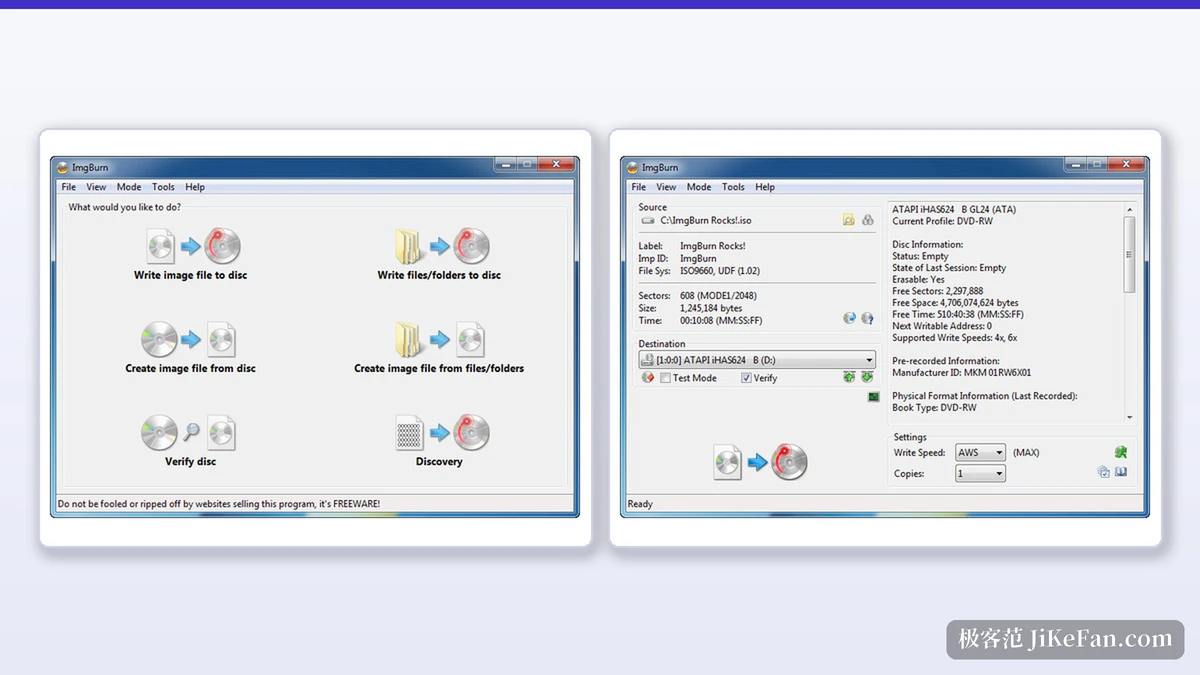
ImgBurn comes from LIGHTNING UK! and describes itself as a lightweight burning program for CD, DVD, HD DVD and Blu-ray. The main window does not pile on features. An Ez-Mode Picker puts the choices up front, and behind it sit five working modes: Read turns a disc into an image file, Build produces an image from files and folders or writes those files straight to a disc, Write puts an image onto a disc, Verify checks whether the disc reads back completely, and Discovery pulls the drive and the media into the foreground for an actual test.
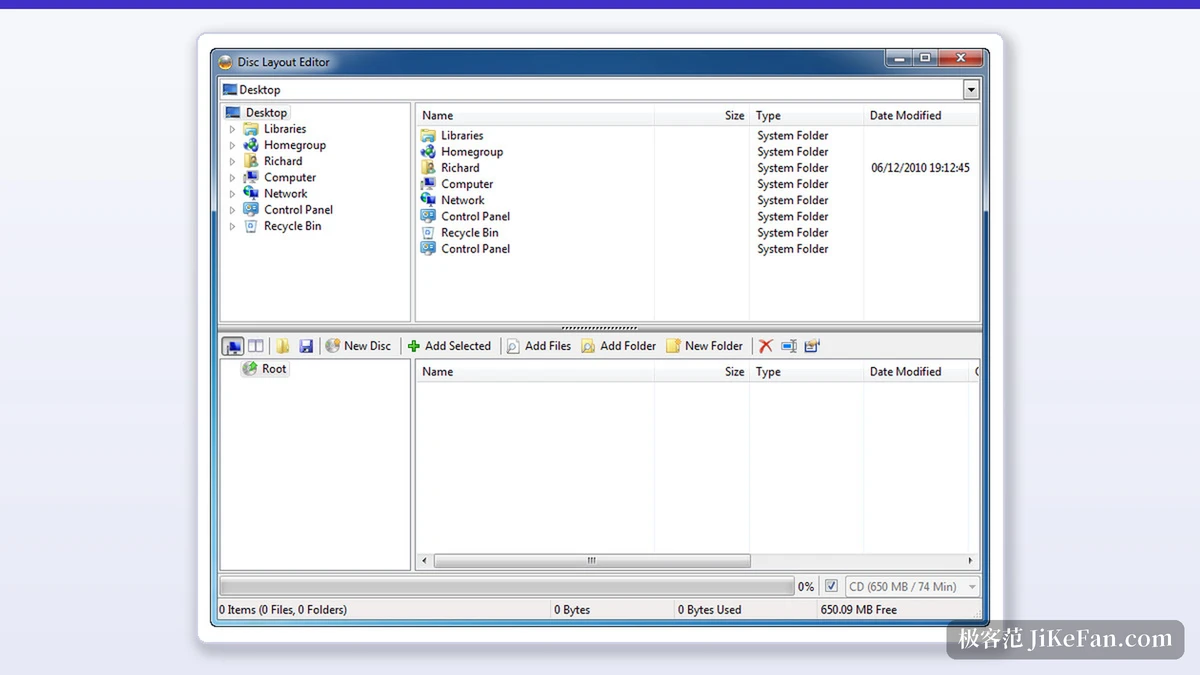
Build has two faces. The standard interface asks for a source folder and a target device and little else. The advanced interface lays out the file system, the volume label, the boot image and the disc layout item by item. The layout editor is the centre of that layer: a browser pane on the left, the directory tree that will be written on the right, and a running count of used and free capacity along the bottom.
Twelve image formats, plus audio and video discs
The website lists twelve readable image formats: BIN, CCD, CDI, CUE, DI, DVD, GI, IMG, ISO, MDS, NRG and PDI. The direction reverses just as easily, with Read pulling a whole disc into an image and Write putting that image back onto fresh media.
Data is not the only thing a disc holds. Audio CD input goes through DirectShow and ACM decoding, so AAC, APE, FLAC, M4A, MP3, MP4, MPC, OGG, PCM, WAV, WMA and WV can all be burned as a plain Audio CD. Video discs are recognised by folder structure: a VIDEO_TS folder yields DVD-Video, an HVDVD_TS folder yields HD DVD-Video, and a BDAV or BDMV folder yields a Blu-ray disc. Folder and file names accept Unicode, so non-English titles survive the burning step.
Verification, queues and the layer break
One step remains after writing. Verify reads the disc back in segments and checks whether the whole thing can be read, and it can also take an image file and compare it byte for byte against what landed on the media. The speed and buffer figures recorded during a burn can be exported as a graph, which is how you tell whether a particular disc and drive make a good pair.
When several discs have to be written in a row, an image queue lines the jobs up, and a machine with more than one burner can spread that queue across drives in parallel. Dual-layer DVD-Video gets its own consideration: the program offers a layer break selection screen that grades every candidate position by compatibility, from Excellent down to Average, so the switch happens somewhere sensible rather than wherever the capacity runs out.
Stopped at 2.5.8.0
The version number stopped early. ImgBurn sits at 2.5.8.0, released on 16 June 2013, with a 3,870 KB installer and CRC32, MD5 and SHA-1 checksums published alongside the download. That release was not a formality: it added the Platform ID setting needed to build a UEFI bootable disc, picked up the Opus and TAK audio formats, and raised the read and write buffer ceiling to 1GB.
Mode | What it does |
|---|---|
Read | Reads a disc into an image file |
Build | Builds an image from files or folders, or writes them straight to a disc |
Write | Writes an image file onto a disc |
Verify | Checks that the disc reads back, and can compare it with the image |
Discovery | Tests the drive and the media as they really behave |
The licence is stated plainly. This is free software, usable at home and in the office, while embedding it in another commercial program or reselling it requires separate permission. The same changelog records one change to the installer: the 2.5.8.0 entry says the setup no longer offers the old toolbar and that OpenCandy presents product options during installation instead, quoted as OpenCandy now handles product offerings during installation.
Compatibility
The compatibility list reaches down to Windows 95 and up to Windows 10, with a 64-bit build included, and the site notes that it also runs under Wine on Linux and other x86 based Unix systems. For an old machine kept around to burn or read discs, that span is the reason it stays installed.
A tool that has not been updated in thirteen years keeps coming up for a simple reason. The job of writing an image to a disc has not changed, ImgBurn drew the boundaries between its modes clearly enough, and the features people need are still there while the ones they do not need were never added.