
WinMerge: two files, two folders, and the difference laid out side by side
Summary
An open source comparison and merge tool maintained since 2000. Two files are matched line by line and the differences highlighted; whole folder trees are compared recursively with a status column; three-way merge, image and table comparison, HTML reports and patch output are all included, under GPL v2.
Recommend- Name
- WinMerge
- Version
- 2.16.58.2
- Pricing
- Free
- Open source
- Open source
- Operating system
- Windows
- Website
- https://winmerge.org
- Updated
- 2026-10-06 22:27
Seeing a difference properly takes a tool built for it
Two versions of a document sit on the disk and somewhere inside them is the sentence that changed; a code folder was backed up twice and nobody is quite sure whether the last edit made it into the copy. Reading both by eye is tiring and, worse, unreliable, because attention slides over exactly the lines that matter. WinMerge is a long-running open source tool for comparison and merging, in development since 2000, built for that one question: what is different between these two files, or these two folders. It answers visually, in two panes side by side, with the differing places marked, so the answer arrives at a glance instead of after a careful read.
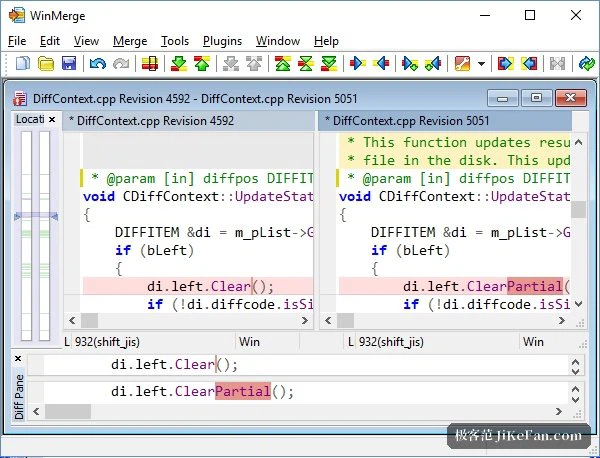
Files: line by line, with the merge built into the same window
Drop two files into the window and the comparison happens immediately. Identical stretches are folded and dimmed out of the way, differing lines are given a colour that cannot be missed, and the small changes inside a line get their own embedded highlight, down to the level of a punctuation mark. Blocks of code that were moved rather than rewritten are recognised as moved, which stops them being reported as one deletion plus one addition and saves a great deal of pointless reading. A difference map down the side jumps to the next disagreement in one click, and the two buttons that matter, copy to the left and copy to the right, sit on the toolbar: look at a difference, resolve it, move on, then save. Syntax highlighting is applied when the files being compared are code, and a three-way mode puts a common base next to two modified versions, which is exactly the shape of the conflict files a version control system leaves behind.
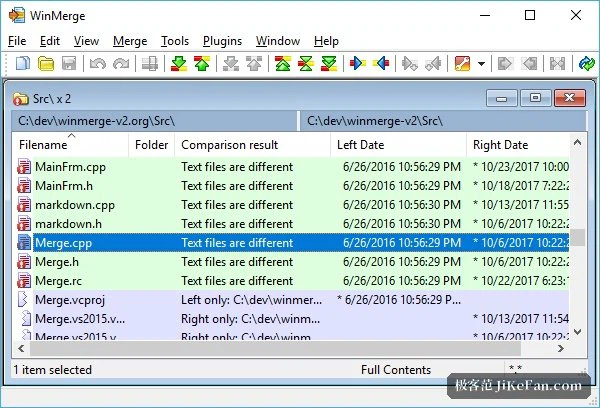
Folders: the whole tree, and what state each file is in
Above the level of single files it compares an entire folder tree recursively. Which files exist only on the left, which only on the right, which exist on both sides with different contents: all of it is stated in a status column, and a tree view keeps the shape of the hierarchy visible while a regular expression filter cuts the list down to what is being looked for. Filtering by size and by date answers the narrower questions quickly, and differences that carry no meaning can be told to stay quiet. Renamed and moved files are tracked rather than mistaken for new ones, so the report does not fill up with noise made of deletions and additions. Copying files between the two sides in bulk happens from the context menu, which makes checking a backup or synchronising a directory a matter of a few clicks, and a third folder can be brought in as well, for the familiar triangle of local, backup and live.
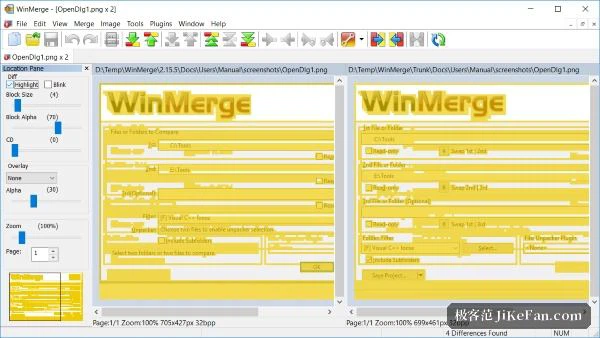
Not only text: images, tables and archives as well
The things it can compare are not limited to plain text. Images get two views, one marking the regions that differ in blocks and one laying the two over each other, either of which answers whether a picture really changed and where. Tables are shown side by side as column data, aligned column by column, which is the only sane way to read two versions of a data file. With the help of a widely used open source unpacking engine it can look inside archives directly, and even compare an archive against a folder. A plugin mechanism extends the same treatment to proprietary formats such as spreadsheets and PDF documents, and the whole tool can be registered as the external comparison program of a version control workflow, so that a diff command opens this window instead of a bare console.
Reports and patches, so the finding travels
A comparison is not much use if it stays on one screen. Differences can be exported as an HTML report, and recent versions can gather several file comparisons into one document, which turns a review request to a colleague into an attachment rather than a meeting. A patch file in the standard format can be produced as well, for use with a code collaboration flow. The command line parameters are complete enough that scheduled verification can be written as a batch script, and the newer releases have added details such as grouping everything into a single instance instead of scattering windows.
Free, open source, native to Windows
WinMerge is released under GPL v2 and is free for individual use, and its interface has been translated into a long list of languages. It is native to Windows, ships installers for both the common 64-bit architecture and the ARM one, and integrates with the file manager, so selecting two files and choosing the tool from the context menu starts a comparison directly. As of September 2026 the stable release is still being iterated month by month, fixing small things and keeping the translations current, which is what makes it worth keeping within reach rather than installing once and forgetting.