
Windhawk review: system tweaks that install like apps and uninstall cleanly
Summary
Hundreds of community modifications, each installed with one click, each removable without a trace: the old craft of bending Windows turned into something a cautious person can try.
Recommend- Name
- Windhawk
- Version
- 1.7.3
- Pricing
- Free
- Open source
- Open source
- Operating system
- Windows
- Website
- https://windhawk.net/
- Updated
- 2026-10-08 20:43
Why system tuning used to be a bad idea
Windows has always been adjustable, and the traditional ways of adjusting it have always been unpleasant. Editing the registry by hand means working without a safety net: one wrong value and the machine boots into something you do not recognise. Installing a patched system file means trusting a binary from a forum post, and hoping that the next system update does not replace it. Downloading a small utility from an unfamiliar site means accepting whatever else comes with it.
Windhawk's premise is that the adjustment itself was never the problem; the delivery was. It provides a framework that loads modifications as modules, installs each one from a catalogue, and removes it completely when you change your mind. For a category where the standard advice used to be "do not try this on a machine you rely on", that is a meaningful change.
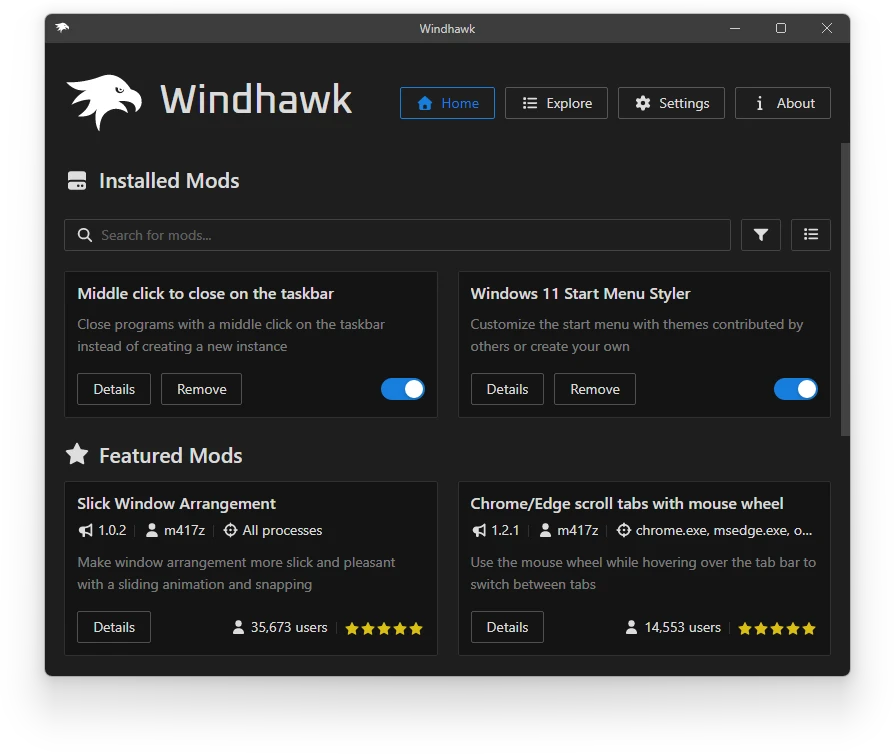
What the catalogue actually contains
The modules cover the parts of the system that people complain about. Taskbar behaviour is the largest group: stop combining buttons, restore labels next to icons, change what a middle click does, adjust the height. The start menu gets options for its layout and behaviour, the file manager gets small conveniences, the notification area gets restyling, and there are modules for window handling and for the appearance of older dialogs that never received a redesign.
What is notable is the granularity. These are not themes; they are individual behaviours, each described in plain language with the version of the system it applies to. Someone who only wants uncombined taskbar buttons installs that one module and nothing else, which is a much smaller intervention than the all-in-one tuning suites of the previous era.
Safety, honestly assessed
Loading code into system processes carries risk, and the project's answer is transparency rather than a promise. The engine is open source, each module's code is visible before installation, the catalogue shows ratings and comments from people who have used it, and the author of a module is identified. Uninstalling is one action and leaves nothing behind, which matters more than any feature.
The honest caveats: a module written for one build of the system may behave oddly after a major update, so the catalogue flags compatibility and it is worth reading those notes before an update. And this remains software that touches internals, so the sensible practice is the same as with any system tool: install one module at a time, restart, and confirm the machine is still healthy before adding the next.
A word on removal, because it is what makes the approach credible. Disabling a module removes its behaviour the next time the affected process starts, with no reboot and no residue in the registry. Anyone who has uninstalled a tool only to find files of unknown purpose still sitting there knows what that is worth.
The clever part is not the modules themselves. It is turning an undocumented craft into something with a version number, a review page and an undo button. Freedom and stability stop being a trade-off.
How to use it well. Keep the number of installed modules small and purposeful, since each one is a piece of code inside a system process. Avoid the intrusive ones on a work machine and save the experiments for a spare system. After each major system update, check the compatibility notes before assuming everything still works, and if something breaks, disable modules one by one rather than reinstalling the system. And read a module's description before installing it: the ones that explain exactly which behaviour they change are usually the ones written carefully.