
Privacy Browser 3.20.1: every privacy switch starts off, and sites are opened one rule at a time
Summary
Privacy Browser 3.20.1 keeps scripts, cookies and DOM storage off by default and lets each domain opt in. Version 3.20 rewrote the block list engine so filtering lands more precisely, and the cache is no longer left on the device.
Recommend- Name
- Privacy Browser
- Version
- 3.20.1
- Pricing
- Free
- Open source
- Open source
- Operating system
- Android
- Updated
- 2026-10-21 12:29
The usual shape of a browser is to switch everything on and then offer a menu of things to turn off. This one goes the other way: it starts with the switches off and asks you to open them, site by site, as the need appears. The benefit is that nothing leaves the device unless someone decided it should.
Off first, then opened per site
Privacy Browser is an open source browser for Android, and the current version is 3.20.1. The website reduces its position to two sentences: send as little data to the network as possible, and keep as little data on the device as possible. In practice that means everything starts closed. Scripts, cookies, DOM storage and the user agent, anything an advertising network might stitch into a fingerprint, simply does not travel by default.
When a site will not load without one of those, the answer is not to flip a global switch but to open it for that visit alone. The tidier route is a domain setting: the site opens on arrival and closes again on departure, so the next visit needs no presses.
Quite a few items can be set per domain: scripts, cookies, DOM storage, each of the five block lists on its own, whether all third party requests are blocked, the user agent string, font size, theme, viewport width, whether images load, certificate pinning, and pinning a domain to a given address. A site visited often can be configured once and the rest keep the defaults.
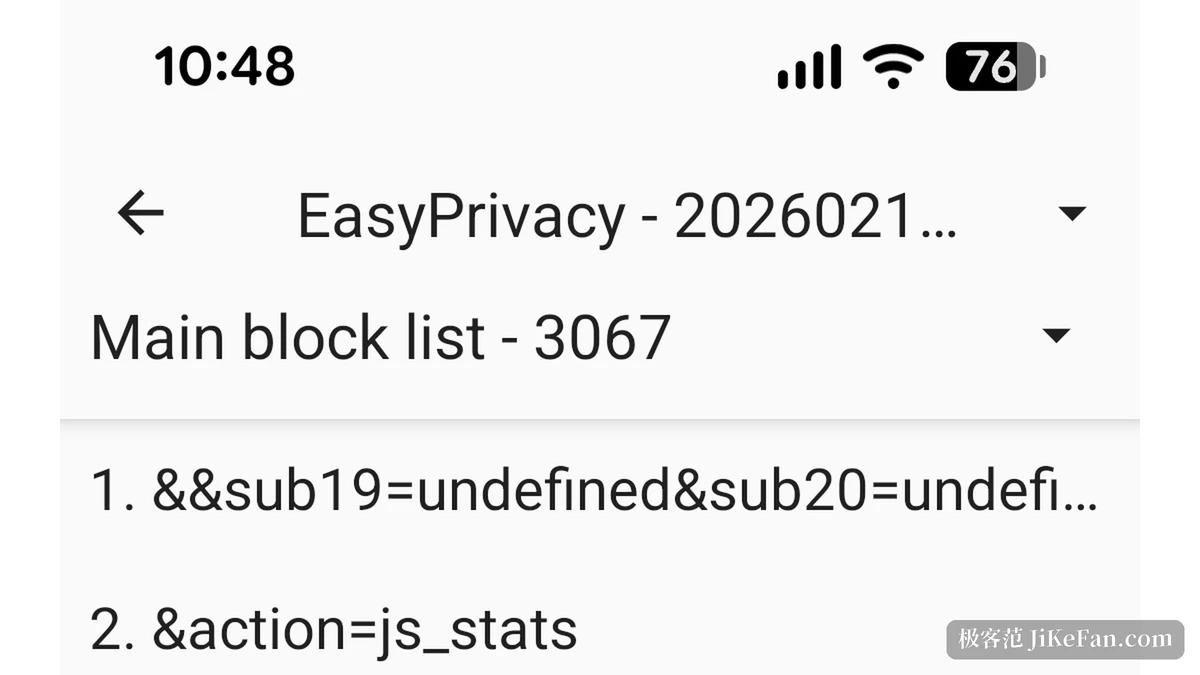
3.20 rewrote the block list engine
This version concentrates on the block lists. The whole parsing and matching path was rewritten with the aim of matching the desktop build. Where the author had once patched individual rules by hand so that a list would not misfire on a particular site, those patches are gone; some entries in the old code could crash the application outright, and the new implementation does not.
A blocklist activity arrived in the app, reached from the menu at the top right of the request list. Tapping any entry shows how it was parsed: which list it belongs to, which sublist, which substring matched, and which filtering options came with it, so a rule can be checked for being read the right way.
The test for a third party request changed as well. It used to count only a difference in the main domain; now the fully qualified domain name decides, and a mismatch between subdomains counts too. Some requests that used to pass are now inside the filter, and the rule agrees with the desktop build.
Caching also changed: the cache is cleared after every completed page load. Previously only private mode did that; now it is the default, at the price of a possible re-download when going back a page.
Five lists, filtered by domain and third party test
Five lists ship in two tiers: a general list and a privacy list as the base, two stricter ones stacked on top, and an annoyance list aimed at pop-ups, overlays and social widgets. The social block list that used to be listed separately has been folded into the annoyance list, on the grounds that keeping it apart brought no measured gain.
Android offers limited hooks, so only two filtering options are fully supported: domain and third party. The rest would need more information from the browser than is exposed, and they are skipped for now. Regular expression entries are expensive, so few appear in the lists, and only lines carrying certain characters are treated as expressions.
List | What it targets |
|---|---|
General | The base list that covers ordinary advertising and tracking |
Privacy | The second half of the base, aimed at tracking scripts |
Strict one and two | Stacked on top for harder filtering |
Annoyance | Pop-ups, overlays and social widgets, now including the social list |
Storing as little as possible
During ordinary browsing, apart from bookmarks and domain settings the user saves on purpose, everything is cleared when a session ends, when a clear and exit runs, or when the last remaining tab closes. The Service Worker directory is deleted after each page load completes.
Private mode exists for the cases that need more: the cache and history go after every page load. The author's own principles page names people who need extreme protection, for whom visiting a site is itself a risk, and calls the friction a fair price.
Automatic saving of full history and restoring tabs after a restart have both been refused outright: ordinary browsing would then leave traces behind, easy to lift if the device falls into other hands. Bookmarks and domain settings export to a single SQLite file, which travels to a new machine.
Four permissions only
The website lists them: network access for loading pages, install shortcuts for putting a site on the home screen, nearby devices on the local network, which is a dangerous permission and has to be granted by hand, used for local addresses such as a router administration page, and one protection permission that Android adds to dynamic receivers on its own.
No advertising library, no analytics, no in app purchase. The author retired the free version with ads in 2021, because that version had to bundle an advertising library, and such a library slips permissions of its own into an application, boot startup among them.
Versions and compatibility
3.20.1 carries version code 81, needs Android 8.0 at the lowest and targets API 36. The release fixed one build problem: F-Droid had pinned the Java version by hand, the default has since passed 17, and the constraint could go.
Rendering still uses the system WebView, so the newer it is on a machine, the better things behave. The author plans to move to a separately maintained fork in the 4.x series, at which point some web standards will be bent for privacy, WebRTC being the example already named. The next release, 3.21, aims at fine grained cookie control and raises the minimum API to 29.
Free and paid at the same time
The source sits on the author's own GitWeb under GPLv3 or later, and issues run through a self hosted Redmine. Distribution splits two ways: the F-Droid build is compiled by the community from source and is free to take, while the three commercial stores carry a paid build whose income is one of the project's main sources, alongside donations.
Both channels hold the same code; only the way of getting them differs. Anyone who wants convenience and update notices goes to a store, anyone who wants to pay nothing goes to F-Droid.
Trade-offs worth knowing in advance
Everything off by default means a great many sites arrive broken on the first visit: lazy loaded images never run, comment sections fail to appear, a login box will not respond. Using it comfortably means accepting the early work of configuring sites.
Bound by the system WebView, there is a ceiling on what can be blocked. The lists judge on two dimensions only, domain and third party; element level hiding and script injection must wait for a maintained engine of its own.
It supports Android 8.0 and above, older systems fall outside, and interface problems on old Android get best effort repairs only.
Privacy Browser treats privacy as the default rather than an option: switches start off, sites are opened as needed, and what could be stored mostly is not. The weight of 3.20.1 is the rewritten block list engine, with the third party test tightened to the fully qualified domain name; no loud new features, and what can be felt is filtering that lands better and a cache that no longer stays on the device.