
UninstallView Review: One Table That Sees the Whole Machine
Summary
The built in removal panel shows only half the story. UninstallView reads every uninstall entry in the registry, both 32 and 64 bit, hidden ones included, and lays out version, publisher, install date, path and removal command in sortable columns you can export as HTML or CSV.
Recommend- Name
- UninstallView
- Version
- 20260922
- Pricing
- Free
- Open source
- Proprietary
- Operating system
- Windows
- Updated
- 2026-10-07 16:13
One table that sees the whole machine
The removal panel that ships with Windows has always shown a partial picture, and the missing part is often the interesting one. Portable programs that never registered properly, bundled components installed silently by something else, entries that exist at system level and never appear in the friendly list: all of them stay invisible, and all of them are exactly what you want to find when a machine starts behaving strangely. The list you are shown is a curated view, not an inventory.
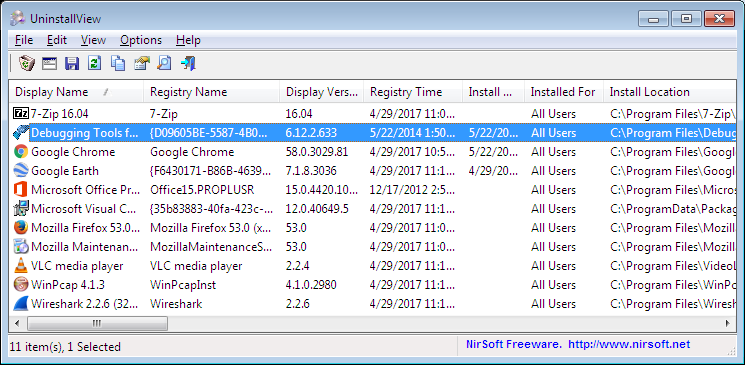
UninstallView replaces the curated view with the raw one. It reads every uninstall entry in the registry, covers both the thirty-two and sixty-four bit locations, and includes the hidden entries the system prefers not to display. The result is a single table with a column for each thing you might want to know: the name, the version, the publisher, the install date, the directory it occupies and the command that would remove it.
The practical power of that table is in the sorting. Order by install date and the ancient components come to the surface: the driver helper installed by a printer two years ago, the runtime that arrived with a game you no longer play, the toolbar that came in with something else entirely. Those are the entries that accumulate silently and that the standard panel never lets you see.
Batch and silent, for people who maintain machines
The tool is aimed at installation and maintenance work rather than at casual use, and the features follow from that. Several programs can be selected and removed in one pass instead of one confirmation dialog at a time. A silent mode runs the removal without asking for confirmation on each item, which matters when you are rebuilding a machine and already know exactly what should go. Leftover registry entries can be cleaned up in the same session rather than in a separate utility.
The export function is the quiet gem. The whole inventory can be written out as HTML or CSV, which turns a maintenance session into a document: a machine handover, an asset count, a record of what was installed before a rebuild. Anyone who has tried to reconstruct that list from memory after reinstalling an operating system understands the value immediately.
The philosophy behind it is consistent with the rest of the suite it comes from: a single executable, no installation procedure to run, and a resource footprint close to nothing. It can live on a USB stick and open when needed, which is precisely the property you want from a tool you reach for on someone else machine.
UninstallView carries the same belief as the rest of the toolbox: small and precise, fast and complete. A few hundred kilobytes holding the most thorough understanding of how the system actually removes things.
Using it without breaking anything
Two rules cover most of the risk. Before a batch silent removal, read the selected rows in the table and confirm that no system component slipped into the selection, because the silent mode will not ask twice. And keep the export habit: saving an inventory before a rebuild or a handover costs seconds and answers questions that otherwise require archaeology.
It is free, portable, and available from the official page, which makes it a permanent small resident of a Windows maintenance kit. It does not clean your machine for you and it does not pretend to understand what should stay. It tells you what is there, in full, which is the part most tools get wrong.