
Uninstall Tool review: removing programs properly, leftovers included
Summary
The system uninstaller is slow, blunt and leaves a trail. This one lists everything in a second, records what an installer writes so removal can follow the same map, and stays small enough for an old machine.
Recommend- Name
- Uninstall Tool
- Version
- 20260923
- Pricing
- Paid
- Open source
- Proprietary
- Operating system
- Windows
- Updated
- 2026-10-08 16:34
Removal deserves the same care as installation
The uninstall entry built into Windows works, in the sense that a door works even if it is stuck. It is slow to populate, it presents a flat list with no grouping, it gives you no information about what a program actually is, and when it finishes, a portion of the program is still there. Nobody notices for a year, and then the system drive is full of directories belonging to software that was removed long ago.
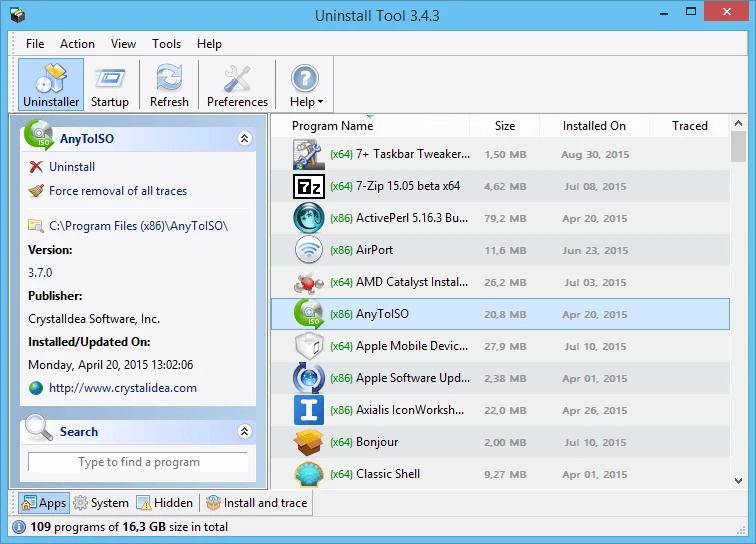
Uninstall Tool treats removal as a process with a beginning. The list opens instantly and can be sorted by name, size, install date or publisher, with system components and hidden entries in their own groups rather than mixed into the general population. That alone changes the experience: you can see which programs are large, which were installed the same afternoon and which you genuinely do not recognise.
The install monitor is the actual product
The feature that makes the rest possible is monitoring. Turn it on, install something, and the tool records every file and registry change the installer makes. Later, when that program is removed, the uninstaller follows the recorded map instead of guessing from a name pattern, which is the difference between a clean removal and a plausible one. Installation and removal become the two halves of one operation rather than two unrelated events separated by a year.
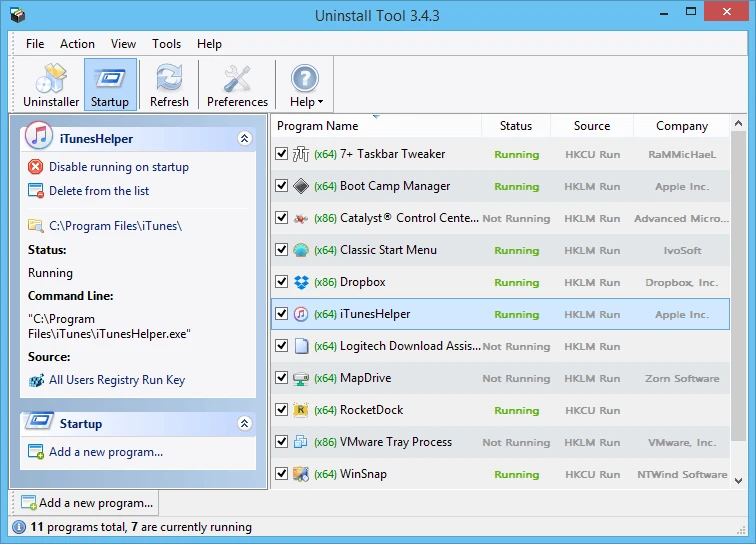
Around that sit the usual, useful extras. Batch removal queues several programs and clears them in sequence, which is what you want when cleaning a machine inherited from someone else. Forced removal handles the stubborn cases where an uninstaller is missing or broken, with a clear warning that this is a last resort. A log records what happened, so if something breaks afterwards you can see why. And the startup manager, which is where most of the perceived slowness of an old machine actually lives, is included rather than sold separately.
Being small is part of the pitch and not a marketing line. The installer is a few megabytes, memory use is modest, and a portable build runs from a USB stick without touching the registry, which matters for anyone who fixes other people's computers for a living or for free.
Two things to understand before you start
The first is that it is paid software with a trial, from a small developer that has been updating it for years. That is a reasonable model for a utility that does one job well, but it is worth knowing rather than discovering at the end of a trial period.
The second is that power here is real power. Forcing the removal of a system component or a shared runtime can break something else, and the tool will let you do it. The safety comes from reading the entry before acting, not from the application refusing the action, and a restore point before a large cleanup is the cheap insurance that covers the rest.
The value is in prevention: the cleanest removal begins at the moment of installation. Monitor well and cleaning becomes easy; clean up after the fact and you are always working from a partial map.
How to use it. Turn the monitor on before installing anything new, since the record only exists if it was watching. Before batch-cleaning, filter by category and read the list rather than selecting everything unfamiliar. Be careful with anything labelled as a system component, and check what depends on a runtime before removing it. And for a machine that has never been maintained, run the startup manager before the uninstaller, because disabling six auto-starting helpers often delivers more of the speed the user was hoping for than removing six programs would.
Finally, a note on expectations: this will not make a slow machine fast. It will remove the residue of software that should not be there, and it will show you what is starting with the system. The rest is still hardware, and no uninstaller upgrades memory.