
Umi-OCR 2.1.5 reads text without a network
Summary
Umi-OCR 2.1.5 is a free offline recogniser for screenshots, folders of images and scanned PDFs, with selectable text, ignore zones and a local HTTP interface.
Recommend- Name
- Umi-OCR
- Version
- 2.1.5
- Pricing
- Free
- Open source
- Open source
- Operating system
- WindowsLinux
- Updated
- 2026-11-14 23:00
A scanned page, a screenshot, a picture someone sent: the characters are right there, and the only way to get them into a document is to type them out one at a time. Anyone who has done that once remembers it. Recognising online saves the labour, at the price of handing the file to someone else's server, which rules the method out on an isolated machine, on confidential material, or simply for anyone who dislikes the detour. Umi-OCR takes a different position: the engine sits on the local machine and runs without a connection. It is an open-source project written in Python and Qt under the MIT licence, the package unpacks and works with no separate runtime, builds exist for Windows and Linux, and the interface speaks more than a dozen languages.
The project page describes itself with restraint: a free, open-source, batch-capable offline OCR tool. Three properties, no adjectives.
After a screenshot, the text can be selected
The main window is organised as tabs: screenshot recognition, batch recognition and global settings, with room for more tabs. On the screenshot page the captured picture sits on the left, settings and history on the right. Once recognition finishes, text in the image can be dragged over with the mouse, while the record area lists each result newest first, every line carrying a confidence figure. A number like 0.92 does not look pretty, yet it says honestly how sure this line is, which points straight at the places a human should re-read.
Since 2.1.5 most tabs switch between a side-by-side and a stacked layout, so a narrow screen moves the history underneath and gives the image more room. Escape hides the main window, a shortcut left there for people who capture screens all day.
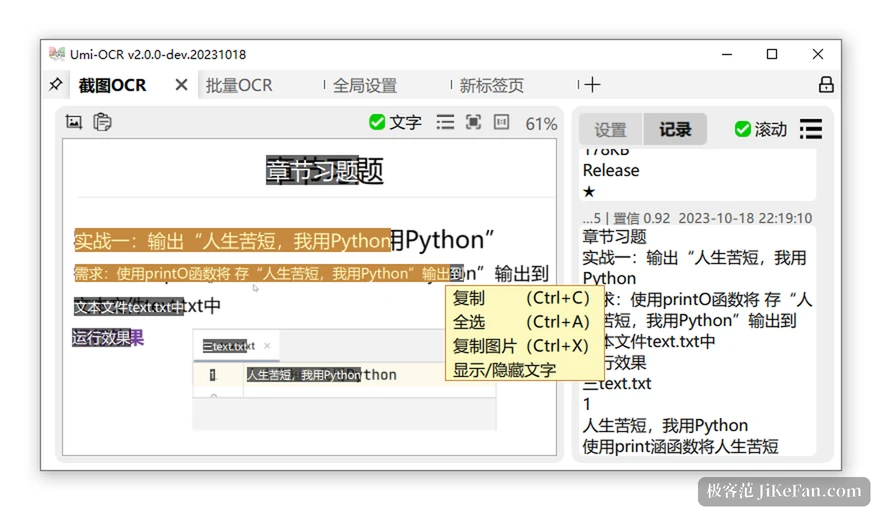
Layout analysis puts scrambled blocks back into sentences
The original sin of recognition is not a wrong character but two columns of text poured into one pot in reading order. Umi-OCR ships layout analysis in its text post-processing, offering multi-column, single-column and single-line schemes that rearrange the result so the output follows the order a person would read. The single-line scheme also handles another common case: it inserts a space between two text blocks that sit far apart, keeping sentences from gluing together.
Details like these never appear on a feature list. They become noticeable the moment a long passage is copied out and no manual re-punctuating is needed.
The batch page is a small production line
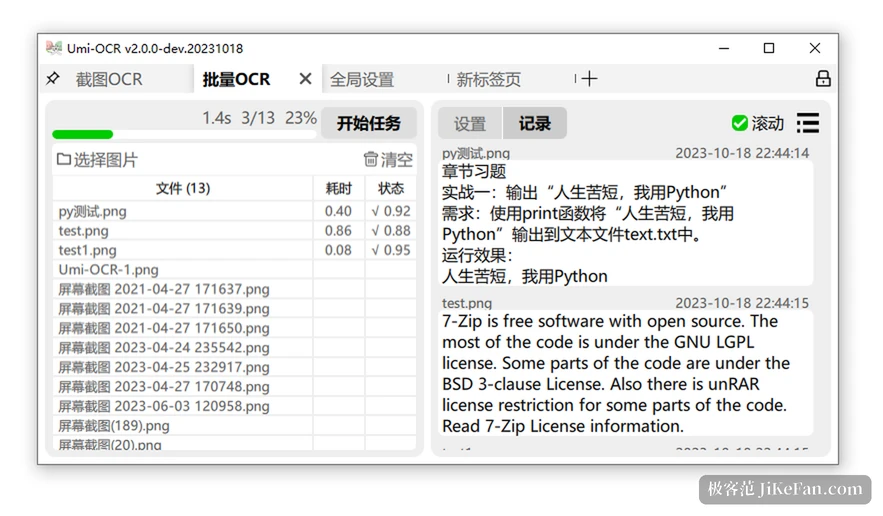
On the left sits a file list giving name, elapsed time and state, and the tick in the state column is followed by that same confidence figure. A progress bar along the top reports finished images and a percentage. The record area groups results by file: click an image to read its result, scroll down to see what the rest of the batch produced.
What actually saves time is not concurrency but reading while the job runs, since a finished file enters the list without waiting for the whole batch. Version 2.1.5 made image and document loading asynchronous, so a folder with tens of thousands of nested files still expands smoothly with the progress bar following along. The same page carries ignore zones: draw a rectangle and the text inside takes no part in recognition, which skips corner badges, watermarks and timestamps in one sweep.
Scanned PDFs can be read too
Document recognition handles PDFs in two forms. A scan has no text layer at all and depends on recognition to produce one; a born-digital file already carries a layer that can simply be extracted, which saves the work. Output goes two ways: plain text, or a double-layer searchable PDF where the page looks untouched and an invisible layer of characters sits beneath it, so searching and copying behave normally in any reader.
Version 2.1.5 repaired two faults in this area: existing text was lost when a page was rotated, and the original text was not written when a single-layer PDF was produced. For contracts and manuals destined for an archive, those two matter more than any new feature.
Being callable from other programs is the real use
Beyond the window there are two entrances. The command line takes instructions at launch and accepts tasks remotely while running; an HTTP interface turns the program into a local service where screenshots, images and PDFs are submitted as requests and the answer carries coordinates and confidence for every line. On Linux the whole thing also runs as a container inside an existing pipeline.
The logging added in 2.1.5 exists for that road: start with the right arguments to watch a live log, set a level and records land in the log directory, so a failed recognition no longer has to be guessed at. The same release added a command to reload the configuration, which spares a restart after a parameter change.
Two limits worth knowing in advance
The engine arrives as a plugin, and releases are split into two packages by engine. The fast one asks for certain processor instruction sets, so Pentium, Celeron and Atom class chips refuse to start it; when initialisation fails, the compatible build is the answer. That is a limit of the inference framework rather than a defect, and the documentation says so plainly.
The other limit: it recognises text and does not rebuild layout. A table comes out as a stream of words, and keeping the structure means arranging it again by hand. Interface languages number more than a dozen, maintained through a community translation platform, Chinese and English included.
What it is for
Put Umi-OCR 2.1.5 back into a working day and the problem it solves is narrow: turn the characters inside images and scans into text that can be copied, searched and fed to another program, with the whole process never leaving the machine. Selecting on a screenshot, queueing a batch, ignoring a zone, building a double-layer PDF, calling from a command line or an interface — together these cover the distance from occasional use to a step inside automation. Free, open source, no account, no connection: for anyone handling sensitive material those three points are the reason to choose it.