
Arc PDF 2.0.9 keeps annotation and OCR on the Mac
Summary
Arc PDF 2.0.9 is a free macOS reader in an 11.4 MB package that annotates, edits text and runs OCR on the machine, with AI on your own key.
Recommend- Name
- Arc PDF
- Version
- 2.0.9
- Pricing
- Free
- Open source
- Proprietary
- Operating system
- macOS
- Website
- https://arcpdf.app
- Updated
- 2026-11-13 23:00
Arc PDF is a PDF tool for macOS, and version 2.0.9 arrived on 5 November 2026. It takes the four jobs people actually open a PDF for, which are reading, marking up, correcting a line of text and pulling a table out, and keeps all four inside one window of 11.4 MB. Nothing leaves the machine except the requests you point at a model with your own key.
Open a file, mark the passage that matters, fix two typos, lift the table out. Four small jobs that should not cost four programs.
PDF is the format everybody can open and nobody can edit. Readers are everywhere, but the moment a sentence has to change, or a scanned page has to become searchable text, or a table has to land in a spreadsheet, the usual answer is another suite that takes a minute to start and buries the one button you need behind panels. Arc PDF goes the other way: fewer jobs, done properly, in a package small enough to forget about.
Where 11.4 MB comes from
The developer's explanation is that the program bundles no framework and wraps no rendering pipeline around the format. It works against the PDF structure itself. The installer is 11.4 MB, it opens immediately, and there is no splash screen to sit through.
Nothing was cut to get there. Reading covers zoom, search, thumbnails and a bookmark outline. Annotation covers highlight, underline, strike-through, wavy underline and sticky notes, plus a pen, a highlighter and an eraser. Pages can be added, removed, rotated and dragged into a new order, and text and images can be changed in place on the page.
2.0.9 sharpens the shape tools
This release concentrates on drawing. Rectangles, ellipses, lines and arrows can all be placed, with a solid or dashed border and adjustable width, colour and fill. The useful part is what happens afterwards: the endpoints stay draggable, so a shape can be lengthened or turned without being deleted and redrawn. For anyone reviewing a document, being able to adjust a mark once the comment has been thought through matters more than being able to draw it.
The same version adds a toolbar that gathers text recognition and batch processing in one place, where both used to sit somewhere in the menus. The toolbar icons were redrawn as well, which sounds cosmetic until you notice that the buttons pinned to the page can finally be told apart at a glance.
Editing that behaves like a document
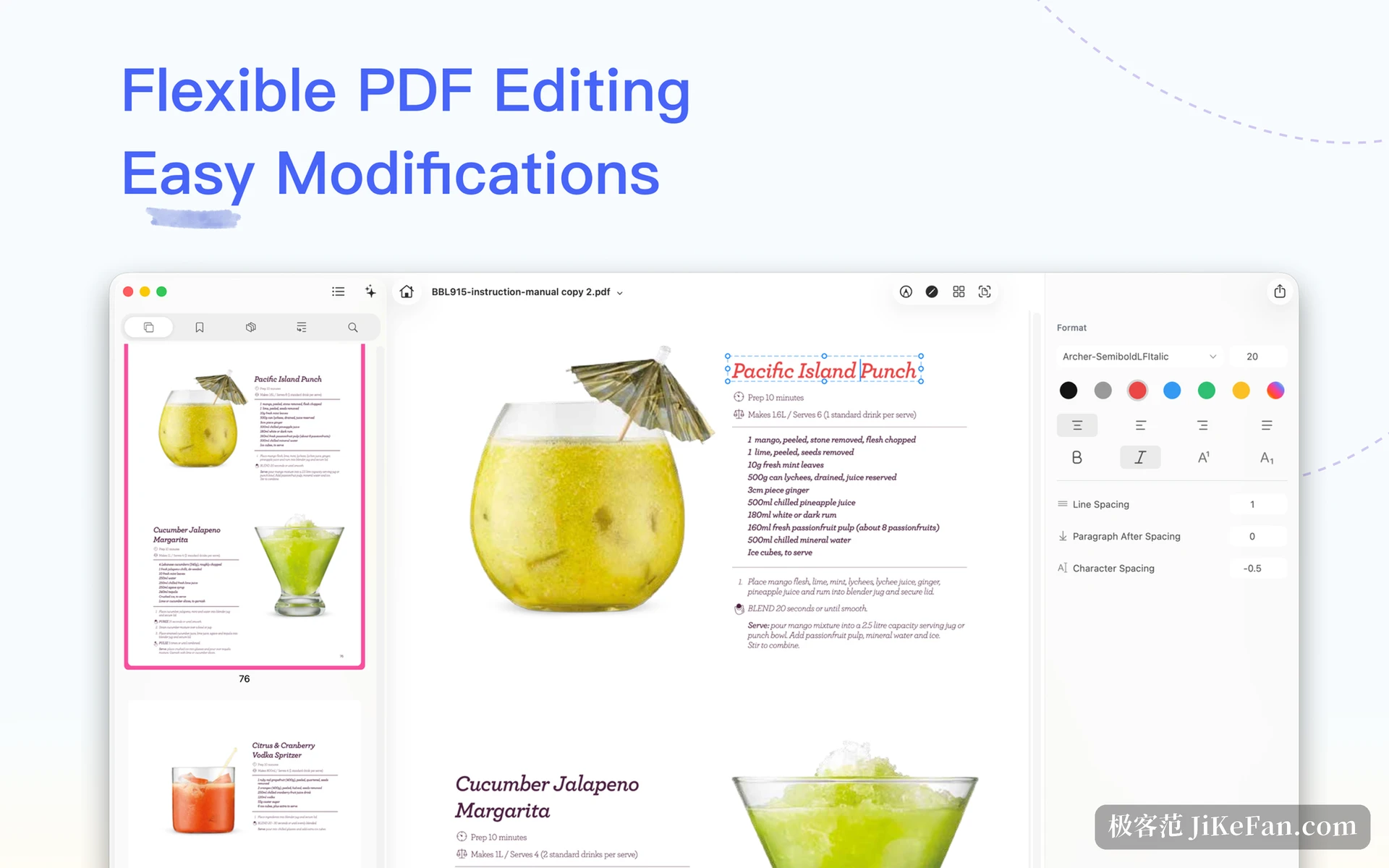
Text editing is what earns the word editor. Paragraphs inside the PDF can be selected, corrected, extended, and given a new size or weight, while the panel on the right exposes the font, the size, the leading, the space above and below and the letter spacing. Images can be swapped and scaled in the same way, so a stale chart can be replaced without going back to the source file.
These edits change the objects laid out on the page rather than painting a white box over the old text. A file sent onwards carries no patch marks, and a search still finds the words that were changed.
Recognition on the machine, AI on your key
Scanned pages go through on-device vision, turning the letters in an image into a searchable layer over a dozen languages. Nothing is uploaded, which matters more to anyone handling contracts or internal papers than a percentage point of accuracy would.
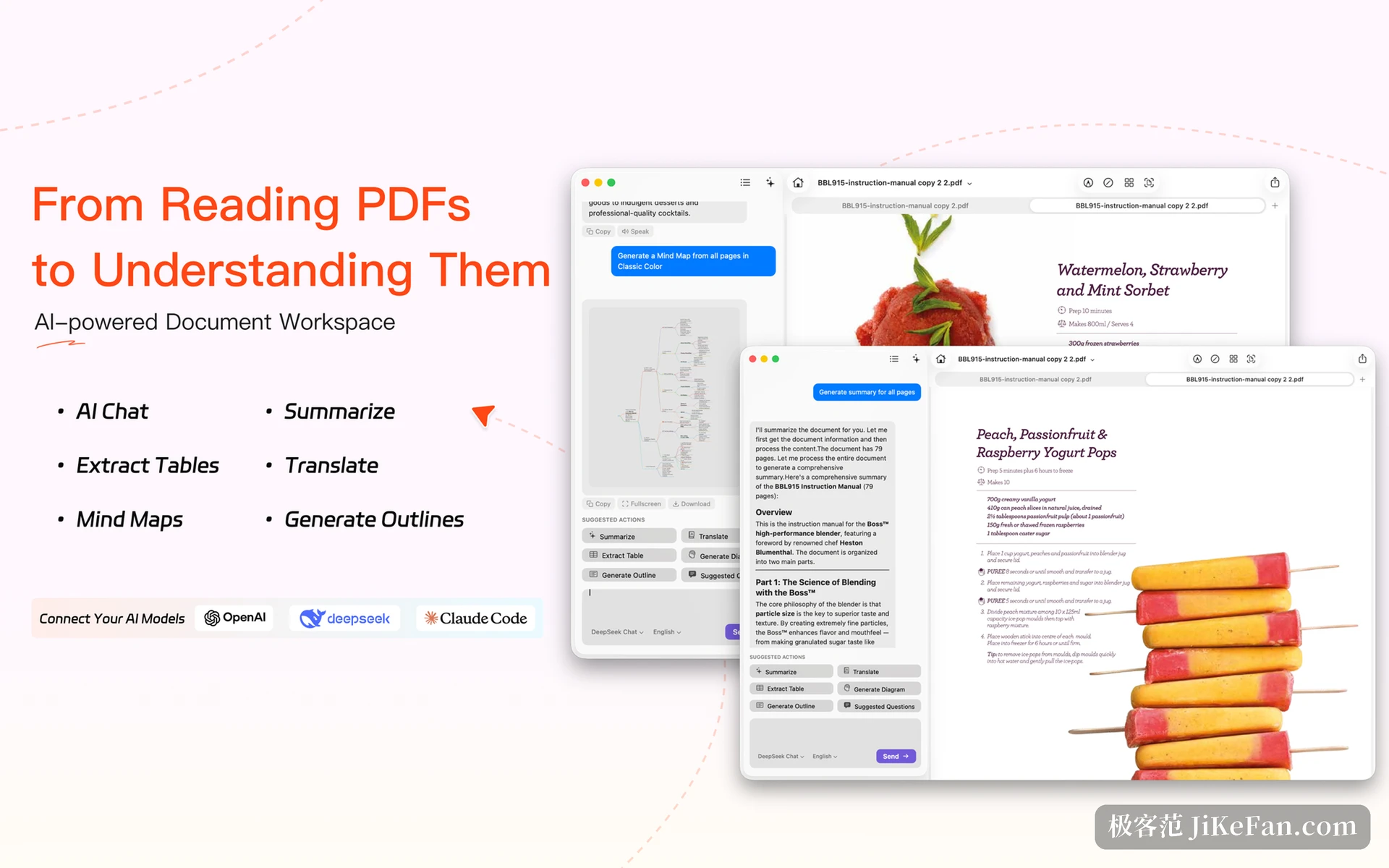
The AI side is built around bringing your own model. An API key goes into the settings, OpenAI, Claude and DeepSeek all work, and the key is kept in the system keychain where the program itself cannot read it. What the key unlocks is summaries, mind maps, table extraction, translation and an automatic outline. A long report collapses into points, a table exports to Markdown, CSV or HTML, and translation lays a searchable text layer over a scan in more than forty languages. Because the quota is yours, usage is billed as you go, with no per-document charge and no monthly ceiling.
Free, with the edges marked
It is free for now, and the developer says the program is still being polished and wants more people to try it and complain. Free has costs of its own: this is a one-person project, the code was written with AI assistance, and the feature choices carry a strong personal preference. Only macOS is supported, the mobile version is still in progress, and the interface is mostly English.
What it will not do is worth saying too. This is not a layout tool, so page design belongs elsewhere. Recognition quality follows the source: a fax that arrives as mush comes out as mush. The quality of the AI output follows the model you connect, and a cheap model writes a lazy summary. What Arc PDF does well is the everyday set of reading, marking, correcting, recognising and extracting, and it does them quickly.
If a PDF opens only a few times a month, being small is the value: when the program is not needed it holds no memory and takes no space worth counting. If contracts, papers and scans are daily work, then the shape editing and the gathered batch entry in 2.0.9 are worth an afternoon of their own.