
RS File Manager: local files, cloud drives and the home server in one window
Summary
A free Android file manager that also mounts the big cloud drives and reaches SMB, FTP, SFTP, FTPS and WebDAV shares, with storage analysis, automatic grouping by file type, archive handling and a local server so a computer can browse the phone.
Recommend- Name
- RS File Manager
- Version
- 20260624
- Pricing
- Free
- Open source
- Proprietary
- Operating system
- AndroidAndroid TV
- Website
- https://rsfile.net/
- Updated
- 2026-10-06 09:19
The file manager that ships with a phone is not bad. It is simply finished — it stopped at the point where files live everywhere except on the phone.
Where the built-in one gives up
Ask it for a share on the home server and it has no answer. Ask it to pull something out of a cloud drive and it points you at a separate application. Ask which folders are eating the storage and it declines to say. None of these is exotic; every phone owner has made one of these requests, usually in the same week.
This application fills those three holes at once, at no cost, in a package of modest size. Its store rating sits close to the maximum, it speaks more than twenty languages, and the footprint stays under fifty megabytes — a detail that matters on a device where storage is the scarce resource.
Local work, beyond copy and paste
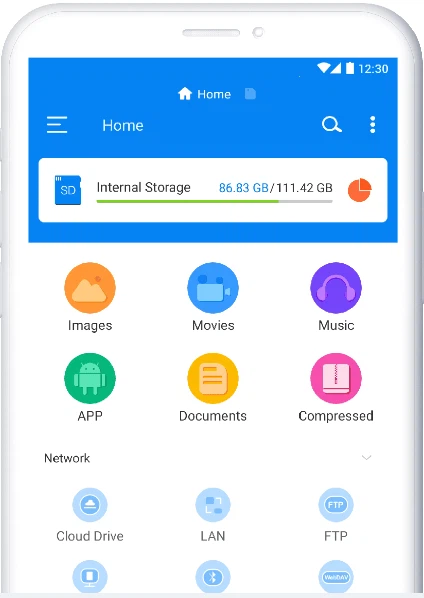
Cutting, copying, renaming and deleting are the floor, not the feature. Three additions actually change how the phone is used. A storage analysis ranks folders by size and lists the largest files, which is the only practical way to find out why the device is full — speculation is useless here, and the answer is nearly always a folder nobody thought about. Automatic grouping collects images, videos, music, documents and installation packages into views of their own, so the question becomes what kind of thing you are looking for rather than which of forty folders it might be in.
Archive handling covers the common compression formats in both directions, which removes the absurd ritual of transferring a file to a computer, unpacking it there and copying it back. And bookmarks for frequently used folders — a messaging application's download directory, the browser's downloads — save the repeated descent through four levels of path every time.
The part that is actually unusual
Cloud drives from the major providers can be mounted and then treated as ordinary folders: copy between them and local storage, move, rename, without switching applications. That sounds like a convenience and behaves like a structural change, because once the boundary between local and remote stops being an application boundary, people stop thinking about where a file is.
The local network side supports five protocols — SMB, FTP, SFTP, FTPS and WebDAV — which between them cover the home server, the office share and the personal web space. It can scan the network for sharing devices rather than making the user type an address, which is the difference between a feature that gets used and one that gets configured once and forgotten.
The phone as a small server
The direction can be reversed: switch on a local FTP service and a computer on the same network browses and downloads the phone's files through a browser, with no cable and no software installed on the computer. That single capability removes the most tedious transfer path in ordinary life, and it costs nothing to leave available.
External storage over USB is supported, so a memory stick or portable drive plugs in and appears. Android TV devices can be managed the same way, which is useful for a television box where installing and arranging things is otherwise awkward.
Where it stands, and the limit
Against the once-dominant file manager for this platform, which has grown advertising and paywalls around its advanced features, this one is free throughout and quieter — no feed of promoted content in the interface. Against the polished paid alternative, it reaches a comparable experience on the two axes that matter most here, cloud mounting and protocol breadth, without a purchase.
The limit is total: Android only, with no iPhone and no desktop version. Anyone who needs one workflow across a phone, a tablet and a laptop should look elsewhere, because this is not a complete answer to that. For someone who lives entirely inside Android, the restriction barely registers — the phone is the computer, and the home server is one click away.
Free, light and not cut down: three properties that rarely appear together. The cloud mounting and the local network access are the reasons to install it; the storage analysis is the reason to keep it.