
QCAD 3.32: open-source 2D drafting with 4,800 standard parts on call, free under the GPL
Summary
A two-dimensional drafting program under the GPL: more than forty construction tools, a library of over 4,800 standard parts, command-line converters and a scripting interface, with a free community edition.
Recommend- Name
- QCAD
- Version
- 3.32.9
- Pricing
- Free
- Open source
- Open source
- Operating system
- WindowsmacOSLinux
- Website
- https://www.qcad.org/en/
- Updated
- 2026-10-06 22:27
Two-dimensional drafting that does not ask for a subscription
Mention computer-aided drawing and most people picture expensive commercial packages with licence servers and annual renewals. There is a plainer path: a two-dimensional drafting program whose source code is published under the GPL, with a community edition that costs nothing and builds for Windows, macOS and Linux. The version number alone tells you how long it has been running — the project has been in development for more than twenty years through the current 3.32 line, quietly and steadily kept up to date. On Linux in particular it is one of the few native choices for someone who needs to produce a real drawing rather than an image of one.
The toolset is more substantial than the description suggests
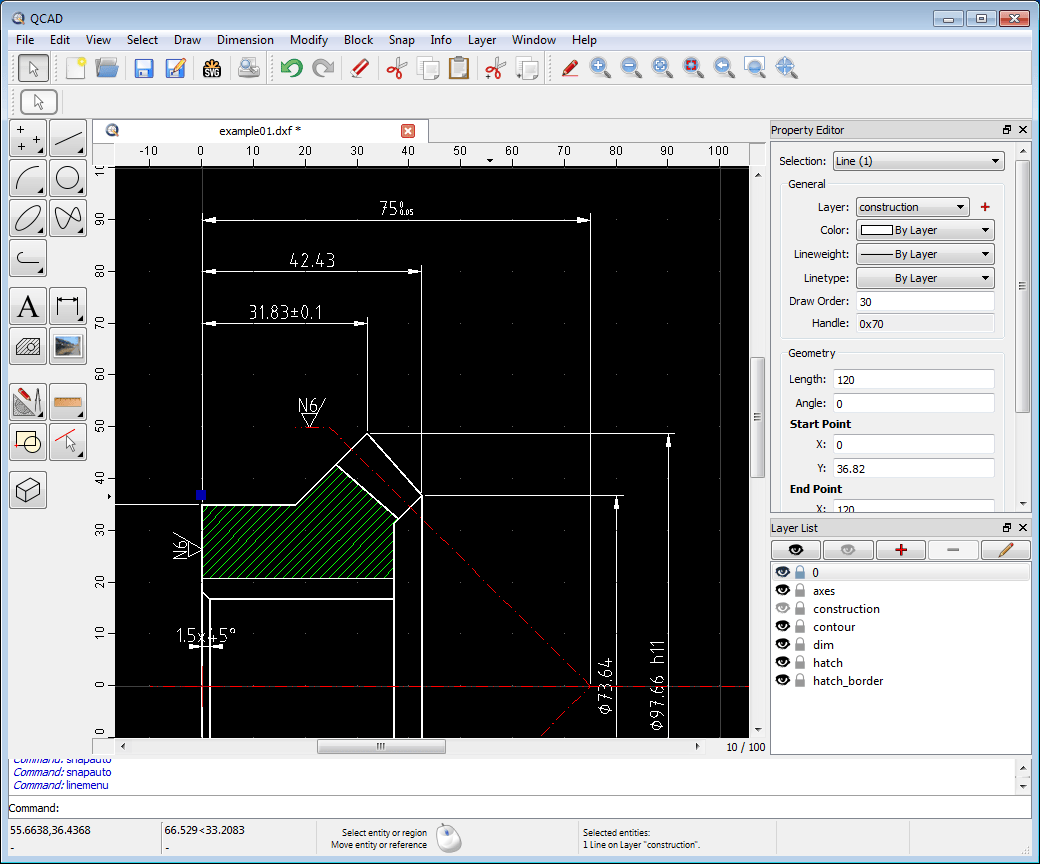
The phrase approachable can mislead. Behind it sits a serious inventory: more than forty construction tools and over twenty modification tools, covering points, lines, arcs, circles, ellipses, splines, polylines, text, dimensions, hatches and raster images placed in a drawing. Layers, blocks and grouping, object snapping and measuring tools are all present, and the program brings thirty-five CAD fonts of its own while accepting TrueType as well. Metric and imperial units switch freely, drawings print to scale, and large formats can be split across several pages and tiled back together.
Four thousand eight hundred parts, and a deep reading of DXF
The bundled library holds more than 4,800 standard CAD parts and symbols — bolts, bearings, furniture symbols and the rest — so a common block gets inserted instead of redrawn. On file formats the support for DXF is unusually thorough, and DWG is read and written too, which keeps drawings exchangeable with the commercial packages an office already uses. For anyone with a pile of drawings to process, command-line converters ship alongside: dwg2pdf, dwg2svg, dwg2bmp. A few lines of shell script turn hundreds of drawings into PDF or SVG in one pass, a job that elsewhere tends to need an extra plugin or a paid tier.
Scripting is where it becomes a specialist tool
The program exposes a complete ECMAScript interface, which means anything from drawing one shape to automating a whole drafting procedure can be driven by code. Combined with the open source, a user with a specific industry can reshape it into a tool that fits that industry exactly rather than approximately. A paid professional edition, around 42 euros as a one-time purchase, adds further advanced tools and deeper DWG handling on top of the free core, and a separate CAM-oriented edition exports drawings as G-code for numerically controlled machining.
Who it is for
The positioning is clear: two-dimensional drafting, and no attempt at three-dimensional modelling. Within that boundary it covers mechanical part drawings, architectural floor plans, interior layouts, circuit schematics and furniture fabrication drawings. Students and teaching environments can use it without worrying about licences; individuals and small studios save the subscription; Linux servers and older machines run it smoothly because the hardware requirements are genuinely low. As of September 2026 the current release is 3.32.9 and development continues. If your drawing work is mostly flat, starting with the community edition is a reasonable place to stop looking.
The first hour is easier than expected
A good deal of interface design went into lowering the entry cost. Toolbars are grouped by category, and once a tool is picked the command line prompts the next step, so the sequence is taught as it is performed. Snapping can be toggled per type, and the cursor pulls toward endpoints, midpoints and centres without being asked, which is what stops a beginner's drawing from drifting. The official reference manual and an interactive tutorial series cover the basics, and the settings for units, dimension styles and layer naming are all editable, so a template can lock in a house standard and save a team the round of messages about how a line should be labelled. The interface is translated into many languages, and drawings that follow one template can be started on a shared convention from the first line.