
LibreCAD: professional drawings without a licence fee
Summary
A two dimensional drafting program that has done one job for twenty years: layers, blocks, dimensions and scaled printing, exchange format support, and almost no demand on hardware.
Recommend- Name
- LibreCAD
- Version
- 2.2.1.5
- Pricing
- Free
- Open source
- Open source
- Operating system
- WindowsmacOSLinux
- Website
- https://librecad.org/
- Updated
- 2026-10-08 21:16
Drafting without a down payment
Want to draw a mechanical part, a layout for a laser cutter, or the floor plan of a flat? Commercial drafting software puts a licence fee in front of the first line. LibreCAD answers with zero: it is free and open source, it does two dimensional work and nothing else, and it has layers, blocks, dimensions and scaled printing in the places a drafter expects them. Exchange format support is native, so a drawing sent to a workshop or returned by a colleague opens without a conversion adventure.
That last point matters more than the feature list. A drawing program is only useful if it can trade files with the people who make the object, and the formats used by machine shops have been stable for decades. Twenty years of community use is the argument here, not a marketing page.
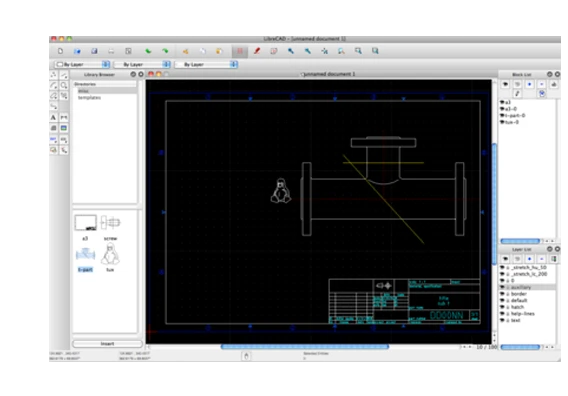
Light enough for an old notebook
The program is small in the way that engineering software rarely is. Demand on hardware is low enough that a decade old laptop draws without stuttering, and the installers for the three desktop systems are modest. Files open quickly because there is no rendering pipeline to warm up, and a drawing with a few thousand entities scrolls the way a text document scrolls.
The interface follows the classic drafting layout rather than inventing a new one. Coordinate entry through the command line, snapping to grid and object points, layer management and property panels all behave as somebody arriving from a commercial package would expect, which keeps the migration cost close to zero. A complete beginner can follow community tutorials and produce a usable drawing in a few days, because the concepts behind two dimensional drafting have not changed.
Where it sits comfortably
Mechanical parts, cutting paths, furniture layouts, electrical schematics of the simple kind: the comfortable zone covers most everyday drafting. What it does not attempt is three dimensional modelling, parametric constraints or the deep detail of a production drawing standard. Treat it as a precise two dimensional instrument and it will not disappoint; expect it to be a complete design suite and it will.
The project has been maintained by its community for a long time, and recent releases still adapt to current hardware and current operating system versions. That continuity is worth something on its own: a file format and a set of habits that will still open in five years.
LibreCAD defends another possibility for professional software: not every tool has to be rented, and a free project can hand a drawing board to anybody who wants one.
Habits that raise the quality
Build a layer convention before drawing anything, because a drawing with named layers can be read by somebody else and a drawing without them cannot. Set dimension styles once, as a template, instead of adjusting each dimension by hand. Agree on the exchange format with whoever receives the file, and check the result by opening it again on the other side before a deadline makes the check impossible.
None of this is about the software. Drafting quality lives in the conventions, and the program is only the pen.
Printing deserves a section of its own. A drawing that leaves the screen has to arrive at a stated scale, on a paper size the recipient recognises, with line weights that survive a photocopy. LibreCAD handles that through a print preview with a scale field, paper size selection and a table that assigns pens to layers, and it saves that setup with the drawing so the next plot does not repeat the work. For anybody who sends drawings to a workshop, that reliability is worth more than a long list of features nobody opens.
Dimensioning follows conventions too. Pick a baseline, stack dimensions from it, and a later revision changes one number instead of breaking the sheet. Scattered dimensions turn a small change into a set of contradictions, which is why a drawing is made for the next person who reads it rather than for the person who drew it.