
OlSoul Puts the Windows Settings You Actually Change in One Window
Summary
A single small executable that gathers the Windows settings people really change — services, switches, repairs, built-in tools and cleanup — into one window of toggles, with nothing to install.
Recommend- Name
- OlSoul
- Version
- 20260612
- Pricing
- Free
- Open source
- Proprietary
- Operating system
- Windows
- Website
- http://b.olsoul.com
- Updated
- 2026-10-19 22:00
The half hour after a clean installation
Anyone who has reinstalled Windows knows the ritual that follows. The printer will not connect until a particular service is running. Hibernation is on and should not be. The network needs a repair that no dialog offers. A program will not start because a runtime library is missing. Solving each of these means descending into a different corner of the system — services here, power options there, an obscure registry value somewhere else — and remembering which corner, which is precisely what nobody remembers.
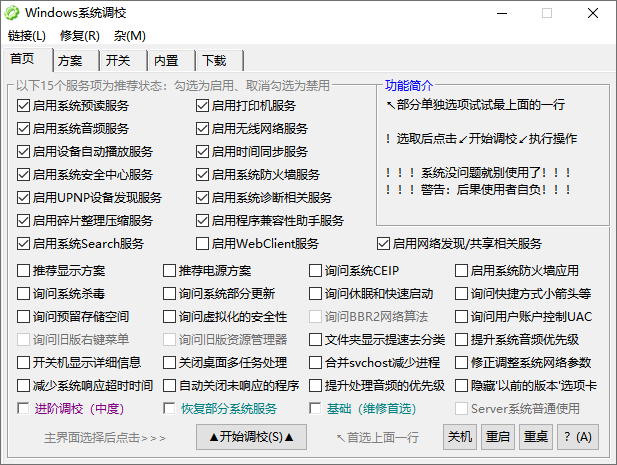
OlSoul is aimed at that half hour. It is a single executable of a few hundred kilobytes with no installation, organised into five sections, each of which presents a row of switches rather than a manual. Nothing is automated on your behalf; what changes is that every option is visible at once and can be flipped without knowing where it lives.
Services, switches and repairs
The first section starts system services: theme support, the print spooler, the firewall, time synchronisation, wireless networking, folder sharing. The print spooler is the example everyone recognises — a printer that refuses to connect after a reinstall is usually a stopped service, and the fix is one click instead of a search for the right management console.
The second collects switches that are normally buried: optical disc autoplay, memory compression, automatic updates, fast startup, hibernation. Each is a behaviour rather than a preference, which is why they hide so well, and having them in one column converts a scavenger hunt into a decision.
The third is the section that gets used most often after the first week: repairs. Network repair, icon-cache repair, lifting the limit on how many windows one program may open, network discovery, a fix for a graphics driver that refuses to install, a fix for folder thumbnails that load slowly. These are the small chronic complaints of a Windows machine, and every one of them normally costs an hour of searching for the same answer someone else already found.
The parts that are not settings
The fourth section is a drawer of built-in tools: defragmentation, the system management console, power options, removal of the shortcut arrow overlay, and an elevation mode for the times when something has to run with administrator rights. On a freshly installed machine it is a shortcut to the settings one opens most often; on a maintenance USB stick it saves assembling the same collection by hand.
The fifth deals with the unglamorous part of setting up a computer: fetching the runtime libraries and drivers that applications assume are present, clearing the system caches, and reaching the official installation images. Cache cleaning deserves a specific mention because it is the one item on the list that produces a visible number — a machine that has not been cleaned in a year often gives back tens of gigabytes, and the reason it was never cleaned is that the tools for it are scattered and the operation always feels riskier than it is.
One file, carried on a key
The whole program is one executable of a few hundred kilobytes, with nothing to install: it runs from wherever it is opened, so a USB stick turns any machine into a machine with this tool on it. Coverage runs from the oldest Windows versions still in use to the current one and its server editions, which is a wider range than most utilities of this kind bother with and is the reason it turns up in repair kits.
Being a single file also settles the trust question in a particular way: there is no installer to inspect, no background service, and no update mechanism that could change behaviour after the fact. The program does what the window says and leaves nothing behind when it is closed, which for a tool that edits system settings is exactly the property one wants.
Who it is for
People who reinstall Windows more often than they would like and have the half hour memorised. People who repair other people's computers, for whom a single file on a stick replaces a folder of downloaded utilities. And people who dislike the category of optimisation tool that promises a faster machine and changes forty settings without saying which — this one makes no such promise, and shows every switch it offers.
A few hundred kilobytes, every Windows version still in service, and a list instead of a magic button. It does not claim to accelerate anything; it takes the settings that people actually change after an installation and puts them where they can be seen and flipped. For setting up a machine, repairing one, or keeping a stick in a drawer, that is enough.
The honest summary
The value is in the collection rather than in any single function: every individual item here can be done by hand, and all of them require knowing where to look. Gathering them into one window, with a switch per item and no automation in between, is the whole contribution, and it is a real one — visible state, reversible actions, nothing hidden. The limits follow from the same design: it is a Windows-only tool, the interface is a list of buttons rather than a guide, and nothing in it explains what a given service does, so a certain amount of knowledge is assumed. That is a fair trade for people who already know what they came for.