
Nmap: open source network discovery, with Zenmap in the 7.991 release
Summary
Nmap is a free open source tool for network discovery and security auditing, answering which hosts on a subnet are up, which ports are open and what runs behind them, with Zenmap, Ncat, Ndiff and Nping in the same package.
- Name
- Nmap
- Version
- 7.991
- Pricing
- Free
- Open source
- Open source
- Operating system
- WindowsmacOSLinux
- Website
- https://nmap.org/
- Updated
- 2026-10-11 17:12
In daily operations, what is this machine actually running tends to become a question before how should it be fixed does.
See the subnet clearly first
Nmap is a free open source tool for network discovery and security auditing, and the official site defines it as a Network Mapper. The question it answers is plain: which hosts on a subnet are up, what services do they offer, what operating system is running. The official description is direct, saying Nmap uses raw IP packets in novel ways to determine what hosts are available on the network, what services those hosts offer along with application name and version, what operating systems and versions they run, what type of packet filters and firewalls are in use, and dozens of other characteristics.
The value is not in the discovery itself but in what follows. The site points out that many system and network administrators also use it for asset inventory, for scheduling service upgrades and for monitoring whether hosts or services are up. All three rest on one premise: see what is on the subnet, and scheduling plus monitoring have a basis. An old machine nobody remembers, running an outdated version of a service, is usually found exactly this way.
From the command line to a window
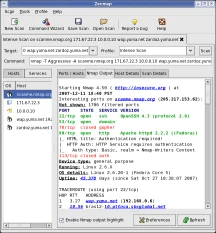
The starting threshold is lower than expected. On ease of use the site explains that although rich capabilities exist for advanced users, getting started can be as simple as one command with the verbose and aggressive flags, that both the traditional command line and a graphical interface are offered so habits can decide, and that ready made binaries exist for anyone who would rather not compile. Official packages cover Windows, macOS and Linux, and the source is distributed as usual.
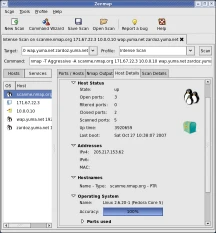
The graphical piece is called Zenmap, described officially as an advanced graphical interface and results viewer. Three companions sit beside it: Ncat for flexible data transfer, redirection and debugging, Ndiff for comparing two scans, and Nping for packet generation and response analysis. A complete pass at tidying a network, from launching a scan through reading results, comparing two runs and constructing a packet to verify something by hand, closes inside the official package.
Item
Official description
Position
Free open source network discovery and security auditing
What it determines
Live hosts, service names and versions, OS versions, packet filter types
Package contents
Nmap, Zenmap, Ncat, Ndiff, Nping
Platforms
Official binaries for Linux, Windows and macOS
Current stable
7.991, with Npcap 1.89
Storing results is what makes comparison possible
A single output means little; comparison is where value appears. Ndiff exists to make that practical, defined officially as a tool for comparing two scans. The usual habit in operations is to run a pass on a schedule, keep the output, run again later and look at the differences: newly opened ports, services that vanished, version numbers that moved. That is far more reliable than recalling that it did not look like this last time.
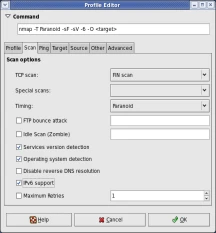
System and version detection are the other underrated output. The feature list mentions dozens of advanced techniques for mapping a network, including host discovery and operating system plus version detection, covering both TCP and UDP port scanning. For hosts behind an edge device, what becomes visible is not only whether a port answers but who is standing behind it and at what version.
The more often a subnet is looked at clearly, the harder it is for an unexpected change to catch you unprepared.
How to use it well: for a first pass, run host discovery only and refine segment by segment from the list of live hosts, rather than throwing a full scan at a large range immediately; export results on a schedule and compare runs with Ndiff; and before touching a production subnet, confirm the administrative authorisation is actually held.