
gBurner: free disc burning and image editing, Blu ray and boot media included
Summary
gBurner is a disc burning and image handling tool for Windows in which burning data, audio and video, editing and converting images, and building a bootable USB all live in one program. The free version is open to personal and commercial use alike.
Recommend- Name
- gBurner
- Version
- 5.9
- Open source
- Proprietary
- Operating system
- Windows
- Website
- https://www.gburner.com/
- Updated
- 2026-10-17 16:01
Cloud storage has moved most files online, yet a system install disc, a master archived for the long term, or the licence check of an old program still depends on a physical disc or an image file. gBurner puts burning and image handling into one Windows program, and the free version opens both of those lines completely.
One program, two kinds of output
gBurner comes from Power Software, and the site sums it up as a disc burning and image handling tool. Data, audio and video projects all start from the same project list: the left side is split into Data, Audio, Video, Copy and Tools, and opening any of them gives its own project window, where you choose the drive, insert a blank disc, set the write speed, and follow the window through the remaining steps.
Writable media cover CDs, DVDs and Blu ray. The disc types listed officially include CD-R, CD-RW, DVD-R and DVD-RW, DVD-R DL, DVD+R and DVD+RW, DVD+R DL, DVD-RAM, and BD-R, BD-R DL, BD-RE and BD-RE DL. A data disc can also be made bootable, or made multisession: files are appended to the same disc in batches, each batch its own recorded segment, and reading the disc still shows one complete directory.
At the file system level there is support for ISO9660, Joliet and UDF, and Unicode file names survive unchanged. Audio discs cover standard Audio CD and Mixed Mode CD, with CD-TEXT and pause settings between tracks; video discs can be authored as Video CD, Super Video CD and DVD-Video. An audio CD can also be ripped back into six formats, namely MP3, WMA, WAV, FLAC, APE and Ogg.
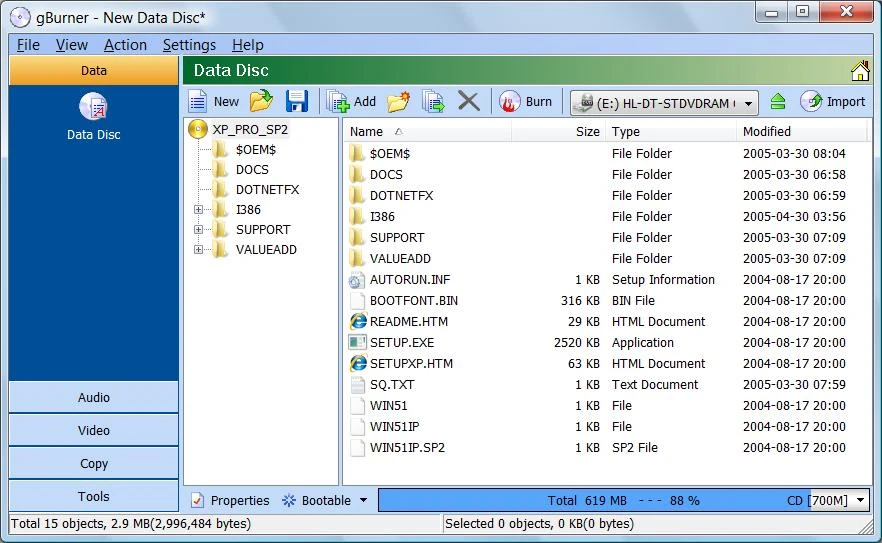
Image work is the other half of the job
When there is no disc in the drive, the image editor takes over. It can create a new ISO, or open an ISO along with almost every common image format, and inside the project window you can add or remove files and folders, create directories, rename things and change the volume label; once edited there is no need to export first, and pointing it at a burner produces the disc. A data disc or an ISO can both be made bootable by writing in a boot record.
Format coverage is the other emphasis. The official list holds common formats such as ISO, BIN/CUE, DMG, MDF/MDS, NRG, IMG and CDI, alongside rarer images including DAA, UIF, ASHDISC, BWI/B5I, LCD, CIF, P01, PDI, NCD, PXI, GI, FCD, VCD, C2D and BIF, and it also reads system and virtual disk files such as WIM, VMDK, VHD and VDI. Anything opened can be converted to ISO or BIN/CUE, or packed into gBurner own GBI format. GBI supports compression, password protection, encryption and splitting across volumes, which suits long term archiving of masters.
Writing an image to a USB stick
The Tools category holds a Write USB entry that writes an ISO straight to a USB stick, producing a bootable Windows or Linux medium. The documentation covers the mainstream Linux distributions, and the writing method works with both traditional BIOS and UEFI boot; for a Windows installer it can also split an oversized wim or esd file automatically, getting around the FAT32 limit on single file size.
The Pro edition adds a Windows To Go capability: a full Windows installation goes onto a USB stick and boots from it as a separate system, while whatever is on the host machine stays usable. The official requirements are a stick of at least 32GB and a Windows image, with Windows 11, Windows 10 and Windows 8/8.1 supported.
Where free ends and Pro begins
The difference between the two editions needs no guessing, since the download page sets out eleven capabilities in a comparison table. Nine of them, covering both the burning and the image lines, are present in the free edition exactly as in Pro; two cells are left empty, one for mounting an image on a virtual drive and one for Windows To Go.
Capability | Free | Pro |
|---|---|---|
Burn image files such as iso, nrg, dmg, bin | Yes | Yes |
Create data discs or audio discs | Yes | Yes |
Append data to a disc, multisession | Yes | Yes |
Copy a disc to ISO or another format | Yes | Yes |
Copy disc to disc | Yes | Yes |
Open ISO or other image files | Yes | Yes |
Create or edit image files | Yes | Yes |
Convert between image formats | Yes | Yes |
Build a bootable USB stick | Yes | Yes |
Mount an image on a virtual drive | No | Yes |
Install Windows to a USB stick | No | Yes |
On price, Pro is a one time licence listed at 39.95 dollars, settled through PayPal, with the licence code arriving by mail after the order. The free edition states plainly on the page that it may be used both privately and commercially, which is not common among tools of this kind. The same company offers a separate free tool, gBurner Virtual Drive, dedicated to virtual drives, able to create up to sixteen of them for mounting discs.
Nineteen years, forty two versions
A version number is the plainest evidence of whether an old tool is still maintained. gBurner stands at 5.9, released on 3 August 2026; the official revision history runs from version 1.0 on 10 August 2007 all the way to 5.9, forty two version numbers in all. From BDXL and 64 bit support in the 3.x era, through LVM, XFS and UFS image recognition in 5.x, to 5.5 and 5.6 bringing gz, bz, xz, lzma, zst, lz and br compression into the USB writing flow, the rhythm has not broken.
Compatibility reaches back to Windows NT 4.0, with both 32 and 64 bit installers provided and a simplified Chinese interface among the languages. For an old machine kept only for burning discs or repairing images, that range of support is itself the reason it stays in use.
If the need is honestly to burn a disc and tidy up a pile of images in assorted formats, the free edition is enough; paying for Pro only makes sense when an image really has to be mounted or a Windows To Go stick built. In years when burning tools have largely stopped being updated, a revision history that keeps pace by quarter says more than a feature list.