
Keka: the archiver macOS never shipped
Summary
An open source archiver that turns compression into a drag onto an icon: broad format support, split volumes, password protection, free from the developer site, and native on Apple silicon.
Recommend- Name
- Keka
- Version
- 1.6.7
- Pricing
- Free
- Open source
- Open source
- Operating system
- macOS
- Website
- https://www.keka.io/en/
- Updated
- 2026-10-08 20:58
The gap macOS leaves open
Every Mac ships with an archive tool, and that tool does one thing well: it makes a zip. Ask it for a password, a split volume, a format other than zip, or a look inside an archive that arrived slightly damaged, and the answer is a shrug. Keka fills exactly that gap. The project is open source, the build on the developer site costs nothing, and the window is small enough that nothing on it needs explaining to anybody who has used a computer before.
It also respects the way a Mac is actually used. Drag a folder onto the app icon in the dock and it compresses. Drag an archive onto the same icon and it extracts, straight into the folder you were already looking at. There is no wizard to click through, no queue window to close afterwards, and no dialog asking twice whether you really meant it. The whole interaction is one gesture, which is the reason people keep it in the dock instead of opening it from a launcher.
Formats, sizes and passwords done properly
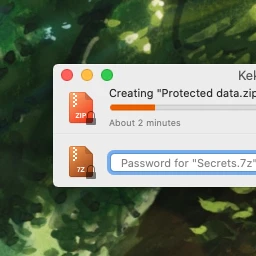
Coverage runs in both directions. Common formats can be created, and a longer list can be read, so an archive from a colleague on another platform is rarely a dead end. Compression level, volume size and password protection all sit on the main window rather than buried three levels deep in preferences, which matters on the afternoon when a folder has to travel through a mail system that refuses anything above a couple of gigabytes.
The engine is built natively for Apple silicon, so a large archive finishes in the time the processor needs rather than the time a translated binary needs. Encrypted archives use established ciphers, and the password field is where a person expects to find it. Finder integration means the context menu calls the app directly, so routine jobs never require the main window at all: right click, pick the action, done.
An unusually honest business model
There are two ways to pay and both are stated plainly. The download from the developer site is free. The version on the app store costs money, and the project describes that purchase as buying the developer a coffee rather than unlocking features. Nothing is held back from the free build, which is a rarer arrangement than the wording makes it sound, because most software that uses this model keeps at least one feature behind the paid door.
What the arrangement buys the user is continuity. An independent developer has been polishing the app for years, updates arrive often, and the community is large enough that problems get discussed in public where anyone can read the answer. On the informal lists of software every Mac ought to have, it has held a place for so long that the recommendation no longer needs an argument behind it.
Keka proves a plain fact: what people want from a utility is that the most common job is done fast and done reliably. The reputation takes care of itself.
Small habits that pay for themselves
Set the default format and compression level once, in preferences, and then stop thinking about them. Confirm that the person receiving a file can open the format before sending it, because a perfect archive nobody can unpack wastes an afternoon. For anything headed into long term storage, combine a password with split volumes and keep the pieces in more than one place, so a single failed drive does not take the whole set with it.
None of those habits takes any effort after the first week. What they produce is a machine that handles archives without a decision being made, which is the highest compliment a utility of this size can earn. It is also the reason the app survives in a category where the operating system keeps absorbing features.