
htop 3.4: a colour dashboard for processes in the terminal, the first thing installed on a server
Summary
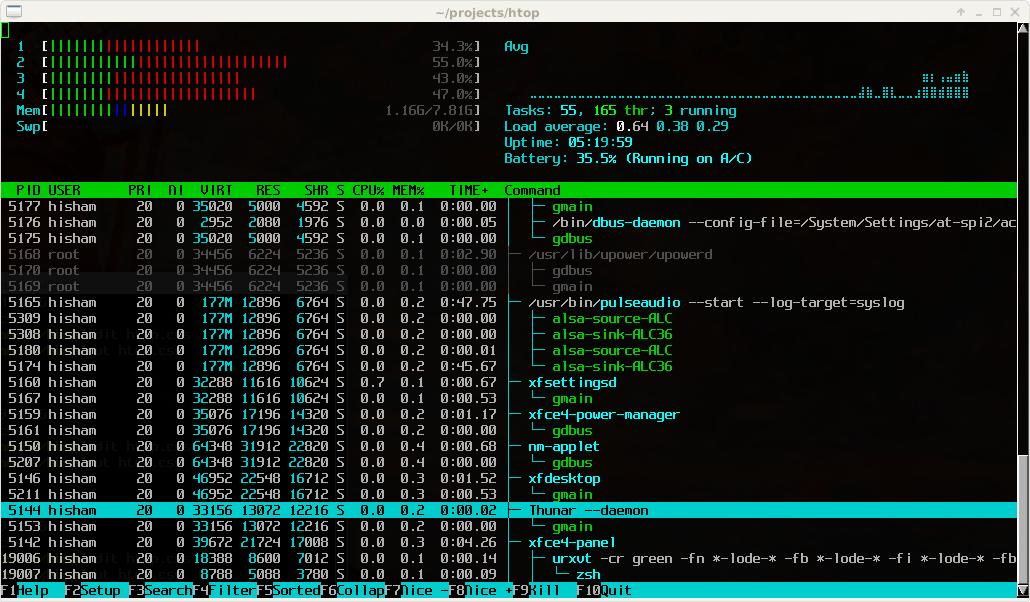
Where top hands you a wall of monochrome numbers, htop draws a dashboard: one coloured bar per core, memory and swap in plain view, and a process list that scrolls and takes clicks. Killing or reprioritising a process no longer requires its number, and the whole thing stays under two hundred kilobytes.
Recommend- Name
- htop
- Version
- 3.4.1
- Open source
- Open source
- Operating system
- LinuxmacOS
- Website
- https://htop.dev/
- Updated
- 2026-10-06 15:24
A dashboard where top gives you a wall of digits
Something is wrong with the server, the memory is exhausted, and you log in over SSH to run top, only to be handed a screen of dense monochrome numbers arranged with little regard for the person reading them. htop is the open-source interactive process viewer, under the GPL version 2 or later, that turns that screen into something closer to an instrument panel: one coloured bar per processor core, memory and swap laid out so their consumption is obvious at a glance, and a process list that scrolls in every direction and takes clicks, so a process can be killed or reprioritised without first memorising its number. The project was started more than twenty years ago and has been maintained by its community ever since; the stable release as of September 2026 is 3.4.1.
How it gets used when something is really broken
The moves in a real incident are fairly fixed. Sort by memory to find whatever is eating the machine, sort by processor time to find the process spinning on nothing, switch to the tree view to see which service those processes belong to, then select and kill or renice without ever leaving the screen. The function-key bar along the bottom keeps the common actions visible instead of hidden behind a manual, filtering narrows the display to the processes worth looking at, and the per-core bars separate time spent in user space from time spent in the kernel, which is usually the quickest way to tell whether the bottleneck is an application or the system underneath it. Against the older habit of reading numbers and doing arithmetic in your head, this turns a diagnosis that took minutes into one that takes seconds.
Where it improves on top
It starts faster than the traditional tool, and the layout is deliberately three-part: load bars, a task summary, then the process list, so a bottleneck is found at a glance rather than by scanning. Processes can be shown as a tree, which makes parent-child relationships legible and, on a container host, makes it clear which service a crowd of short-lived processes belongs to. Search and filter match incrementally as characters are typed, several processes can be selected and acted on together, column ordering and visibility are configurable, colour schemes can be changed to taste, and mouse support means someone new to the terminal is not left helpless.
Configure it once, and it follows you
Settings live in a configuration file in the user's home directory, so the column layout, the sort order and the style of the meters can be fixed in place and copied to another machine to reproduce the same working environment. Recent versions keep fixing compatibility problems, with improvements to sensor readings on newer hardware and to working out which service a process belongs to inside containerised environments, and the community responds at a reasonable pace. Once it becomes the default process viewer, routine inspection, emergency handling and performance watching all happen in one place, and going back to the older tool afterwards is difficult.
Light enough to live on any machine
It depends only on basic terminal libraries, the package is under two hundred kilobytes, and the resources it consumes are close to nothing, which is why it runs on old servers, embedded devices and single-board computers alike. Ready-made packages exist in the repositories of the mainstream distributions. It can also monitor a remote host over SSH, filter processes by user and show thread-level detail. For anyone who works with Linux servers regularly, whether in operations, in development or on a storage box at home, it is the first small thing installed after the system, and the source and the documentation are both public.