
Driver Fusion 14: driver upkeep as a pipeline rather than a hunt
Summary
Driver Fusion gathers driver updates, backups, cleanup and migration into one suite, checked against a library of more than thirty-five million records and a device database covering six million devices. A health check lists what can be updated, migration exports the current drivers so a new installation can be finished offline, and a monitoring panel reads processor, graphics card and disk temperatures in real time. Version 14, with a free edition.
Recommend- Name
- Driver Fusion
- Version
- 14
- Pricing
- Free
- Open source
- Proprietary
- Operating system
- Windows
- Updated
- 2026-10-06 18:46
Drivers are the part of a rebuild nobody plans for
Reinstalling a system is easy until the network adapter has no driver and the machine that was going to fetch that driver is the machine without a network. Everything else in a rebuild can be scripted; this step still tends to be a hunt through model numbers, vendor pages and forum threads, with a reboot in the middle of it.
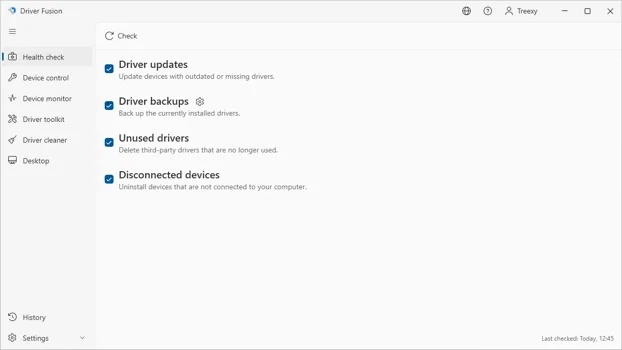
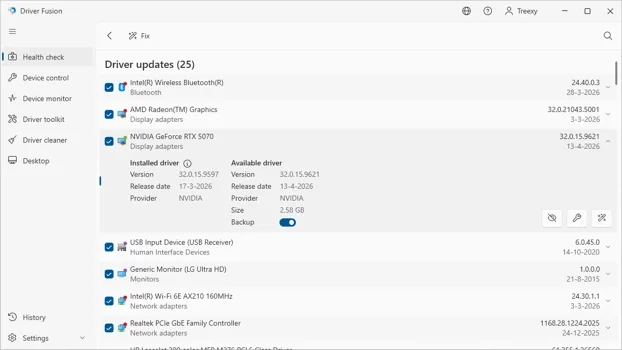
This suite treats the problem as a pipeline instead. A health check reads the whole machine, compares what it finds against a cloud library of driver records, and returns a list of what could be updated. Identification is the part that decides whether the tool is useful: a library of more than thirty-five million records and a device database covering six million devices means unusual hardware still gets recognised, instead of being told that the model is unknown.
Migration is the feature worth installing for
The export that matters is not the update but the package. Current drivers can be exported into a bundle, carried to a fresh installation and installed with no network at all. Anyone who has finished a server rebuild with a borrowed wireless adapter knows what that is worth: the awkward hour disappears, and the machine comes up with the network it is going to keep.
Cleanup covers the other end of the lifecycle. Removing a driver has never meant removing everything it left behind — files, folders and registry entries stay in place and later confuse the next installation. This module continues the work of an older cleaner that used to do that job, so the residue is collected rather than left for a support thread to find.
The part people forget to mention
A monitoring panel reads processor, graphics card and disk temperatures, load and fan speeds in real time. It is not the reason anyone installs a driver suite, but it is the reason the suite stays installed: the same window that answers "is there a newer driver" also answers "why is this machine loud", and having one place for both is worth more than either feature alone.
Version, channels and what is free
The current major version is 14, published on 20 August 2026, and it is a round of detail work driven by user reports rather than a redesign. There are two ways to get it: the free edition from the vendor's own site, or the version distributed on a game platform, where it is offered as free to play with paid additions. The interface is translated into more than fifty languages.
The free edition covers identification, cleanup and basic maintenance. Automatic updating and backup sit behind the paid edition, which is a fair split: the free tier is genuinely useful for a one-off cleanup, and the features that save time repeatedly are the ones that cost money.
One habit makes the whole thing cheaper: export the package right after a clean installation, while everything works. The bundle then becomes a known-good baseline, and a later problem can be traced by returning to it instead of guessing which update broke what.
Where it stops being the right tool
A driver tool is not a performance tool. Installing the newest driver is not automatically faster and is occasionally the cause of a new problem; the health check is worth running when something is misbehaving or after a rebuild, not on a schedule for its own sake. The same applies to cleanup — it removes residue from things that were uninstalled, and it cannot repair a driver that is installed but wrong. For that, the vendor's own package is still the answer.
This corner of software is full of tools that sell fear, and this one does not: an established developer, a normal distribution channel, no alarming pop-ups. For a rebuild, the backup and migration are the parts to use; for everyone else, an occasional health check is enough. With drivers, stable beats new.