
ConEmu: every command line on Windows, in one window
Summary
A developer desktop on Windows fills up with black windows fast: one build running, one service managed, one Linux session, one remote connection. ConEmu collects them into a single window with tabs, splits and a global hotkey.
Recommend- Name
- ConEmu
- Version
- 23.07.24
- Pricing
- Free
- Open source
- Open source
- Operating system
- Windows
- Website
- https://conemu.github.io/
- Updated
- 2026-10-07 18:28
The desk that disappears under black windows
Anyone who develops on Windows knows the shape of the problem. One console runs the build. Another holds a service you restarted twenty minutes ago and are afraid to touch. A third is a Linux session for the half of the stack that does not live on Windows. A fourth is an ssh connection to a machine you are supposed to be watching. Each has its own window, each sits somewhere different, and finding the right one is a small tax paid dozens of times a day.
ConEmu answers with the least elegant and most effective solution available: put everything in one window. Every session becomes a tab, and when you need two of them side by side there is a split that costs one keystroke rather than a session of dragging window edges. The window title reflects the current task instead of a static string, so the thing in front of you announces what it is doing. For long remote jobs, the taskbar can show progress, which means you can keep working elsewhere and still know whether the build finished.
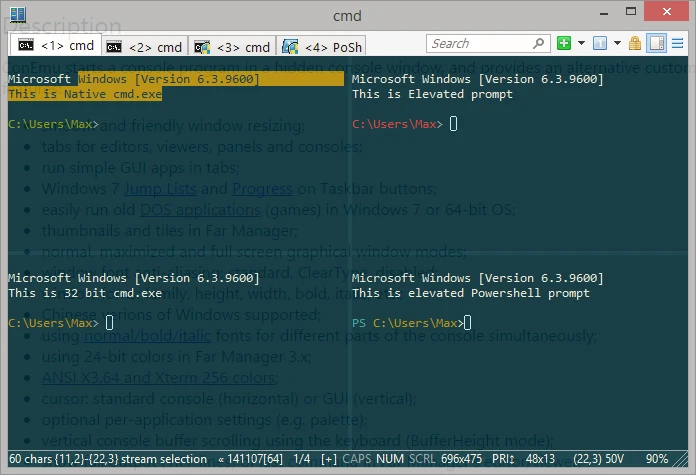
Configurability that has aged well
Its reputation comes from one property: it can be made to look and behave exactly the way you want. Fonts, colour schemes, transparency, hotkeys, the initial directory for each shell, startup tasks that open a whole working environment in one action. A global hotkey summons the terminal from inside any application, which sounds like a small convenience until you have used it for a week and then try to work on a machine without it.
The modern comforts are present as well: select and copy with the mouse, scroll back through output with the wheel, paste without a dialog asking for permission. None of this is exotic. What is unusual is that the program has been maintained for years without losing the settings that long-term users depend on, and that it remains the engine underneath a number of well-known shell bundle packages. Many of those users have been running ConEmu every day for years without knowing its name, because they meet it through a wrapper that starts it for them.
It is free, it is open source, and it is Windows only, which is the honest limitation. If your work lives on other platforms, this is not a candidate. If your work lives on Windows and involves four kinds of console at once, it is close to the only serious answer that has survived this long.
The character of the program is that of an old craftsman with practical habits: it does not chase new concepts, it just smooths out the daily frictions of opening many sessions, splitting them, and copying text between them. Smooth something long enough and it becomes a dependency.
How to get the benefit without the setup tax
Save your usual combination of shells as a startup task, so a single menu entry brings up the whole working environment: the build console, the service console, the Linux session, each in the right directory. This is the one piece of configuration that pays back every morning, and it takes ten minutes to build once.
Back up the configuration file. ConEmu carries years of accumulated preferences in it, and moving to a new machine without it means rebuilding all of that from memory, badly. With the file, a new install is restored in one step.
On a fresh system, it is worth comparing against the modern terminal that now ships with the operating system before deciding. For a simple single session, the built-in option is fine and needs no installation. But for granular configuration and compatibility with older environments and older habits, this remains the option heavy users keep installed, and there is a reason it has outlived several generations of alternatives.