
Bulk Crap Uninstaller Review: Emptying a Machine in Batches
Summary
Queue a hundred programs, press once, and walk away. BCUninstaller removes silently in batches, then scans the registry and disk for what the vendor installer left behind. Free and open source.
Recommend- Name
- Bulk Crap Uninstaller
- Version
- 6.3
- Pricing
- Free
- Open source
- Open source
- Operating system
- Windows
- Website
- https://www.bcuninstaller.com/
- Updated
- 2026-10-08 11:44
Uninstalling one at a time is a punishment
A new machine arrives carrying a pile of programs nobody asked for: trial versions, vendor utilities, a browser toolbar that reappears after every update. An older machine is worse, because the list has been growing for years and half of it is software the owner cannot identify. Right click, uninstall, next, next, finish, confirm, wait, repeat. Doing that forty times is not a task, it is a sentence.
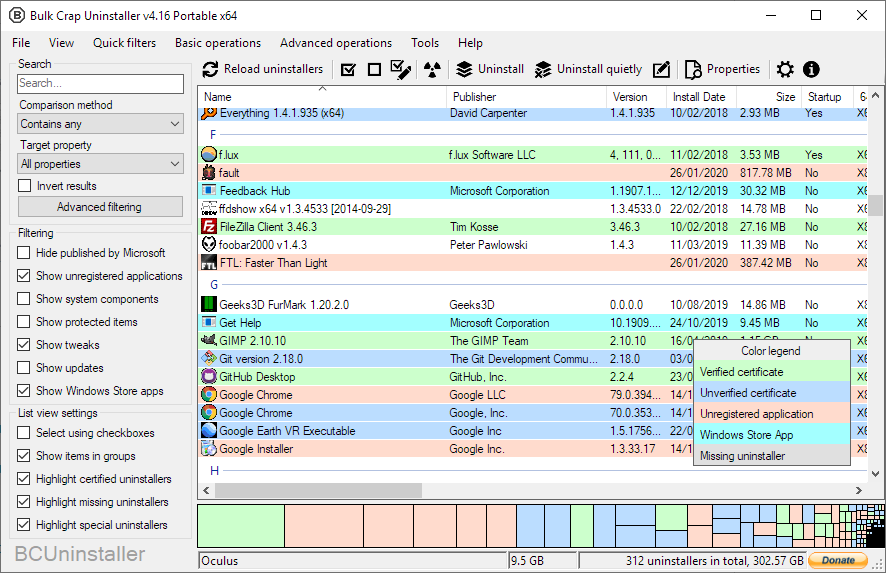
Bulk Crap Uninstaller turns the job into a batch. Filter by publisher or install date, tick a set, press the button once, and silent uninstallers run in sequence without asking anything. The list is sortable by size, which is usually the most useful sort, because the biggest entries are the ones that were installed once and forgotten. A rating column and a smart filter help separate the obviously disposable from the ones worth a second look.
The leftovers are the real problem
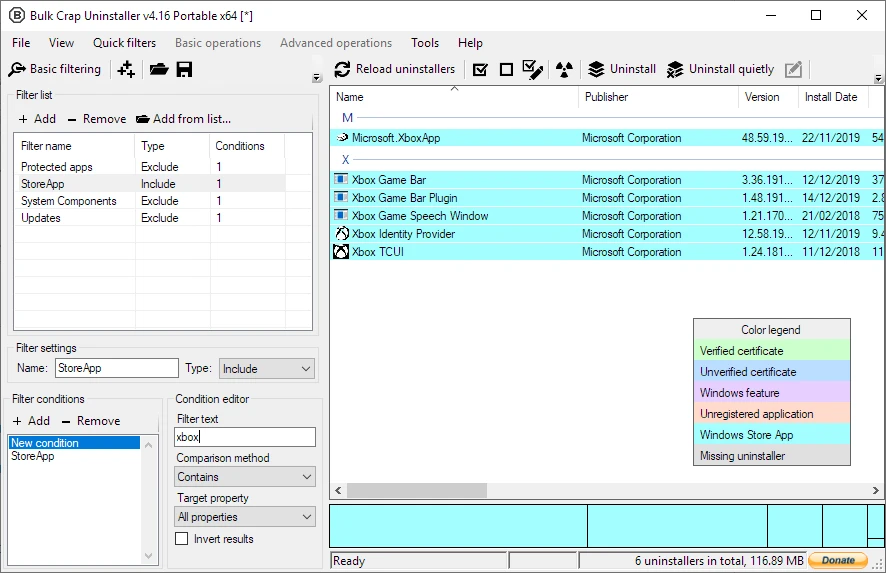
Most complaints about uninstalling are not about the removal, they are about what stays. Vendor uninstallers routinely leave registry keys, empty folders, services and scheduled tasks behind, and a machine that has been cleaned by hand a dozen times still carries the ghosts. This tool scans for leftovers right after the removal, when the trail is fresh, and presents what it found for deletion with the reason attached. It also recognises store applications, orphaned entries pointing at software that no longer exists, and programs whose uninstaller has gone missing.
The second feature that earns its place is the ability to see what a program actually installed. That turns a vague suspicion into a list, and it makes the decision about a dubious utility a matter of evidence rather than instinct.
The question the project quietly asks the industry: removing software is a basic function, so why is it so often the worst one? Someone decided to do it properly and charge nothing.
Free, open, and maintained
The licence is permissive, personal and commercial use are both free, and there is no feature wall or upgrade prompt anywhere in the interface. Development continues, with releases appearing this autumn, and the community around it is large enough that obscure edge cases have usually been reported and fixed. For a utility that touches the registry, that transparency matters: the source can be read, and the behaviour can be audited by anyone who cares to.
Two cautions belong here. Do not tick system components, device drivers or the runtime libraries that other programs depend on, because a batch removal is fast enough to break something before you notice. And test the flow on a machine you can afford to rebuild before using it on a fleet. In a batch, being steady matters more than being fast.
A sensible order of operations
Before a reinstall, export the installed program list first, so there is a record of what to bring back. Then remove in waves rather than all at once: the obvious junk first, a reboot, then the next wave, checking that the machine still behaves. Leftover scanning is most effective immediately after each wave, not at the end of the day. For a machine being sold or handed on, the same flow doubles as a privacy pass, since store apps and browser extensions carry account data that a simple file deletion does not touch.
Keep the export file somewhere other than the machine. It is a small text file, it takes seconds, and it turns an afternoon of guessing into a checklist. The habit costs nothing and pays back the first time a driver or a codec disappears along with something else.