
Baimiao: Batch Recognition, Proofreading and Offline Text Capture
Summary
Baimiao is a mobile app built around character recognition: photograph a page, get text that is already paragraphed and can be proofread on the spot. It also scans documents into PDFs, turns tables into spreadsheets, recognises several languages, and works without a network.
Recommend- Name
- Baimiao
- Version
- 3.5.3
- Pricing
- Paid
- Open source
- Proprietary
- Operating system
- iOSAndroid
- Website
- https://baimiao.uzero.cn/
- Updated
- 2026-10-06 22:34
Point the camera, get the text
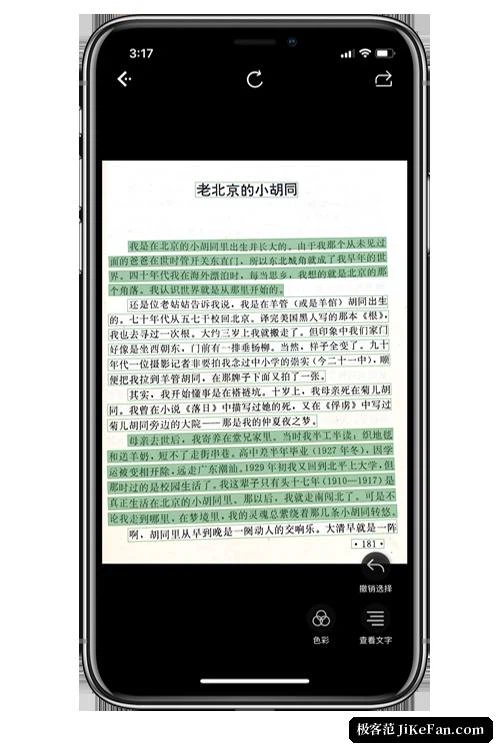
Baimiao is a mobile application built around character recognition, and what it does is easy to state: it turns the text inside a paper document, a screenshot or a photograph into text that can be edited and copied. The picture can be taken on the spot or chosen from the album. The result comes back already divided into paragraphs instead of arriving as one undifferentiated block, and for anyone copying out a long passage that detail is the difference between a usable result and half an hour of pressing return.
Proofreading happens on the result page, which is the right place for it. Recognition engines fail in small, local ways - a character that looks like another, a column read in the wrong order - and the only effective repair is a person looking at both the original and the text at the same time. Putting the correction step in the same screen is not a feature so much as an acknowledgement of how the work actually goes.
Scanning and tables
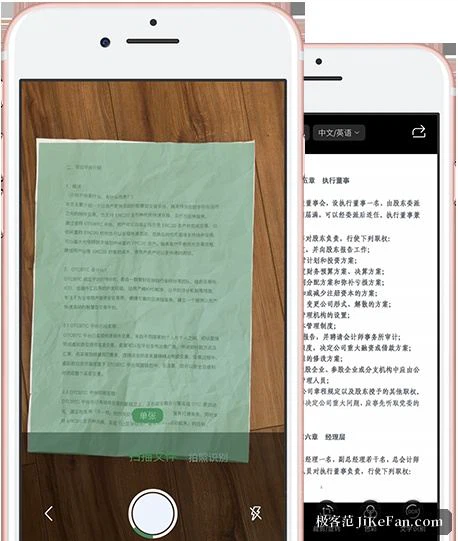
Beyond lifting text, this is a scanning tool. Pointed at a document, the camera finds the edges and crops to them automatically, works in colour, black and white or greyscale, and combines several pages into a single exported PDF. Table recognition is the other practical item: a table that exists only as part of an image can be turned into a spreadsheet directly, which removes the retyping entirely rather than shortening it.
Batch recognition handles several images in one pass, and the records are kept automatically, so a page recognised last month can be found again instead of being redone. That last part is easy to overlook and disproportionately useful: the reason people repeat work is usually that they cannot find the earlier result.
Languages, offline mode, and the desktop hand-off
The recognition covers simplified and traditional Chinese, English, Japanese, Korean, French, German, Russian and Spanish among others, and a result can be translated into a range of languages, including a few uncommon options such as Cantonese and classical Chinese. An offline mode is offered officially, so text can be captured with no network at all - which matters in a basement archive, on a train, or anywhere the connection is the unreliable part.
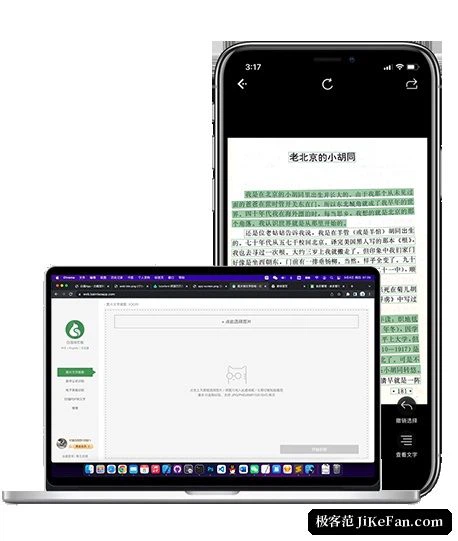
The other convenience is a pairing with a desktop browser over the local network: images sitting on a computer can be dragged into the browser, recognised, and then proofread and exported on the computer, with the phone doing the recognition and none of the file shuffling. It is a small thing that saves the awkward middle step of moving pictures between two devices by hand.
Version and how it is paid for
It is maintained by an independent developer, and the interface carries no pop-up advertising. The free tier allows a certain number of text recognitions, batch recognitions and translations per day, which is enough for light use. Membership is a one-time purchase rather than a monthly renewal. As of 2026 the iOS version has reached 3.5.3, while the Android version series does not move in step with iOS, and features there are still being filled in.
What the pricing model changes
A one-time purchase changes the relationship more than the arithmetic suggests. A subscription makes the tool a small recurring decision, and every month it invites the question of whether it earned its keep; a one-time purchase removes the question entirely and leaves only the original judgement about whether the thing was worth having. For a tool used daily this is a real relief, and for the developer it is a bet that the work will keep attracting new people rather than that existing ones will keep paying. Both models are honest. Only one of them lets a user stop thinking about the bill.
For pulling text out of paper material, screenshots or course handouts, this is one of the more comfortable options on a phone: fast, already paragraphed, easy to proofread, and the table-to-spreadsheet step saves a surprising amount of typing. The free allowance suits occasional use; for daily work, a one-time purchase sits more lightly than a monthly charge.