
Docling 2.150 Keeps the Structure, Not Just the Text
Summary
Docling 2.150, a parser released under the MIT licence, turns PDFs, scans and recordings into structured Markdown and JSON offline, keeping tables and formulas.
Recommend- Name
- Docling
- Version
- 2.150
- Pricing
- Free
- Open source
- Open source
- Operating system
- WindowsmacOSLinux
- Website
- https://docling.ai/
- Updated
- 2026-11-12 23:00
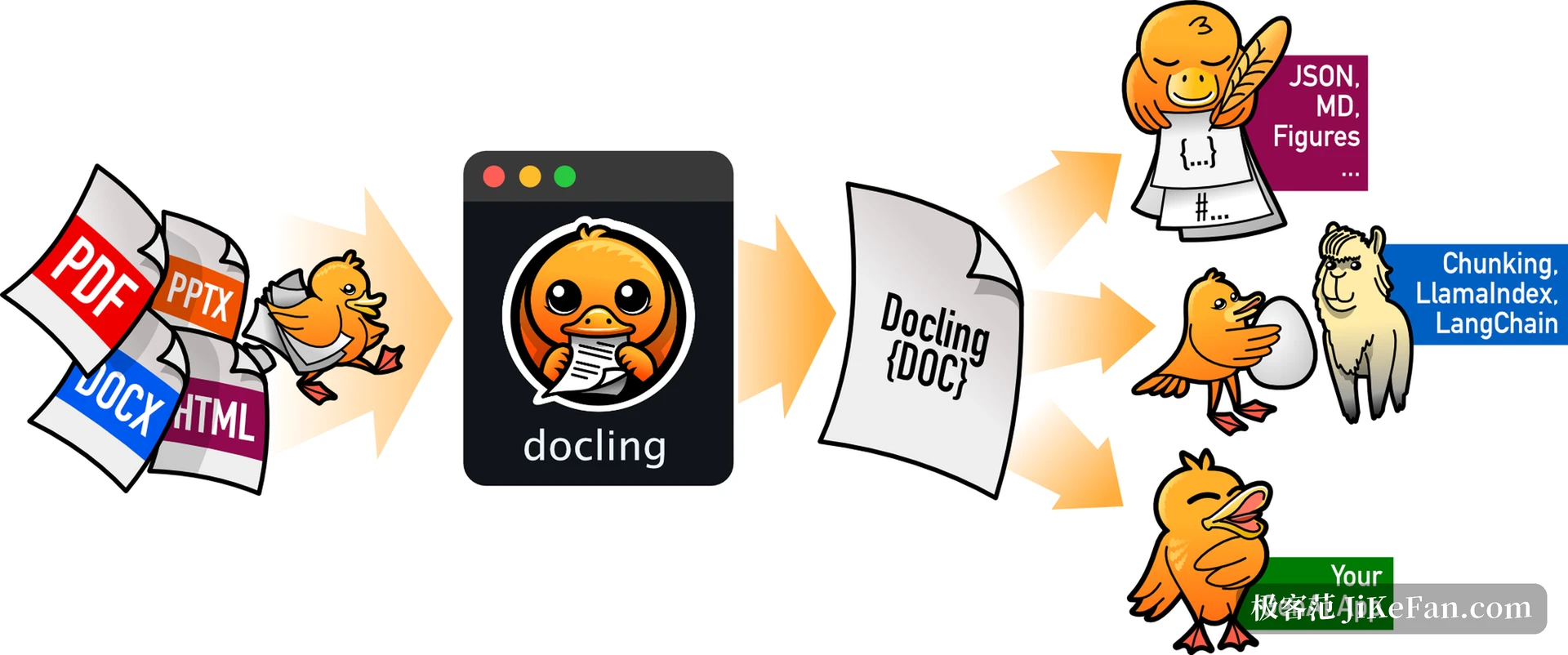
Pulling the text out of a document is the easy half, and every online converter does it. Docling is a parsing tool that starts from the other end, reading the layout first so that a table stays a table.
Docling runs on your own machine and takes PDF, Word, PowerPoint, Excel, web pages, scans and even recordings, breaks what is inside into structured text and exports Markdown, HTML or lossless JSON. It began with a team at IBM Research and is now hosted by the LF AI & Data Foundation under the MIT licence. Version 2.150, released on 10 November 2026, adds iXBRL financial reports to the list of input formats.
Layout first, characters second
Most converters take the extraction route: pull the text stream out of the PDF in order and join it into paragraphs. Docling does the reverse. A layout model decides which regions a page holds, whether header, footer, body paragraph, list, code block, table, picture or formula, where each boundary falls, and only then arranges the reading order.
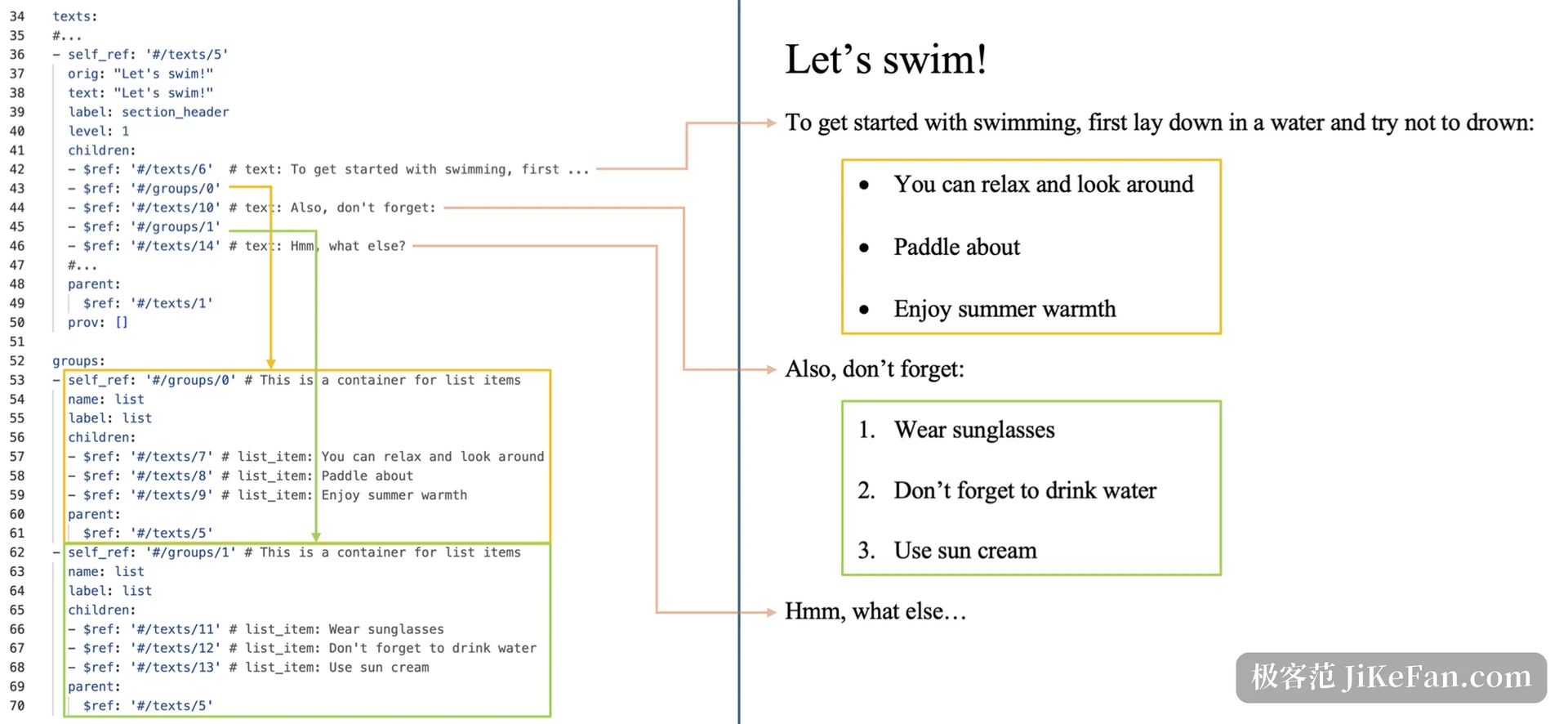
A two-column paper shows the difference best. Scanning by coordinates from top to bottom interleaves sentences from the left and right columns; sorted by reading order, the left column finishes before the right begins and the sentences connect. That order is written into a unified document model, so exporting to Markdown copies it instead of guessing again.
Scans travel a different path. When a page is all picture there is no text stream to pull, so recognition takes over. Docling first asks whether the page carries a usable text layer and starts OCR only when it does not. The recognition engine can be swapped, and a vision model can be attached to read the layout. Models are downloaded once and then run locally.
A table goes in, a table comes out
Tables are where PDF conversion most often falls over. Flatten a grid into a line of numbers and both retrieval and reading lose their meaning. Docling brings cell boundaries back with a table structure model, keeps rows, columns and multi-level headers as they were, and does not lose cells merged across rows or columns. A table caption does not drift into the body text; it travels with its table.
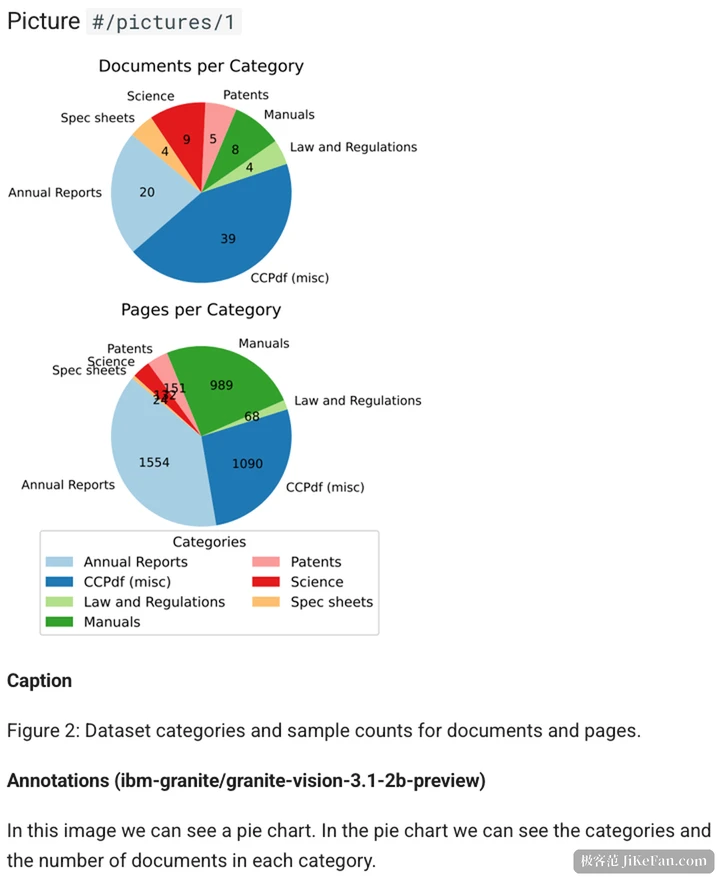
Formulas follow the same rule. Inline and display formulas are recognised as LaTeX rather than a string of misplaced glyphs. Pictures are extracted on their own, with their coordinates on the page, the original caption and a content class saying whether the image is a line chart, a pie chart or a photograph.
What the 2.150 build changes
November has been busy, with several releases between 3 and 10 November, and the changes land on inputs and on extraction control. Inline-tagged XBRL inside financial reports used to be readable only as a web page, losing the financial facts held in the tags; 2.150 reads it directly and can resolve taxonomies from a remote address. Embedded images in a PDF are now opened on demand rather than written to disk by default, which removes a batch of pointless writes. The command line was reorganised for reading a directory in bulk, and several output formats can be named in one go.
Offline is the premise, not an add-on
Docling does not reach the network by default. Models are cached locally after the first download and conversion then runs offline, with nothing uploaded, no account and no remote interface. For people handling contracts, financial reports or medical records, that rule often decides whether the tool can be used at all, since a file that never leaves the machine needs no explanation for compliance.
The same pipeline can run in more than one place. Once it works locally, the same document model and configuration move to a service on the local network with almost no change to the calling code, and commercial hosting sits above that. For individuals and small teams the first two are enough.
What it connects to afterwards
The outputs are wider than the inputs. Structure goes to JSON, human reading goes to Markdown, HTML or plain text, and retrieval gets chunks cut along chapters and table boundaries instead of a fixed character count, each chunk carrying its page number and box coordinates so an answer can point back to a place in the original.
There is an MCP server as well, which lets an agent treat reading a document as a typed tool call rather than throwing PDF bytes at a model to guess. Frameworks such as LangChain and LlamaIndex have ready-made integrations.
What it accepts is more varied than expected. Beyond a run of Office formats and EPUB, email, calendars and subtitle files are on the list, and recordings and video convert into the same document model, so a transcript is taken once and then read through the same structure.
Turning one PDF into text is something any online tool can do. Docling earns its place with the other half: tables stay tables, formulas stay LaTeX, captions stay with their pictures, and two columns are not read across. Keep those structures during conversion and retrieval, knowledge bases and model input no longer have to guess them again.