Apple iWork 15.1: liquid glass, writing tools, and a free core that is still free
Summary
Pages, Numbers and Keynote after the 2026 update: a system-wide liquid glass redesign, writing tools that summarise and rewrite, generated presentations from an outline, and core editing still free.
Recommend- Name
- Apple iWork
- Version
- 15.1
- Pricing
- Free
- Open source
- Proprietary
- Operating system
- macOS
- Website
- https://www.apple.com/
- Updated
- 2026-10-06 12:20
Pages, Numbers and Keynote are the three office applications that come with Apple platforms, an arrangement long known collectively as iWork. As of 2026-09 all three have been through a major update alongside macOS 26, carrying application version 15.1. Between them they cover the three scenes of ordinary office work: text, spreadsheets and presentations. On a newly bought Mac, iPhone or iPad they are already there, and the core features cost an individual nothing.
Pages keeps writing and page layout in one place, with a large set of built-in templates, real-time collaboration and comments, and export formats that stay compatible with the document standards other people use. Numbers takes a different view of a spreadsheet: the sheet sits on a canvas, so several tables, charts and blocks of text share one page instead of being stacked in a single grid. Formulas and functions cover everyday statistics, and the newer version recognises patterns in data and suggests a formula that fits. Keynote is the presentation tool the other two get measured against for motion, with transitions that behave like a cinema cut, and HDR support that lifts the brightness and colour of text and objects on the slide.

The design that came with the system update
The update at the start of 2026 brought all three onto the visual language Apple calls liquid glass, which makes the interface more transparent and lighter on its feet. A new menu bar in the tablet system puts every advanced option within reach on an iPad rather than two levels down. And each application gained a set of editable graphic elements, which is the difference between a document that looks like a template and one that looks like it belongs to whoever wrote it.
Where the intelligence actually sits
Since late 2024 the three have been picking up Apple Intelligence features. The writing tools will summarise a passage in Pages, rewrite it in another register, or proofread it. On a Mac with an M1 chip or newer, images and graphics can be generated, an existing picture can be upscaled or reframed intelligently, and Keynote will draft a presentation from a text outline and write presenter notes that follow the context of the slide. None of it is a reason to buy the suite, but all of it removes the small frictions that used to sit between an idea and the page.
A free core, and a subscription above it
From 2026-01 Apple moved part of the content and some of the intelligence into a new subscription called Creator Studio. Subscribers get a library of professionally designed themes, a centre of content assets, and a larger quota for shared files in iCloud. The core work, editing, layout, presenting and collaborating, stays free for everyone. For most ordinary office work the free tier is already complete, and that deserves saying plainly, because this market rarely behaves that way.
Collaboration and the rest of the ecosystem
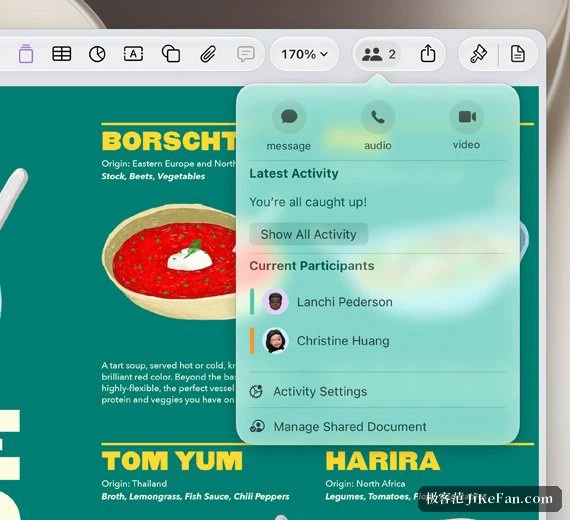
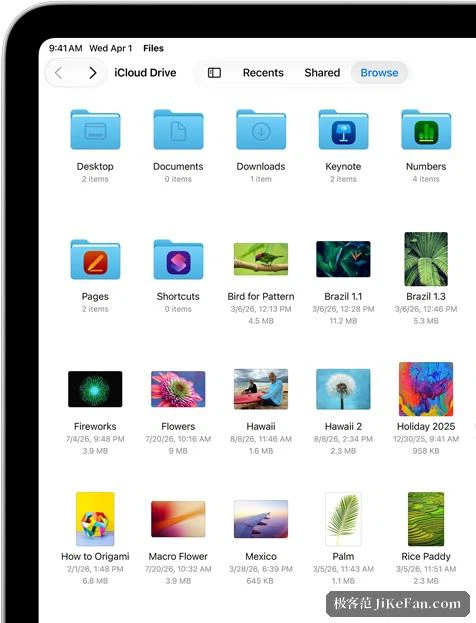
All three are built around iCloud. A document moves between Mac, iPhone and iPad through handoff without a save step, and a link can be sent so that other people join in real time from a browser rather than installing anything. The shared file limit was raised to 4GB in this generation, which is the number that matters when a presentation is mostly photographs and video and still has to reach a collaborator.
Who it suits
Anyone already living inside the ecosystem, mainly, for whom this is the shortest path to full office capability at no cost: the native behaviour is smooth, collaboration needs no explanation, and the 2026 update adds both a system-level redesign and intelligence that is actually useful. Teams that exchange documents with the rest of the world should check that exports land cleanly in whatever the other side uses, and anyone needing the professional template libraries should look at the subscription rather than suppose it is included.
One thing the arrangement gets right is the order of the offer. The applications are not a trial that expires, and the paid tier does not lock a document behind a wall; what it adds is material, themes and template libraries that a professional would otherwise buy separately. That makes the free tier a real product rather than a demonstration, which is rarer than it should be in office software.