
AnyToISO: every awkward disc image turned into a standard ISO
Summary
A small tool for one specific irritation: disc images that arrive in formats the burning and mounting software will not open. It turns the common ones into a standard ISO, builds an ISO from a physical disc or a folder, and unpacks the contents without mounting anything first, on both desktop systems.
Recommend- Name
- AnyToISO
- Version
- 3.9.8
- Open source
- Proprietary
- Operating system
- WindowsmacOS
- Updated
- 2026-10-05 22:59
One awkward format after another, all turned into ISO
Disc images travel around in a remarkable variety of formats. The same content may arrive as an NRG, an MDF, a UIF, a DMG, a BIN with its companion file, or a DAA, and a good part of the software that burns discs or mounts them only understands ISO. The download therefore sits there and refuses to open, which is a small problem that manages to waste a whole evening. AnyToISO was built for exactly that mismatch. It converts the common image formats into a standard ISO, and it can also create an ISO from a physical disc or from a folder sitting on the local disk. It runs on both Windows and macOS, the installed package is a few megabytes, and it takes up little while running, which puts it in the category of tools that are forgotten after installation and appreciated the moment they are needed.
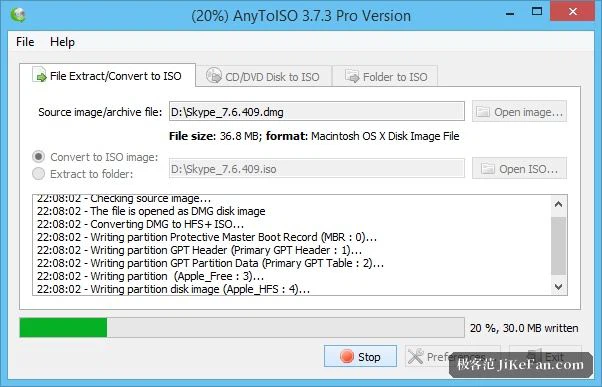
Three steps, and nothing to learn
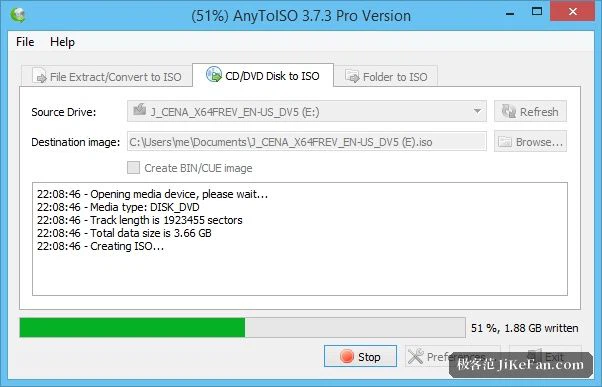
The operation is as direct as it sounds: choose the source file, choose where the result should go, press convert, and the progress bar takes over. How long it takes depends on the size of the source, and a small image is finished in seconds. The window is divided into three tasks, converting from a file, creating from a disc, and creating from a folder, each with its own tab, so there is no hunting through menus for the right command. The shell context menu is wired in as well, so a right-click on an image file in the file manager starts the conversion directly, and a command line interface is provided for anyone who would rather write a script and process a pile of them unattended. The interface is translated into many languages, Chinese among them.
Not only conversion: unpacking as well
Beyond producing an ISO, it will open an image and extract what is inside, whether that image is an ISO, a DMG, a DEB or an RPM, without the two-step ritual of mounting it first and copying afterwards. Recent versions improved support for the file system used inside Apple images, and symbolic links stored inside a DMG are handled correctly, so an installer image that came from that ecosystem can be opened on Windows like any other archive. For anyone who mounts images inside a virtual machine, converting everything to ISO first makes the compatibility question disappear entirely, and feeding images to a virtualisation program becomes uneventful.
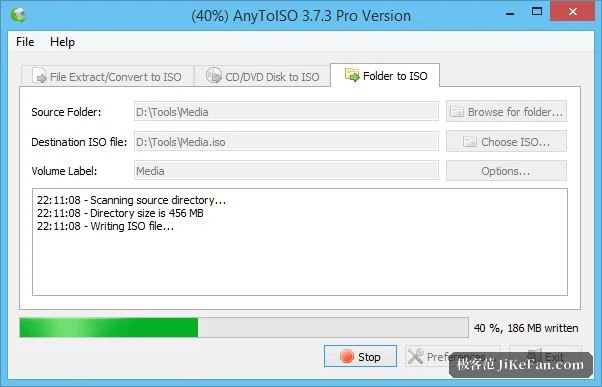
A folder can become an image too
The reverse direction is supported as well: point it at a folder full of files and it will pack the whole thing into an ISO, which is convenient for a delivery medium or for an archival copy. Reading a physical disc is done the same way, the entire disc being read as it stands into one standard file. That is how a shelf of old discs gets turned into something that will still be readable in ten years, and the worry about a disc surface deteriorating quietly in its sleeve goes away.
Between old delivery media and new virtual machines
The reason a tool like this keeps being wanted is that the number of formats does not shrink. A disc burned ten years ago is still on the shelf, the media that arrives from a supplier still comes as an image, and what gets handed to a virtual machine is smoothest as an ISO. As long as no single format wins, a small tool that builds bridges has work to do.
And a bridge cannot have only one side. Being able to convert is one thing; being able to pull the contents out is another, and they serve different moments. When the mount-then-copy ritual starts to grate, what a person usually wants is to look inside first, not to carry the image around intact. Having both in the same window means not hunting for a different tool each time.
A free edition that covers the daily case, and Pro for the large ones
The licensing comes in two levels. The free edition handles ordinary needs, with a limit on the size of a single file. For images at the scale of a DVD or a Blu-ray disc, there is a Pro licence, bought once rather than subscribed to, which also brings priority technical support. The software is translated into more than thirty languages, Chinese naturally included, and a portable build is offered that needs no installation and can live on a memory stick. As of September 2026 it is still maintained, and the recent releases improved the way extraction handles details. The age of the optical disc is receding, admittedly, but as long as images keep circulating, this small tool keeps its place.