
AnVir Task Manager: a rating for startup items, and a deep look at every process
Summary
AnVir Task Manager puts processes, services, drivers, startup items and connections in one window, scores the entries and lets you act on them.
Recommend- Name
- AnVir Task Manager
- Version
- 9.4
- Pricing
- Free
- Open source
- Proprietary
- Operating system
- Windows
- Website
- https://www.anvir.com/
- Updated
- 2026-10-06 06:47
Processes and startup entries in one window
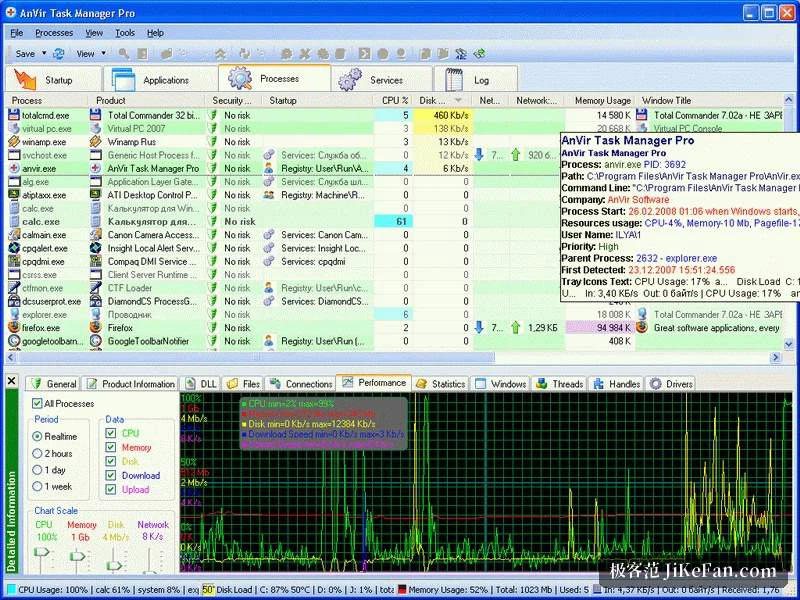
AnVir Task Manager is a replacement for the task manager that ships with Windows. What it does is gather what the system normally scatters: processes, services, drivers, startup items, network connections and windows, all presented in one interface and grouped by category. Against the built-in tool the gain is context. A process list on its own gives a name and a number; the same list with its connections and its startup origin tells a story.
That is why it fits a particular kind of question. A machine that takes longer to boot than it used to, or a background where something is clearly running, are both questions about relationships rather than about single entries, and a tool that puts the relationships on one screen removes the part of the work that is genuinely tiring.
Startup entries with a security rating
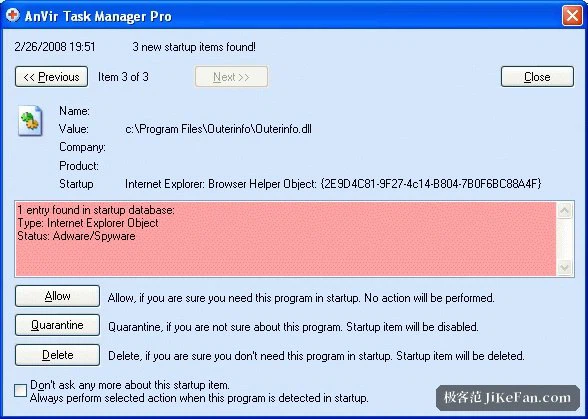
The feature that sets it apart is a security rating applied to startup items and processes. A built-in database of item descriptions is combined with an online lookup, and entries that look suspicious or are simply not widely known get marked, which gives the user something to base a decision on. A rating is not proof in either direction, and it is worth saying so plainly: a low score is a reason to look closer, not a verdict.
For any entry the details go further than a name: the command line it was launched with, the modules it has loaded, the files it touches and the network connections it holds. Where that is still not enough, the file can be handed to an online service that runs it past several detection engines for a second opinion.
The part where you can act
Looking is only half of it. Startup entries can be disabled or delayed, processes ended, services and drivers managed, and some system settings adjusted with the aim of shortening boot time. Delaying rather than disabling is the gentler choice, and the one worth trying first when an entry is needed but not immediately.
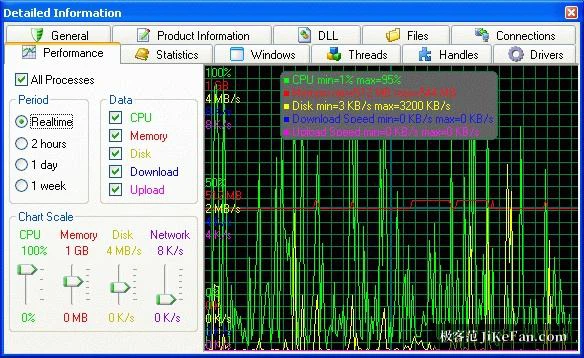
A performance graph on the interface shows processor and disk load in real time, which is what makes a correlation visible: a spike appears, and the question of which process caused it can be answered while it is happening rather than reconstructed afterwards. A small utility for watching disk temperature comes with it.
Editions and the version
There are two editions. The free one covers most personal and household cases; the professional one is aimed at commercial use and unlocks additional automation and management. As of February 2026 the version has reached 9.4, with support for the newer updates of Windows 10 and 11 and improved recognition of startup items and services.
One practical detail: after installation it starts together with the system. Anyone who dislikes a permanently resident tool can switch that off in the settings and do the diagnostic work on demand instead, which for a tool used once a month is the more reasonable arrangement.
It is worth being clear about what a tool like this asks of the person using it. A replacement task manager is not a button that makes a machine faster; it is a view that lets someone with a question find the answer. The score on an entry shortens that search, the command line and the modules finish it, and the decision - keep, delay, disable - stays with the person who knows what the machine is for. That division is healthy, and it is also why the free edition is enough in most homes.
One more thing: the list does not get shorter by itself. What actually speeds up a boot is someone willing to walk the entries one by one and remove what is not needed. The tool only makes that walk less tiring for the eyes.
For a faster boot and for finally knowing what runs in the background, AnVir Task Manager is an entry point with high information density: processes, startup entries and connections seen together, with suspicious items scored. The free edition is enough for a household, and the one thing to notice during installation is its own startup entry.