
WinSCP: six transfer protocols, one window, and no charge
Summary
A free open source transfer client for Windows that speaks SFTP, SCP, FTP, FTPS, WebDAV and S3 from a single two pane window. Dragging files, comparing and mirroring directories, pushing heavy work into a background queue and writing the daily transfers as a script are all part of it, and the current release is 6.5.7.
Recommend- Name
- WinSCP
- Version
- 6.5.7
- Pricing
- Free
- Open source
- Open source
- Operating system
- Windows
- Website
- https://winscp.net
- Updated
- 2026-10-06 13:50
Moving files between a desktop and a server should not be a chore
Anyone who works on Windows against a server running another system spends a good part of the day moving files about, and the right client takes a surprising amount of irritation out of it. WinSCP is one of the old free open source tools of that trade. It started in 1997, it is published under the GPL with the source open to inspection, and it has been kept up by the same hand ever since. What it does is put six ways of talking to a machine into one window with two panes, so whatever service a server happens to be running, the chances are this can connect to it. As of September 2026 the stable release is 6.5.7, which came out in the first days of September, closed a number of security holes and moved its cryptography forward, and the next release is already sitting in the testing channel.
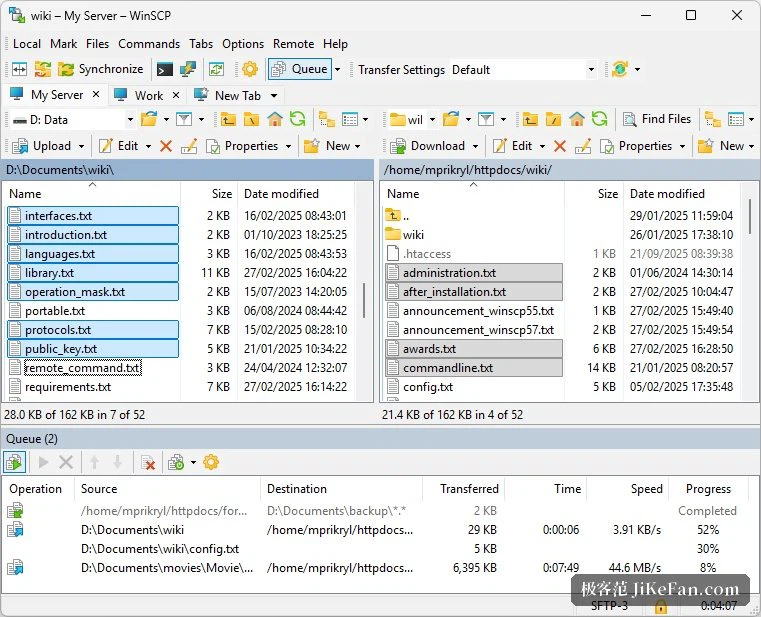
Two panes and a drag, as if the server were local
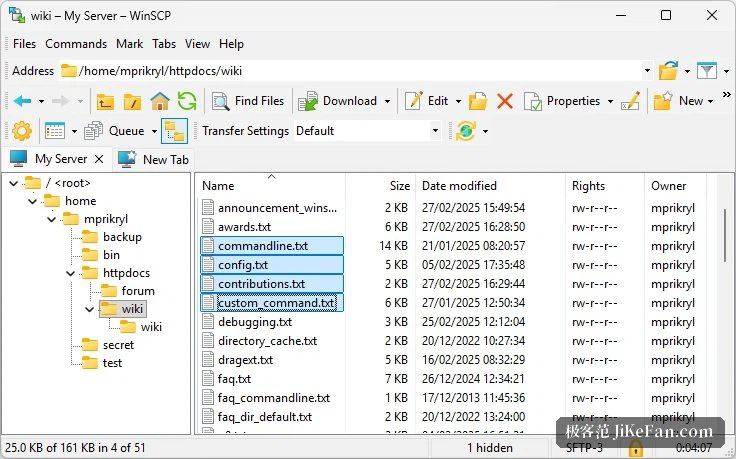
The interface is translated into several dozen languages, the two forms of Chinese among them, chosen during installation. Two styles of window are offered. One shows only the remote side, in the manner of a file manager, and suits anyone who likes a graphical view and wants to start at once. The other is the classic pair of panes, the local directory on the left and the remote on the right, where a drag does the transfer and the right button can set both panels browsing in step. Sessions open as tabs, so several servers can be hanging at once, and the tabs carry a dark theme. The file panel has gained a view of thumbnails as well, so a picture can be looked at without being downloaded first.
Synchronising and queueing, with the bulk handed to the background
Comparing directories is the signature ability. Local and remote are set against each other, and the result can be mirrored in one direction or both, which keeps the two sides agreeing and is exactly what a site deployment or a check of a backup wants. Transfers can be queued and run in the background, and an operation that takes its time, deleting a great tree of folders being the usual example, can be thrown back there to get on with itself while other work continues. The 6.5.7 release sharpened the window that inspects a comparison, taught it to notice that a file has merely been moved, let synchronising jobs be pushed into the background queue, and made large directories go faster.
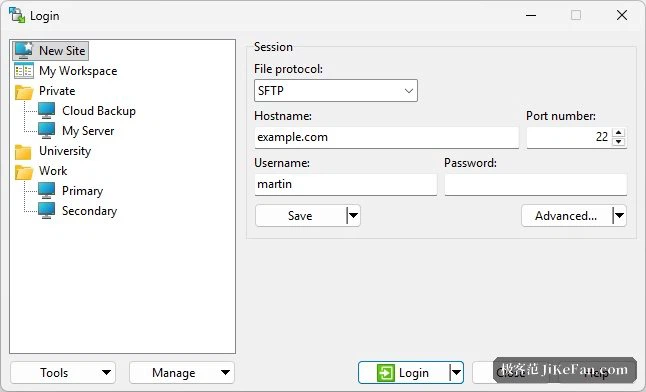
Every protocol, and enough care about security
SFTP and SCP travel over the secure shell, and passwords, public keys and keyboard interaction are all accepted as ways of proving who you are, with deep integration into the usual terminal tools and a shared format for keys. FTP and FTPS cover the older arrangements. WebDAV reaches the interfaces of common online drives, and S3 aims at object storage, with more ways of authenticating added in this release and the labels on objects visible and editable. The cryptographic core keeps pace with the library underneath it, and the login dialog lets the algorithms and the proxy be adjusted in fine detail.
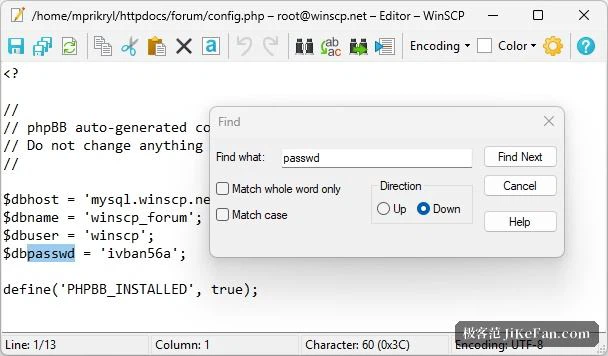
Scripting, which is where operations people live
Beyond the window there is a command line interface and a set of components for the common programming framework on this platform, so the daily transfers can be written out as a batch script and run on a schedule: pushing a backup up, pulling a log down, fetching a set of data. A text editor is built in for editing a remote file directly, saving it straight back to the server, and an editor from elsewhere can be called if that is preferred. It is free for individuals, carries no advertising, the installer is a dozen or so megabytes, a portable edition exists, and the Chinese interface is complete. Server details can be saved as sessions to be called again, passwords can be protected behind a master phrase, and settings can be imported from tools already in use rather than typed in afresh. Transfers distinguish between binary and text so that line endings do not get mangled across systems, and an interrupted transfer can be resumed and checked afterwards, which matters when the file is large and the network is not steady. For anyone who moves files between a machine and a server all day, it remains the reliable choice.