
WinArchiver: archives that mount instead of unpacking
Summary
WinArchiver treats archives and disc images the same way: mount them as a drive letter, browse the contents and read only what is needed, with no extraction step and no second copy on disk.
Recommend- Name
- WinArchiver
- Version
- 6.3
- Pricing
- Free
- Open source
- Proprietary
- Operating system
- Windows
- Website
- https://www.winarchiver.com/
- Updated
- 2026-10-06 22:48
One window, two jobs that usually live apart
Archive software and virtual drive software sound like unrelated categories, yet the same person usually needs both: unpacking a download is routine, and so is mounting an ISO to install a system or to look inside an old game disc. WinArchiver puts the two in one window. It comes from Power Software, the studio behind PowerISO, so opening, creating and converting archives is the day job, and mounting archives and images as virtual drive letters is the trick it is known for.
That combination is less trivial than it sounds. Most people keep two programs installed for this, one that unpacks and one that mounts, and the two rarely share a file association or a right click menu. Bringing them together means a downloaded archive and a disc image are handled by the same gesture, which is the sort of small consistency that is noticed only when it is missing.
No extraction is the real efficiency
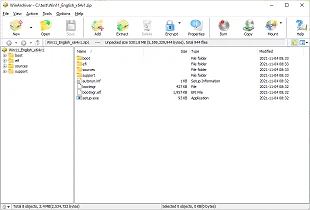
The most restful trick is mounting. A zip, a rar, a 7z, and dozens of image formats including ISO, BIN and NRG can be attached as a virtual drive letter, opened from the file manager and used immediately. No long unpacking wait, and no second copy of the contents taking up space. When the goal is one file from a huge archive, the difference in experience is hard to overstate: the alternative is waiting several minutes to read one text file.
The conventional abilities are not neglected either. Split volumes, password protected compression, context menu integration and batch conversion are all present, and the common formats are covered. Version 6.3 arrived in 2026-08, which places it among the older tools that are still maintained rather than abandoned.
Licensing, and the line between free and Pro
The licensing deserves a plain description. The free version costs nothing for personal or commercial use, and the daily work of extracting, creating and converting is entirely covered. Mounting virtual drives, burning images, copying discs and building bootable USB media sit in the Pro tier, with a thirty day trial to establish whether any of it is needed. No subscription theatre, no account requirement for the basics.
Small install size and a plain interface suit this kind of software, which should be forgotten after installation. A tool that opens an archive should not ask for attention, and the design decisions here point the same way: fewer screens, fewer confirmations, and the file appears where it was expected.
The honest limitation is the same as its strength. Mounting is convenient, but a mounted drive is a view rather than a copy, so anything that must survive a reboot has to be extracted eventually. For reading, browsing and pulling one file out of a large set, the mounted view wins; for archiving work, the extraction path is still the one to use.
A word on the alternatives is fair. Dedicated archivers unpack faster and compress better; dedicated mounting tools handle more image formats and do nothing else. The case for this one is that both jobs are wanted by the same person on the same machine, and installing one program that does both adequately beats installing two that each do one thing well and neither of which knows what the other is doing.
WinArchiver reduces opening an archive to the fewest possible steps: mount it and read. It does not aim at a fashionable interface, it just does the two old jobs properly, which is what a utility is for.