
Ventoy Turns One USB Stick Into a Shelf of Systems
Summary
A boot tool that changes one assumption: the stick is prepared once, and afterwards you copy system images onto it like files. Several of them can sit side by side and be chosen from a menu at start-up, with no reformatting between.
Recommend- Name
- Ventoy Bootable USB Tool
- Version
- 1.1.17
- Pricing
- Free
- Open source
- Open source
- Operating system
- WindowsLinux
- Website
- https://ventoy.net/
- Updated
- 2026-10-15 22:00
The old ritual, and its cost
Making a bootable stick used to be a one-to-one operation. One tool wrote one image onto one drive, erasing whatever was there. Need a different system an hour later and the ritual began again: write, wait, and lose the previous image in the process. Anyone who installs systems, tests distributions or repairs machines keeps several sticks around for exactly this reason. Ventoy changes the assumption rather than improving the ritual, which is why it feels different from other tools in the category.
Prepared once, used as a container afterwards
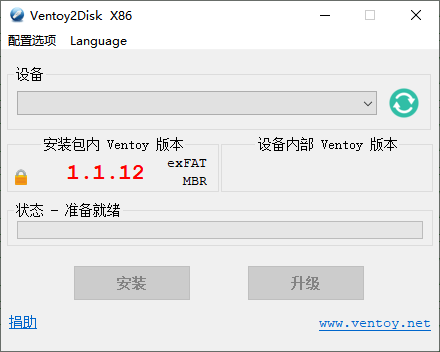
The stick is set up a single time. From that point it behaves less like a written image and more like a folder: system images are copied onto it as ordinary files, and removing one is as simple as deleting a file. No reformatting between systems, no rewriting the whole drive to change one component. The mental shift is small and the practical effect is large, because the expensive step has moved from every use to the first use.
Several systems, one menu
Because the images are just files, they can coexist. At start-up the tool presents a menu listing what is on the drive, and the machine boots whichever one is chosen. This is where the tool stops being a convenience and starts being a different way of working: an installation medium, a rescue system and three distributions under test can all live on the same stick, and the choice happens at the moment of need rather than the moment of preparation.
What it does not ask of you
The operation that disappears is the one people dread. There is no repeated formatting, and therefore no repeated risk of pointing the operation at the wrong drive and losing a disk that mattered. The data on the same stick outside the images also survives, so it can carry ordinary files alongside the systems, which is how most people actually use a USB drive anyway.
Coverage of the images that matter
The point of a tool like this is breadth of support: the mainstream systems, the varied distributions of the open source world, and the repair images that get reached for when a machine will not start. Being able to treat an unfamiliar image the same way as a familiar one removes the step where you check whether the tool supports it before doing anything else. The best outcome for this kind of software is to become uninteresting, and the coverage is what gets it there.
A menu you can shape
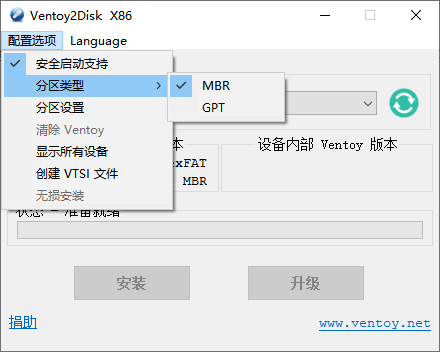
Extensions allow the start-up menu to be customised: naming, grouping, defaults, the ordering that makes sense for a particular set of images. For someone who uses the same three systems repeatedly, that ordering is a small daily saving. For someone maintaining a stick that other people will use, a clear menu is closer to documentation than to decoration.
Where it earns its place
Installing or reinstalling systems is the obvious use. Testing distributions is the second, because trying something new no longer costs a stick. Repair work is the third and the one where the menu matters most, since a machine that will not boot does not allow time to prepare media. Handing a prepared stick to a colleague is the fourth, and it is the case that best shows the difference: the stick can hold several answers to a question that has not been asked yet.
Open source, and the reason it matters for boot media
A tool that writes boot code to a drive asks for a great deal of trust, because what it places there runs before any operating system exists. Being open source means that placement can be examined rather than assumed, which is the appropriate arrangement for software at that level. It also means the project can be carried forward by the people who depend on it, which is the practical difference between a utility and a service that may disappear.
The honest limits
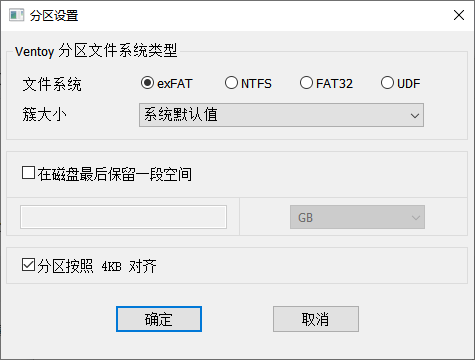
It works with the two desktop systems named for preparing the drive, so a machine running something else prepares it elsewhere. Some images behave in ways that require extra configuration, and unusual hardware occasionally needs persuading. None of that undermines the central claim, which is about repetition: the first preparation costs what it always cost, and every use after that costs a file copy.
Why it stays on the shelf
Most USB tools are used twice a year and forgotten in between. This one changes the shape of that use: the stick is no longer dedicated to a single purpose but becomes the place where several purposes wait. That is a different relationship with a piece of hardware, and it is the reason people who try it stop keeping a drawer of single-purpose sticks.