
ServiWin lists every Windows service on one page
Summary
ServiWin puts services and drivers into a single table with colour coding for running, disabled and set to start but idle, and every management action sits in the right click menu.
Recommend- Name
- ServiWin
- Version
- 20260922
- Pricing
- Free
- Open source
- Proprietary
- Operating system
- Windows
- Updated
- 2026-10-06 10:33
A register of everything running behind the desktop
Windows keeps hundreds of services and drivers alive in the background, and the moment something misbehaves the first question is always the same: which of them is running, which starts by itself at boot, and which one am I allowed to stop. The tools that ship with the system answer that question in pieces, spread across several windows that each show one slice of the picture, so an ordinary investigation turns into a hunt through menus.
ServiWin collects the whole thing into a single window. Services and drivers sit in one table with the name, the description, the version and the publishing company in plain columns, and the state is colour coded: running entries in blue, disabled ones in red, and the interesting third category in purple, meaning a service configured to start automatically that is not actually running at the moment. Open it and the health of the background is legible before you read a single row.
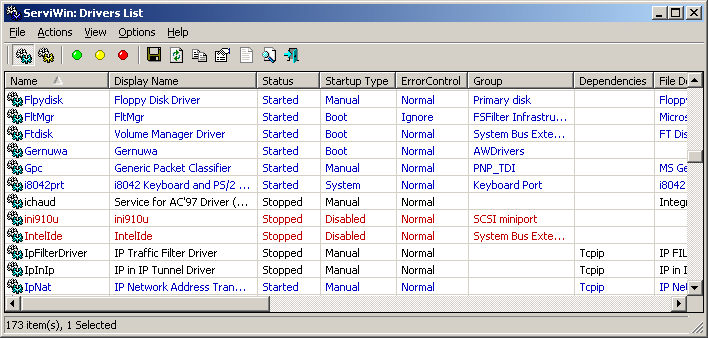
The right click is the whole interface
Every management action lives one right click away: stop, start, restart, pause, resume, and changing the startup type between automatic, manual, disabled, boot and system. That last set is what makes the tool useful for diagnosis rather than curiosity. Set a suspicious service to manual, watch whether the problem disappears, then put it back, and the whole experiment fits into a few minutes without a reboot in the middle.
Exporting the table is the feature that quietly earns its keep. A full dump to a file or a readable HTML report gives a before and after picture, so the question of what a newly installed program actually changed stops being a matter of memory. Two more capabilities go beyond a local list: services on another machine in the same network can be managed remotely, and an offline mode mounts the registry of a Windows installation on another disk, which is what makes a dual boot repair or a machine that will not boot at all approachable.
Small, portable, and not to be handled carelessly
The shape of the program is classic NirSoft. A few hundred KB, no installer, unpack and run, and resource use close to nothing, which is why it lives happily on a repair stick next to the other tools of the same family. It also inherits the family habit of doing one thing and refusing to grow into a suite.
One warning belongs in bold. Services and drivers are the foundation of the system, so identify the target before touching it, export a report before changing anything, and for anything uncertain, look rather than click. A tool like this is written for people who already know, and for people who want to learn by watching, and caution is the only correct way to open it.
The list of who benefits is short and predictable. An administrator keeps it in the pocket collection because it answers a question in ten seconds that would otherwise take ten minutes of clicking. An ordinary user who has ever wondered why a laptop fan runs at full speed while nothing visible is happening can use the same table to find out, and that is more than most utilities of this size offer.
A concrete example shows why the table beats a control panel. A shared folder stops responding on one machine, and the suspect is a service that used to start automatically and is now sitting idle. The purple row is visible immediately, the startup type explains the change, and one right click restores it. The same investigation through the built in windows means opening three panes and remembering what was set last month.
Nothing about the program is new, and that is part of its appeal. No installation means no registry leftovers, no background updater and no telemetry process of its own, which is why it can sit on a repair stick for years without becoming a problem itself.
ServiWin carries the philosophy of its maker without decoration: one small program does one thing and does it without an obvious flaw. It has held a permanent place in the administrator pocket list for years, and it is more than enough for anyone who simply wants to read what their own system is doing.