
ray.so: paste code, get a picture worth publishing
Summary
ray.so turns a few lines of code into a presentable image in three steps: open the page, paste the code, pick a style. Dozens of languages are highlighted, themes are chosen rather than piled up, backgrounds take presets or a custom angle and colour, window size and padding are adjustable, and the export runs at 2x for high-resolution slides. No account, no watermark, and the whole project is open source.
Recommend- Name
- ray.so
- Version
- web
- Pricing
- Free
- Open source
- Open source
- Operating system
- Web
- Website
- https://ray.so/
- Updated
- 2026-10-06 18:56
A small problem that deserves its own tool
Writing a tutorial, posting in a technical thread, putting together slides — sooner or later a few lines of code have to become a picture. Screenshot the editor and the background is busy and the type is small. Open an image editor and the time spent is out of proportion to three screenshots. This tool compresses the whole job into three moves: open the page, paste the code, choose a style. What comes out carries window controls, rounded corners, a shadow and a gradient background, and it drops straight into an article or a post.
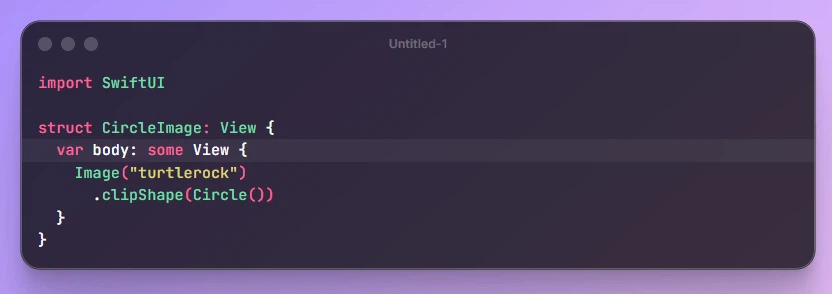
Restraint as a design decision
The project comes from a small team known for productivity tools, and the taste shows in what is missing rather than what is added. Highlighting covers dozens of programming languages, but the theme list is edited down instead of padded: a dozen choices that look deliberate beat two hundred that mostly look wrong. Backgrounds come as presets, or as an angle and a colour you pick yourself, which is the difference between a template and a tool.
Everything that changes the silhouette of the image is adjustable in place — window size, inner padding, a dark rendering for evening reading. Export goes out at 2 times the resolution, so a screenshot survives being placed in a high-resolution deck instead of turning soft on the projector. There is no sign-up wall and no watermark, which for a utility of this size is the whole business model: paste, style, click, save.
Open source, and free the whole way down
The entire project is open on a large code host, on a modern stack, and anyone who enjoys tinkering can stand up an internal copy so a team shares one house style for code in its documentation. For most people a bookmark is enough, because the design goal is explicit: open it, use it, leave. Nothing is stored, nothing follows you afterwards.
It is equally clear about what it is not. There is no editor here, no history, no collaboration, and no file to import — code arrives as pasted text. It also will not rescue a bad crop: three hundred lines in one image is the wrong shape for a picture no matter the resolution, and the honest fix is to cut the snippet down rather than to scale it down.
Where it earns a permanent place
The test for a utility is not how much it can do but how often the reflex lands on it. Anyone who writes documentation, answers questions in a technical forum, or prepares teaching material reaches for the same gesture several times a week, and a tool that turns that gesture into two seconds is worth a bookmark even if it does nothing else.
A real afternoon
Filing a bug report is the clearest case. The reproduction is four lines out of a long file, and a screenshot of the whole editor buries the four lines in a page of irrelevant context. Paste, cut it down to the part that matters, choose a theme that survives being read on a phone in a bright room, export at 2 times and drop the image in. The whole thing takes under a minute, which is the point: a report is written once and skimmed by people who owe it thirty seconds.
The same economy applies to teaching material. A slide with four legible lines beats a capture of a full application with three toolbars around the edge, and the difference is not decoration — it decides whether anyone in the room actually reads the example. When the point of the picture is the code, everything else in the frame is a tax.
The ceiling, honestly
A tool this narrow does not grow with you, and it should not try. It will never organise a library of snippets, it will not version them, and it will not remember which style you used last month. Its proper place is one gesture inside a longer chain: capture the fragment here, annotate it elsewhere, assemble the article somewhere third. Judged as a component it is excellent; judged as a platform it is nothing, and it never claimed otherwise.
The value of a small tool is that it takes one gesture to its limit. No account system, no paywall, open code, a page that produces an image in about three seconds — for a frequent little need like a code screenshot, that is the correct amount of software.