
Process Explorer Answers What the Task Manager Cannot
Summary
The Microsoft tool that stands in for the built-in task manager: a process tree, live CPU and memory graphs, and a search that tells you exactly which process is holding the file you cannot delete.
Recommend- Name
- Process Explorer
- Version
- 17.14
- Pricing
- Free
- Open source
- Proprietary
- Operating system
- Windows
- Updated
- 2026-10-18 22:00
Three questions the built-in manager cannot answer
Everyone who has used Windows for a while has met the same three dead ends. You try to delete a file and are told it is in use, with no indication of what is using it. Something is consuming the processor, and the manager shows a name and a percentage and nothing that explains either. The machine is slow, the list of processes is flat and alphabetical, and there is no visible relationship between the thing at the top and the thing that started it.
Process Explorer exists to answer those three questions, and it is unusual in one respect: it comes from Microsoft itself, out of the company's long-running collection of low-level system utilities, written by an engineer known for explaining how the internals actually work. It is not a third-party replacement for a first-party tool. It is the first party's own answer, and it can take over the role of the built-in manager entirely if you let it.
What it does that a flat list does not
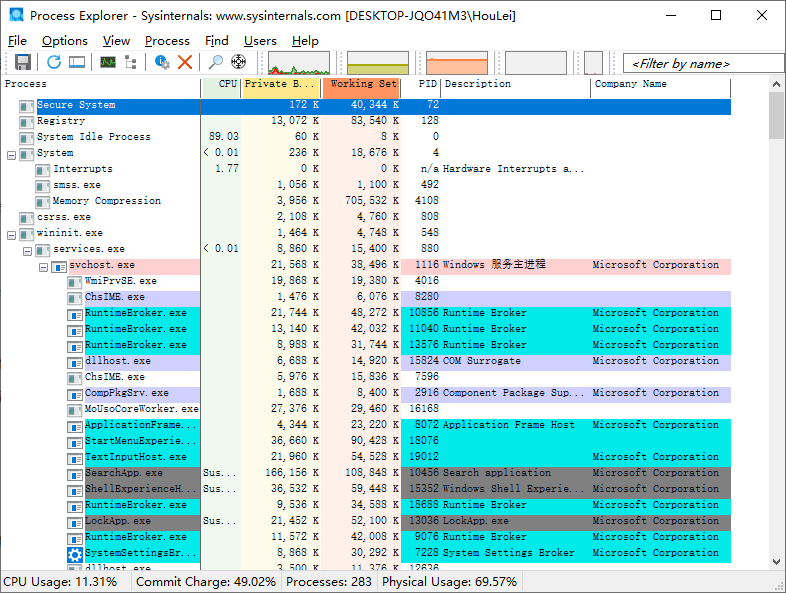
The process list is a tree rather than a column. Every process sits under the one that started it, so a service, the launcher that spawned it and the children it in turn created are visible as a single structure instead of three unrelated lines that happen to share a name prefix. Once you have seen a machine's process table arranged that way, going back to an alphabetical list feels like reading a family tree with the surnames removed.
Alongside it are live graphs for processor, memory and disk activity, and hovering over a spike identifies the process responsible for it. That sounds like a small convenience and is in fact the difference between knowing that something is wrong and knowing what it is. The third capability is the one people install the tool for: a search across the handles and loaded modules of every running process. Ask it which process holds a particular file name, and it answers with the process, immediately, instead of leaving you to close applications one at a time until the file unlocks.
There is also an option to submit a process for scanning by a long list of antivirus engines online, which turns a suspicion into a verdict without installing anything. It is optional, it sends information about that executable away, and the honest framing is that it is a convenience rather than a guarantee — a file that several engines call clean is not therefore clean, and one that several call malicious almost certainly is.
Three situations where it earns its place
The first is the file that will not delete. Every application that might be using it appears to be closed, and the system still insists it is occupied. Searching for the file name inside the running system produces the process holding it — often something invisible, an indexer, a synchronisation client, a shell extension inside another program — and the problem is solved in the time it takes to read the answer.
The second is the machine that has become loud and hot. The built-in manager reports that a system process is using half of the processor and offers nothing further. Opening that process reveals its individual threads, and among them the driver or kernel component that is actually spinning. This is the difference between a symptom and a cause, and it is the reason system administrators keep this tool open permanently on servers.
The third is the classic conflict between versions of a shared library. A program refuses to start and complains about a missing or mismatched component. The lower pane lists every module a process has loaded, with the full path each was loaded from and its version, which makes it obvious that the application is picking up an old copy from somewhere earlier in the search order. That single view replaces a great deal of guessing.
Practicalities
It is free, it is small enough to carry on a key, and it runs without an installation, which matters on machines where you do not have the right to install anything. It is Windows only — there is no other platform version and no pretence of one. It supports current desktop Windows and the server releases of the same generation, which is why it appears on servers as often as on workstations.
One setting deserves mention because it changes the tool's role: it can be told to take the place of the built-in manager, so that the usual shortcut and the usual right-click on the taskbar bring up this instead. After that the built-in manager is effectively gone, which is either the point or an overreach depending on your taste — and it is reversible, so the experiment costs nothing.
Who it is for
Anyone who has ever needed to know which process is holding a file, which is to say most people who have used a computer for long enough. Administrators and support staff for whom the process tree and the thread list are daily tools rather than curiosities. Developers chasing a version conflict in a loaded library. And anyone who simply wants a task manager that answers the question they actually asked, instead of showing a percentage and changing the subject.
This is one of the rare utilities that needs no argument: it is made by the vendor of the operating system, it costs nothing, it is small enough to live on a key, and it answers questions the built-in tool does not acknowledge. The process tree, the live graphs and the handle search are not features to be admired; they are the three things you reach for the moment something goes wrong.
The honest summary
The value is diagnostic rather than decorative. Nothing here makes the machine faster; it makes the machine legible, which is the precondition for making it faster. The limits are equally clear: one platform only, an interface that is functional rather than beautiful, and a level of detail that is exactly what an administrator wants and slightly alarming to everyone else. It is not open source, so the deepest questions about what it does internally are answered by documentation and reputation rather than by reading the code — an acceptable trade for a tool signed by the operating system's own vendor, and one worth stating rather than glossing over.