
PowerISO: mounting, editing, encryption and bootable drives in one tool
Summary
A disc image utility for Windows that reads ISO, BIN, NRG, IMG and DMG, edits the contents of an image without repacking, burns to CD, DVD and Blu-ray, and writes bootable USB drives. One-time licence covering several machines.
- Name
- PowerISO
- Version
- 9.4
- Pricing
- Paid
- Open source
- Proprietary
- Operating system
- Windows
- Website
- http://www.poweriso.com
- Updated
- 2026-10-06 20:01
An ISO downloaded, and no optical drive to put it in
The familiar loop goes like this: a disc image arrives as a download, a tool is found to mount it, a second tool is found because something inside the image needs changing, and a third is found to write the result onto a disc or a memory stick. Each of those programs is small and does its one job, but the switching between them is where the working day disappears.
PowerISO was built to flatten that loop. Creation, editing, burning, compression, encryption, virtual drives and bootable USB media all live in one program that occupies less than ten megabytes. It is also one of the older names in this category, with a history reaching back to 2004 and a release schedule that has not stopped – the current build appeared in May of this year. The stated scope is simple: anything to do with disc images and archive files, handled in one place.
From ISO to BIN to NRG, almost nothing it cannot open
Format coverage is the basic score of an image tool, and this one covers nearly every standard in circulation. The common set – ISO, BIN with its CUE sheet, IMG, and the MDF and MDS pair – opens directly. Third-party formats are read as well: NRG from the older disc burning tradition, DMG as used on Macs, and the VHD and VMDK containers that virtual machines work with.
Audio is handled too. APE, FLAC, WAV, MP3 and WMA files can be read, CD audio tracks can be extracted from a disc and converted between those formats. Compressed archives – ZIP, RAR, 7Z and CAB – open alongside the image formats, and there is a proprietary container of its own, DAA, which gets a section further down.
The practical effect is that format mismatch stops being a reason to install another program. An ISO drags in and is editable immediately; an NRG or a DMG behaves the same way. The DMG case matters more than it sounds, because those files are how Mac users package and share software, and reading one used to require extra help on a Windows machine.
Not just mounting: the whole chain from editing to burning
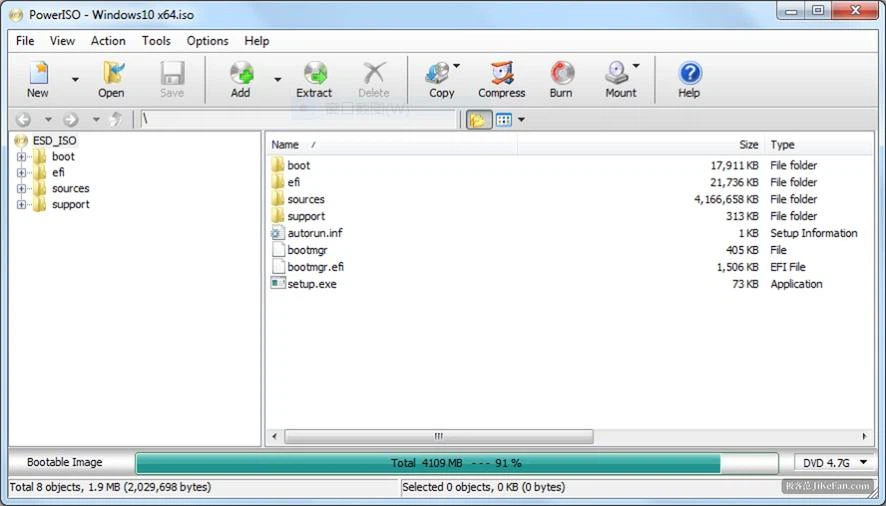
Most people think of an image tool as a virtual drive – you mount an ISO and browse it as though a disc had been inserted. That is indeed one of the most used functions here, but it is the smallest part of the job. Open an ISO in the editor and the files inside can be added, deleted and renamed exactly as in an ordinary folder, then saved directly. No unpacking, no repacking, no temporary directory filling up. Anyone who has ever customised an installation disc – dropping a driver into a Windows setup image, for instance – knows how much difference that makes.
Going the other direction works the same way. Select a folder and package it into a standard ISO or into the compressed container in one step. Burning is covered across the range, from CD-R and CD-RW through DVD-R and DVD-RW to the Blu-ray family, and an existing physical disc can be copied straight into an image file, which is how old game and software discs get preserved before the media fails. Format conversion is included as well, so a BIN can become an ISO, an NRG can become an ISO, and the work can be queued in batches rather than repeated by hand.
DAA: compression and encryption in the same container
DAA, short for Direct Access Archive, is the proprietary image format and the part of this program that has no direct equivalent elsewhere. Three properties define it. The first is compression: the same disc content stored as DAA occupies noticeably less space than as an ISO, in the range of thirty to fifty percent smaller, and it can still be mounted without being unpacked first. The second is password protection backed by AES encryption, which means the contents cannot be read without the key – useful when an image has to be handed to somebody over a link. The third is splitting: a very large Blu-ray image can be divided into several smaller parts so it can be carried across drives in pieces and rejoined later.
USB tools, for when the system itself has to be reinstalled
Beyond disc work, the bundled USB utilities are genuinely useful. An installation image can be written to a memory stick so the machine boots from it and installs, with FAT32 and NTFS among the supported file systems. Windows To Go puts a working system onto an external USB drive, which turns a pocket device into a computer you carry. A whole stick can also be backed up into an image file, so it can be duplicated or restored after something goes wrong.
There is also a graphical front end for DISM built in, so the Windows images used for deployment – the WIM and ESD files – can be managed through windows and buttons instead of typed commands. For anyone in IT operations who does this repeatedly, that alone saves a steady amount of time.
Is it worth paying for?
The honest answer depends on frequency. If the only need is to mount an ISO once in a while, the facilities already present in the operating system are enough and no purchase makes sense. The calculation changes once editing, batch conversion, encrypted compression and bootable media all enter the picture, because then the alternative is assembling four or five separate utilities and switching between them all day.
The licence is a single payment of around two hundred yuan, covers installation on several machines, and does not renew. For someone who works with images regularly, the time saved is worth more than the price fairly quickly.
For an occasional mount, what the system already provides will do. For editing images, converting in batches, producing encrypted archives and building bootable sticks, one program that does all of it is far more comfortable than five that each do a slice. More than twenty years of continuous development is behind it, and the price reflects that reasonably.