
MemoryCleaner 3.0.3 fixes the parts you can see
Summary
MemoryCleaner is a Windows memory tool of about 100 KB that frees cache on demand, by usage or by interval, with no install and no registry left behind.
Recommend- Name
- MemoryCleaner
- Version
- 3.0.3
- Pricing
- Free
- Open source
- Proprietary
- Operating system
- Windows
- Website
- https://memorycleaner.kilho.net/
- Updated
- 2026-11-19 16:42
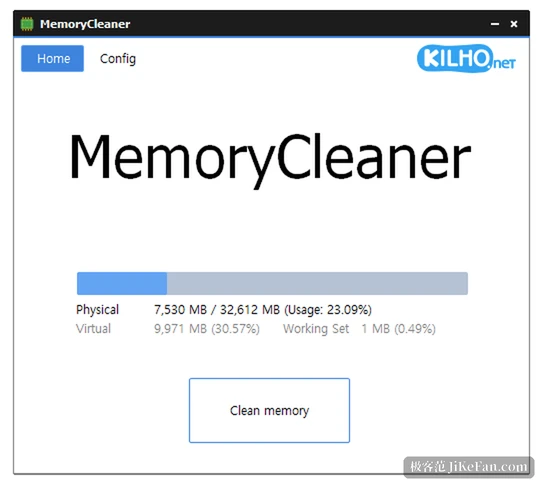
MemoryCleaner is a memory cleaning tool that runs only on Windows, updated to 3.0.3 on 14 November 2026. It puts the current numbers for available memory, cache and virtual memory in one window with a button in the middle that reclaims them, and it can also run by itself on usage, on an interval or on a cache watermark, sitting quietly in the tray the rest of the time.
First, what it actually clears
Memory on Windows is not simply used or free: part of it is file cache and standby, where the system keeps data it has read so the next access hits memory instead of the disk. The available figure in Task Manager therefore always looks smaller than what could really be released. MemoryCleaner hands the working set and the standby list back to the system so the available number grows at once.
Since the 3.0 line you can pick the regions yourself, ticking which lists move and which stay, and the main window shows how much the cache holds. That is more sensible than a blunt sweep: clearing a working set that programs are still using forces a reload from disk next time, which is slower, not faster.
Faster or slower depends on what comes next
If a large program is about to open, freeing space first genuinely helps, especially on an older 8 GB machine with a browser in the background, where the system would otherwise be pushed into paging to disk.
Cleaning once before a game lowers the odds of a frame drop, which is why the tool watches for fullscreen: when a fullscreen application is detected, automatic cleaning pauses so it does not fight for resources at the worst moment.
Turn it around, though, and continuing to switch between the same few programs leaves those discarded caches to be rebuilt, which makes the first minutes noticeably sticky. That is the cache mechanism catching up, not a defect in the software, so keep the automatic threshold high; the default of ninety percent is a fair starting point, while setting it to sixty or seventy amounts to giving the system extra work every few minutes.
Memory cleaning does not make a machine stronger; it trades a little more free room now for a few more disk reads later, and whether that trade is worth it depends on what you are about to open.
Three automatic triggers, and not all at once
The configuration page offers three ways to fire: by usage, where crossing a percentage starts a clean; by fixed interval, say every half hour; and by cache watermark, which waits until free memory falls under a threshold.
All three can be on at the same time, or only one. A right click in the tray runs a clean immediately, and the installer offers to start with Windows.
One is enough. Usage is the least fussy because it follows real pressure; the interval fires even when memory was fine, which manufactures a wobble on a schedule; the watermark suits a machine that stays on for weeks, collecting until it is worth clearing. Running all three mostly interrupts itself, and cleaning happens more often than programs ask for memory.
What 3.0.3 repairs is what you can see
This build adds no features, and the fixes all point at details: truncated labels in the Chinese interface, a tray icon that failed to appear after boot in some environments, a crash on log out or restart while the Korean input method was active, and a blunter way of closing running programs during install and uninstall.
Setting names and memory labels were tidied across several languages as well.
Such repairs look small, yet for a tool that lives in the tray, a missing icon means not knowing whether it runs at all, and a cut label means the settings page cannot be read. The 3.0 rewrite in plain C pulled the package down to about 100 KB and cut tray memory by more than ninety-five percent, buying lightness; the builds since then have been buying steadiness.
What 100 KB buys
The MemoryCleaner package is small enough for any USB stick and runs as a portable build, with no runtime to install and nothing written to the registry. For anyone facing a memory problem on several machines, that matters more than the feature list: copy it over, click once, take it away, and leave no trace.
The free range is wide, covering individuals, companies, government bodies and schools, with no cut-down features and no pop-ups, and the network is used only to check for a new version.
It promises no higher benchmark scores and no second youth for an old laptop, only one narrow thing: handing the cache back at the moment those few hundred megabytes are needed.